Loading
Form preview
  • US Legal Forms
  • Other Templates
  • Industry Forms
  • Industry Academic Forms
  • Neisd Travel Consent/health Form 2012

Get Neisd Travel Consent/health Form 2012-2026

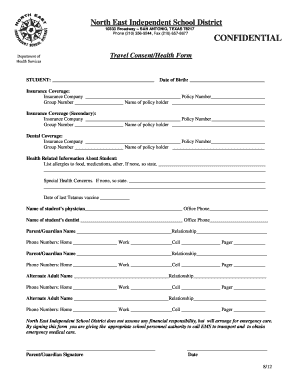
/Health Form STUDENT: Date of Birth: Insurance Coverage: Insurance Company Policy Number Group Number Name of policy holder Insurance Coverage (Secondary): Insurance Company Policy Number Group Number Name of policy hol.

How it works

  1. Open form

    Open form follow the instructions

  2. Easily sign form

    Easily sign the form with your finger

  3. Share form

    Send filled & signed form or save

How to fill out the NEISD Travel Consent/Health Form online

This guide provides a step-by-step overview for users on how to accurately complete the NEISD Travel Consent/Health Form online. Our goal is to ensure that you have all the necessary information to fill out this important document with confidence.

Follow the steps to successfully complete the form online.

  1. Press the ‘Get Form’ button to obtain the NEISD Travel Consent/Health Form and open it in your inline editor.
  2. In the section labeled 'Student', enter the full name of the student as required along with their date of birth.
  3. Fill out the insurance coverage details; provide the name of the insurance company, policy number, and group number for primary insurance coverage.
  4. If there is secondary insurance coverage, input those details in the same format as the primary coverage.
  5. In the dental coverage section, provide the insurance company's name, policy number, and group number.
  6. List any allergies the student may have, including allergies to food and medications. If none, please indicate that there are no allergies.
  7. Provide any special health concerns regarding the student. If there are none, please state that.
  8. Indicate the date of the last Tetanus vaccine.
  9. Fill in the name and office phone number of the student's physician.
  10. Fill in the name and office phone number of the student's dentist.
  11. Enter the names, relationships, and phone numbers (home, work, cell, and pager if applicable) for both parents/guardians.
  12. For alternate contacts, provide their names, relationships, and phone numbers (home, work, cell, and pager if applicable) as necessary.
  13. Sign the form in the space designated for the parent/guardian signature and include the date.
  14. Review the completed form for accuracy. Once satisfied, save any changes, then proceed to download or print the form as needed.

Complete the NEISD Travel Consent/Health Form online today to ensure your student's health and safety.

Get form

Experience a faster way to fill out and sign forms on the web. Access the most extensive library of templates available.
Get form

Related content

SLT-0591 - P&E Report - Q2 2023 Report Period :...
Feb 15, 2023 — An application was developed to minimize barriers to access and to ensure...
Learn more
A Case Study of the International School of the...
by DP Reed · 2013 — All participants were advised of the use of a disinterested third...
Learn more

Related links form

3 Part Scrap Tire Shippingreceiving Form Dsiwm 00 00 0117 Ohio Epa Sediment Sampling Guide And Methodologies Form Epa Form 2s

Questions & Answers

Get answers to your most pressing questions about US Legal Forms API.

Contact support

To fill out a consent form for a trip, start by carefully entering your child’s personal details on the NEISD Travel Consent/Health Form. Include specific trip information such as dates, location, and activities involved. Ensure that you provide any emergency contacts and medical information, and finish with your signature to confirm consent.

Generally, travel consent forms, including the NEISD Travel Consent/Health Form, do not need to be notarized. However, some situations may require it, so it's important to verify with the specific organization organizing the trip. Typically, a parent or legal guardian's signature is sufficient for consent.

Filling out a consent form typically requires that you provide the necessary personal details of your child. For the NEISD Travel Consent/Health Form, include your child’s name, the trip details, and any health disclosures. Ensure all the required sections are completed accurately before reviewing and signing.

Writing a travel consent form involves stating your permission for your child to participate in travel activities. Start with the title, 'NEISD Travel Consent/Health Form', followed by your child’s information and details about the trip. Make sure to include any health information necessary for their safety and conclude with your signature for consent.

To fill out a travel consent form, begin with your child's details, such as name and school. Then, you will want to include information about the trip, including the dates and location. Don't forget to check for any medical or emergency contact information that may be needed. This will ensure a smooth experience during the trip.

Filling out the NEISD Travel Consent/Health Form is straightforward. Start by providing your child's personal information, including their name, grade, and the trip destination. Next, ensure you fill in any medical information relevant to your child’s health. Finally, read the terms thoroughly and sign to confirm your consent.

Get This Form Now!

Use professional pre-built templates to fill in and sign documents online faster. Get access to thousands of forms.
Get form
If you believe that this page should be taken down, please follow our DMCA take down processhere.
Get NEISD Travel Consent/Health Form
Get form
  • Adoption
  • Bankruptcy
  • Contractors
  • Divorce
  • Home Sales
  • Employment
  • Identity Theft
  • Incorporation
  • Landlord Tenant
  • Living Trust
  • Name Change
  • Personal Planning
  • Small Business
  • Wills & Estates
  • Packages A-Z
  • Affidavits
  • Bankruptcy
  • Bill of Sale
  • Corporate - LLC
  • Divorce
  • Employment
  • Identity Theft
  • Internet Technology
  • Landlord Tenant
  • Living Wills
  • Name Change
  • Power of Attorney
  • Real Estate
  • Small Estates
  • Wills
  • All Forms
  • Forms A-Z
  • Other Templates
  • Legal Hub
  • About Us
  • Help Portal
  • Legal Resources
  • Blog
  • Affiliates
  • Contact Us
  • Delete My Account
  • Site Map
  • Industries
  • Forms in Spanish
  • Localized Forms
  • State-specific Forms
  • Forms Kit
  • Real Estate Handbook
  • All Guides
  • Notarize
  • Incorporation services
  • For Consumers
  • For Small Business
  • For Attorneys
  • USLegal
  • FormsPass
  • pdfFiller
  • signNow
  • altaFlow
  • DocHub
  • Instapage
Form Packages
  • Adoption
  • Bankruptcy
  • Contractors
  • Divorce
  • Home Sales
  • Employment
  • Identity Theft
  • Incorporation
  • Landlord Tenant
  • Living Trust
  • Name Change
  • Personal Planning
  • Small Business
  • Wills & Estates
  • Packages A-Z
Form Categories
  • Affidavits
  • Bankruptcy
  • Bill of Sale
  • Corporate - LLC
  • Divorce
  • Employment
  • Identity Theft
  • Internet Technology
  • Landlord Tenant
  • Living Wills
  • Name Change
  • Power of Attorney
  • Real Estate
  • Small Estates
  • Wills
  • All Forms
  • Forms A-Z
  • Other Templates
Customer Service
  • Legal Hub
  • About Us
  • Help Portal
  • Legal Resources
  • Blog
  • Affiliates
  • Contact Us
  • Delete My Account
  • Site Map
  • Industries
  • Forms in Spanish
  • Localized Forms
  • State-specific Forms
  • Forms Kit
Legal Guides
  • Real Estate Handbook
  • All Guides
Prepared for you
  • Notarize
  • Incorporation services
Our Customers
  • For Consumers
  • For Small Business
  • For Attorneys
Our Sites
  • USLegal
  • FormsPass
  • pdfFiller
  • signNow
  • altaFlow
  • DocHub
  • Instapage
Social Media
Call us now toll free:
+1 833 426 79 33
As seen in:
© Copyright 1999-2026 airSlate Legal Forms, Inc. 17 Station Street, Ste. 203, Brookline, MA 02445
  • Your Privacy Choices
  • Terms of Service
  • Privacy Notice
  • Content Takedown Policy
  • Bug Bounty Program