Loading
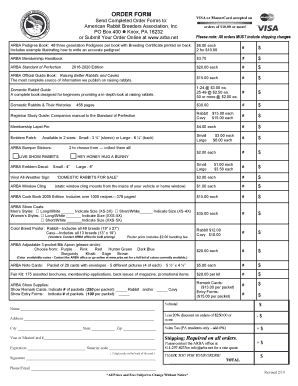
Get Arba Order Form 2019-2026
How it works
-

Open form follow the instructions
-

Easily sign the form with your finger
-

Send filled & signed form or save
How to fill out the ARBA Order Form online
Filling out the ARBA Order Form online is a straightforward process that allows you to order various products related to raising rabbits and cavies. This guide provides clear instructions on how to complete each section of the form effectively.
Follow the steps to successfully complete the ARBA Order Form online.
- Click the ‘Get Form’ button to access the ARBA Order Form and open it in a suitable editor.
- Fill in your name on the designated line to ensure your order is processed under your name.
- Provide your complete address, including city, state, and zip code, to facilitate accurate shipping.
- Indicate the items you wish to purchase by entering the quantity and prices provided in the form. Be meticulous with totals for accuracy.
- If applicable, calculate and apply any discounts for orders over $250 and include it in the subtotal.
- For Pennsylvania residents, add the appropriate sales tax to your order total.
- Enter your Visa or MasterCard information, including card number, expiration date, and security code, ensuring the details are correct.
- Provide your signature at the designated area to authorize the transaction.
- Lastly, include your phone number and email address for confirmation and inquiries.
- Once all fields are completed accurately, save the changes, then download, print, or share the form as necessary.
Complete your ARBA Order Form online today and enjoy the ease of managing your orders.
To fill out an order form, start by providing your personal information, followed by details about the items you wish to order, including quantities and product variations. Take your time to double-check the details before submitting, especially if using an ARBA Order Form, as accuracy is key to ensuring your order is processed swiftly without complications.