Loading
Get Tx Tabc C-220 2018-2026
How it works
-

Open form follow the instructions
-

Easily sign the form with your finger
-

Send filled & signed form or save
How to fill out the TX TABC C-220 online
The TX TABC C-220 is a crucial document for reporting interstate shipments of alcoholic beverages. This guide provides clear, step-by-step instructions to help users complete the form accurately and efficiently online.
Follow the steps to accurately fill out the TX TABC C-220 online.
- Click ‘Get Form’ button to access the TX TABC C-220 and open it in your preferred editor.
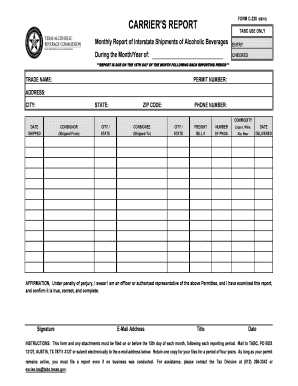
- In the ‘Entry’ section, indicate the month and year for which you are reporting. This is essential for tracking and compliance.
- Fill in your trade name, permit number, address, city, state, zip code, and phone number in the designated fields. Ensure all details are accurate to avoid processing delays.
- For each shipment, enter the date shipped, consignor's information (name, city, and state), consignee's details (name, city, and state), freight bill number, number of packages, and commodity type (liquor, wine, ale, or beer).
- In the affirmation section, confirm that you are an authorized representative of the permit holder. Provide your signature, email address, title, and the date the report is completed.
- After completing all sections, review the form for accuracy. Make any necessary corrections before finalizing.
- Once satisfied with the form, save your changes. You can choose to download, print, or share the completed C-220 as needed.
Complete your TX TABC C-220 online today to ensure timely reporting.
The mixed beverage tax in Texas is a special tax applied to mixed drinks sold in licensed establishments. This tax is an important part of the regulation governing alcohol sales, including those with a TX TABC C-220 permit. Establishments must accurately collect this tax and remit it to the state. Understanding tax responsibilities is crucial for maintaining your business's legal standing.