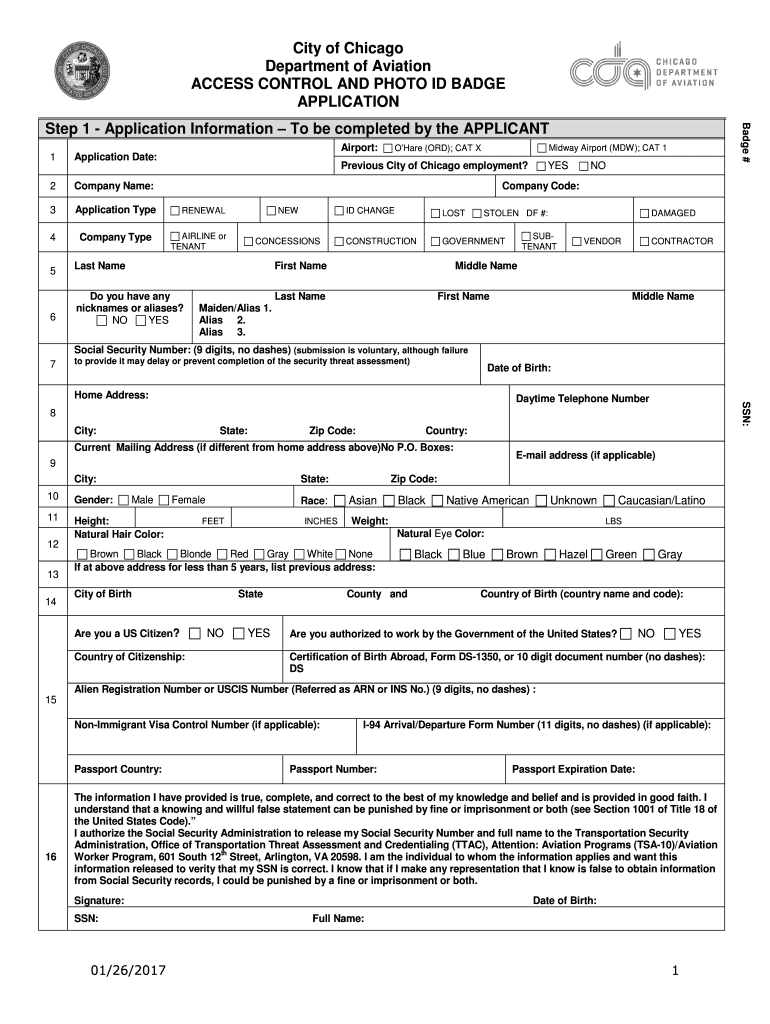
- Application Information – To be completed by the APPLICANT Midway Airport (MDW); CAT 1 O’Hare (ORD); CAT X Previous City of Chicago employment? YES NO Company Code: RENEWAL NEW AIRLINE or TENANT CONCESSIONS Last Name ID CHANGE LOST CONSTRUCTION GOVERNMENT First Name Do you have any nicknames or aliases? NO YES STOLEN DF #: DAMAGED SUBTENANT VENDOR CONTRACTOR Middle Name Last Name First Name Middle Name Maiden/Alias 1. Alias 2. Alias 3. Social Security Number: (9 d.
Loading

Open form follow the instructions

Easily sign the form with your finger

Send filled & signed form or save
How to fill out the IL Access Control and Photo ID Badge Application online
The IL Access Control and Photo ID Badge Application is a crucial document for individuals seeking access to secure areas at Chicago airports. This guide provides clear instructions on how to complete the application online, ensuring you provide the necessary information accurately.
Follow the steps to fill out the application correctly.
- Click ‘Get Form’ button to access the application and open it for editing.
- Begin with the application information section by entering your application date, company name, and type (e.g., renewal, new). Indicate the airport location and badge type. Check 'Yes' or 'No' for previous City of Chicago employment.
- Complete the physical characteristics section, which includes gender, height (feet and inches), weight (pounds), hair color, eye color, city and country of birth, and citizenship status.
- Affirm your citizenship status and work authorization by selecting 'Yes' or 'No.' If required, enter relevant document numbers such as alien registration number or passport information.
- Proceed to review the certification statements, affirming the truthfulness of your provided information. Include your signature and the date.
Complete your IL Access Control and Photo ID Badge Application online today to facilitate your access to secure areas.
Experience a faster way to fill out and sign forms on the web. Access the most extensive library of templates available.
Related content
All badge/access cards are required to be processed in-person during the hours of...
To access your electronic card you will need to download the Illinois App. To obtain your...
▫ Press the LonWorks Option Card firmly onto the drive's 2CN connector and standoffs...
Get answers to your most pressing questions about US Legal Forms API.
What is the access control process?
The access control process involves identifying individuals, granting or denying entry, and monitoring movements within a facility. Utilizing an IL Access Control and Photo ID Badge Application facilitates this by combining badge technology with real-time tracking systems. This integration allows organizations to efficiently enforce security protocols and ensure compliance with safety regulations. Consequently, it enhances the protection of both personnel and property.
What is the access badge?
An access badge is a physical identification card issued to personnel which grants them access to restricted areas. These badges often include features like holograms or barcodes to prevent forgery. With the IL Access Control and Photo ID Badge Application, organizations can design badges tailored to their specific security needs, ensuring that only authorized individuals gain entry to sensitive locations. This level of precaution helps protect valuable assets and information.
What is badge processing access control?
Badge processing access control refers to the methods and technologies used to create and manage identification badges. With an IL Access Control and Photo ID Badge Application, organizations can streamline the process of badge creation, distribution, and usage. This technology enables companies to revoke access quickly if a badge is lost or an employee leaves, enhancing overall security. As a result, it promotes a safer working environment.
What is an example of a badge system?
A badge system often includes physical ID badges, security access points, and the corresponding software to manage them. For instance, a company might utilize an IL Access Control and Photo ID Badge Application to issue badges to employees, allowing them to access different areas of the workplace. This integrated approach enhances security by ensuring only authorized personnel can enter specific locations. In addition, the system can track who enters or exits the premises.
Use professional pre-built templates to fill in and sign documents online faster. Get access to thousands of forms.
If you believe that this page should be taken down, please follow our DMCA take down process here.