Loading
Form preview
  • US Legal Forms
  • Form Library
  • Social Forms
  • Colorado Social Forms
  • Co 2/74-pcretm 2017

Get Co 2/74-pcretm 2017

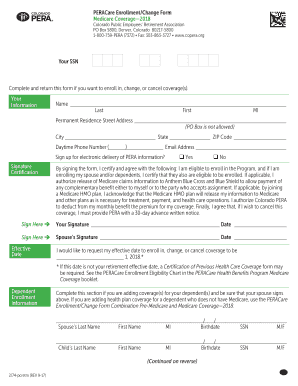
• www.copera.org Your SSN Complete and return this form if you want to enroll in, change, or cancel coverage(s). Your Information Name___________________________________________________________________________ Last First MI Permanent Residence Street Address_____________________________________________________ (PO Box is not allowed) City _______________________________ State ______________ ZIP Code___________________ ) Daytime Phone Number (___________________ Email Address __________.

How it works

  1. Open form

    Open form follow the instructions

  2. Easily sign form

    Easily sign the form with your finger

  3. Share form

    Send filled & signed form or save

How to fill out the CO 2/74-pcretm online

Filling out the CO 2/74-pcretm form online can streamline your enrollment or changes in Medicare coverage. This guide provides clear, step-by-step instructions to help you complete the form accurately and efficiently.

Follow the steps to successfully fill out the form.

  1. Press the ‘Get Form’ button to access the CO 2/74-pcretm and open it in your browser.
  2. Begin by entering your personal information, including your full name, permanent residence address, daytime phone number, and email address. Ensure that all fields are completed accurately.
  3. Indicate whether you would like to sign up for electronic delivery of your PERA information by selecting 'Yes' or 'No'.
  4. In the signature section, certify your eligibility for the program by signing and dating the form. If applicable, have your partner sign as well.
  5. Specify your desired effective date for enrollment, changes, or cancellations, entering the appropriate date in the designated field.
  6. If adding dependents, complete the section with their information as required, ensuring accuracy in names, dates of birth, and Social Security numbers.
  7. For Medicare information, indicate your and your dependents' enrollment status and provide corresponding Medicare numbers.
  8. Select your health plan preferences by checking the appropriate boxes for coverage options, medical questions, and plan selection.
  9. Choose your dental and vision plan selections as needed, following similar steps in the appropriate sections.
  10. Review all provided information for accuracy before finalizing your form. Once completed, save any changes and download a copy of the form for your records.

Complete your CO 2/74-pcretm form online now to ensure your Medicare coverage needs are met!

Get form

Experience a faster way to fill out and sign forms on the web. Access the most extensive library of templates available.

Related content

A comparison of full-term and preterm infants...
contrast, preterm infants had no evidence of neural changes in the occipital ... (2017)...
Learn more

Related links form

MERCER UNIVERSITY SCHOOL OF MEDICINE APPLICATION ... - Medicine Mercer Mississippi Petroleum Tax Registration Application - Dor Ms Rt 7 Duke First Quarter Grade Report 2013 Form

Questions & Answers

Get answers to your most pressing questions about US Legal Forms API.

Contact support

CO2 is obtained through several processes, including natural carbon cycles and industrial methods such as combustion and chemical reactions. Understanding how CO2 is sourced is vital, especially for businesses dealing with emissions. The CO 2/74-pcretm process on US Legal Forms provides the necessary guidance and documentation to facilitate compliant CO2 acquisition.

To calculate the CO2 percentage, divide the volume of CO2 by the total volume of gas and then multiply by 100. This calculation helps in assessing air quality in various settings. Using the CO 2/74-pcretm specifications can assist you in precise calculations and understanding the implications of your CO2 management strategies.

Measuring CO2 percentage can be done using tools such as gas analyzers or infrared sensors that gauge the concentration of CO2 in a given environment. Regular monitoring is crucial for environments where CO2 levels can affect health and safety. The CO 2/74-pcretm framework can help ensure you maintain the appropriate CO2 levels and comply with regulations.

To get CO2, you can source it from suppliers or produce it through various methods, including combustion, fermentation, or chemical reactions. Once obtained, it's essential to manage CO2 responsibly, and the CO 2/74-pcretm guidelines can assist you in adhering to legal requirements. US Legal Forms offers templates to streamline your CO2 acquisition processes.

CO2 can be produced through natural processes such as volcanic eruptions or human activities like burning fossil fuels and waste decomposition. Additionally, industrial processes, including chemical production and fermentation in breweries, generate CO2. Implementing the CO 2/74-pcretm strategy can enhance your understanding of legally producing and managing CO2 in your business.

Collecting CO2 typically involves using specialized equipment like gas scrubbing systems or absorbers that capture CO2 from the atmosphere. Many companies opt for solutions that utilize the CO 2/74-pcretm process to streamline their collection methods. Consider using US Legal Forms for documentation and protocols specific to CO2 collection to ensure compliance.

You can obtain CO2 through various methods such as combustion of fossil fuels, fermentation processes, and even respiration in living organisms. For those in commercial sectors, carbon capture technologies can also be a viable option. Using CO 2/74-pcretm on the US Legal Forms platform can provide the necessary forms and guidelines to legally manage and track CO2 acquisition.

To complete an ACH enrollment form, start by providing your bank account details, including the account number and routing number. You’ll also need to specify whether this enrollment is for direct deposit or bill payments. Finally, review the form to ensure accuracy before submitting. For a seamless process, explore CO 2/74-pcretm to find templates and tips that make it easier.

Reading a W-2 starts with identifying your employer’s information at the top, followed by your personal details. Focus on Boxes 1 and 2, where your total income and federal taxes withheld are listed. Additional boxes provide details on state taxes and benefits. If you find yourself confused, check out CO 2/74-pcretm for user-friendly resources that simplify the process.

Filling out a W-2 form involves entering key information in designated boxes, beginning with your employer’s name and EIN. You’ll then report your earnings in Box 1, including tips and bonuses, and complete the relevant taxation boxes for federal and state. Make sure to review the form thoroughly before submission to avoid errors. For detailed assistance, refer to the CO 2/74-pcretm guidelines.

Get This Form Now!

Use professional pre-built templates to fill in and sign documents online faster. Get access to thousands of forms.
If you believe that this page should be taken down, please follow our DMCA take down processhere.

Industry-leading security and compliance

US Legal Forms protects your data by complying with industry-specific security standards.
  • In businnes since 1997
    25+ years providing professional legal documents.
  • Accredited business
    Guarantees that a business meets BBB accreditation standards in the US and Canada.
  • Secured by Braintree
    Validated Level 1 PCI DSS compliant payment gateway that accepts most major credit and debit card brands from across the globe.
Get CO 2/74-pcretm
  • Adoption
  • Bankruptcy
  • Contractors
  • Divorce
  • Home Sales
  • Employment
  • Identity Theft
  • Incorporation
  • Landlord Tenant
  • Living Trust
  • Name Change
  • Personal Planning
  • Small Business
  • Wills & Estates
  • Packages A-Z
  • Affidavits
  • Bankruptcy
  • Bill of Sale
  • Corporate - LLC
  • Divorce
  • Employment
  • Identity Theft
  • Internet Technology
  • Landlord Tenant
  • Living Wills
  • Name Change
  • Power of Attorney
  • Real Estate
  • Small Estates
  • Wills
  • All Forms
  • Forms A-Z
  • Form Library
  • Legal Hub
  • About Us
  • Help Portal
  • Legal Resources
  • Blog
  • Affiliates
  • Contact Us
  • Delete My Account
  • Site Map
  • Industries
  • Forms in Spanish
  • Localized Forms
  • State-specific Forms
  • Forms Kit
  • Real Estate Handbook
  • All Guides
  • Notarize
  • Incorporation services
  • For Consumers
  • For Small Business
  • For Attorneys
  • USLegal
  • FormsPass
  • pdfFiller
  • signNow
  • altaFlow
  • DocHub
  • Instapage
Form Packages
  • Adoption
  • Bankruptcy
  • Contractors
  • Divorce
  • Home Sales
  • Employment
  • Identity Theft
  • Incorporation
  • Landlord Tenant
  • Living Trust
  • Name Change
  • Personal Planning
  • Small Business
  • Wills & Estates
  • Packages A-Z
Form Categories
  • Affidavits
  • Bankruptcy
  • Bill of Sale
  • Corporate - LLC
  • Divorce
  • Employment
  • Identity Theft
  • Internet Technology
  • Landlord Tenant
  • Living Wills
  • Name Change
  • Power of Attorney
  • Real Estate
  • Small Estates
  • Wills
  • All Forms
  • Forms A-Z
  • Form Library
Customer Service
  • Legal Hub
  • About Us
  • Help Portal
  • Legal Resources
  • Blog
  • Affiliates
  • Contact Us
  • Delete My Account
  • Site Map
  • Industries
  • Forms in Spanish
  • Localized Forms
  • State-specific Forms
  • Forms Kit
Legal Guides
  • Real Estate Handbook
  • All Guides
Prepared for you
  • Notarize
  • Incorporation services
Our Customers
  • For Consumers
  • For Small Business
  • For Attorneys
Our Sites
  • USLegal
  • FormsPass
  • pdfFiller
  • signNow
  • altaFlow
  • DocHub
  • Instapage
Social Media
Call us now toll free:
+1 833 426 79 33
As seen in:
© Copyright 1999-2026 airSlate Legal Forms, Inc. 3720 Flowood Dr, Flowood, Mississippi 39232
  • Your Privacy Choices
  • Terms of Service
  • Privacy Notice
  • Content Takedown Policy
  • Bug Bounty Program
CO 2/74-pcretm
This form is available in several versions.
Select the version you need from the drop-down list below.
2019 CO 2/74-pcretm
Select form
  • 2019 CO 2/74-pcretm
  • 2018 CO 2/74-pcretm
  • 2017 CO 2/74-pcretm
  • 2012 CO 2/74-pcretm
Select form