Loading
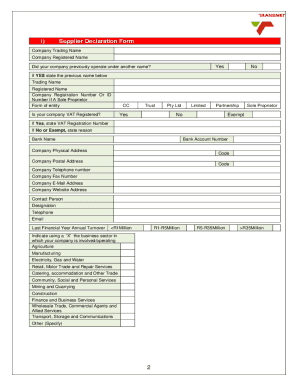
Get Za Transnet Supplier Declaration Form
How it works
-

Open form follow the instructions
-

Easily sign the form with your finger
-

Send filled & signed form or save
How to fill out the ZA Transnet Supplier Declaration Form online
The ZA Transnet Supplier Declaration Form is essential for companies seeking to register as suppliers with Transnet. This guide provides clear instructions to help users complete the form effectively, ensuring that all required information is accurately submitted online.
Follow the steps to successfully complete the ZA Transnet Supplier Declaration Form online.
- Click ‘Get Form’ button to obtain the Supplier Declaration Form and open it in your preferred editor.
- Fill in the company trading name and registered name in the respective fields. Select 'Yes' or 'No' regarding whether your company previously operated under another name, and if 'Yes', provide the previous name.
- Provide the company registration number or ID number if you are a sole proprietor. Indicate the form of entity by checking the appropriate box (CC, Pty Ltd, Partnership, etc.).
- State whether your company is VAT registered. If 'Yes', enter the VAT registration number; if 'No' or 'Exempt', provide the reason.
- Enter your bank name and bank account number. Fill in the company physical address and postal address, including the respective postal codes.
- Provide contact details such as company telephone number, fax number, email address, and website address, along with the contact person's information.
- Indicate the last financial year's annual turnover by marking the corresponding box (<R1Million, R1-R5Million, R5-R35Million, >R35Million).
- Select the business sector in which your company operates by checking the applicable box.
- Complete the category of supplier section. Answer whether you supply goods and/or services, and if applicable, specify the types of goods and/or services provided.
- Fill out the BBBEE ownership details, including whether your company has a valid BBBEE certificate and the relevant ownership percentages.
- Confirm understanding and agreement to the terms of the Transnet Supplier Code of Conduct by marking the appropriate box.
- Ensure all required supporting documentation is prepared as listed in the document checklist. Attach the necessary files as needed.
- Complete the form by authorizing your signature, entering your name, designation, and the date. Ensure the stamp and signature of a Commissioner of Oath is added if required.
- After filling out the form, review all provided information for accuracy. Save changes, and then download or print the completed Supplier Declaration Form for your records.
Begin your supplier registration process today by filling out the ZA Transnet Supplier Declaration Form online.
A vendor declaration form is a document that outlines the vendor's commitments to the regulations and standards they must follow. It serves as a way for clients and partners to ensure that they are working with compliant vendors. Using the ZA Transnet Supplier Declaration Form can streamline your vendor application and enhance your credibility.