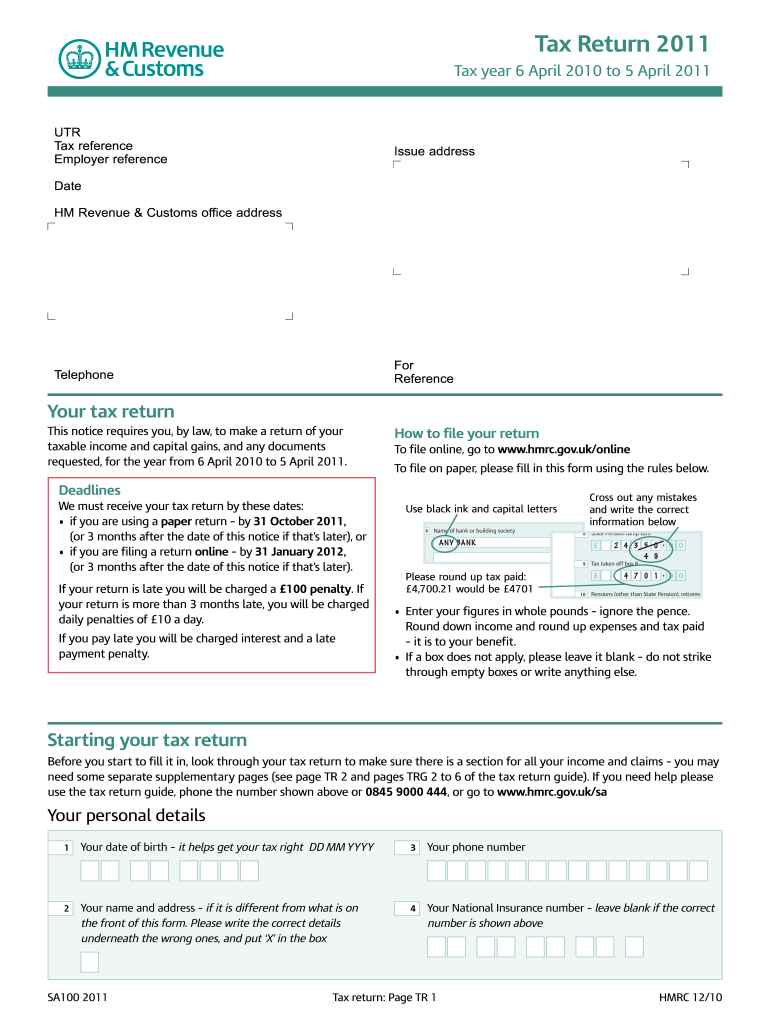
4. ANY BANK. SA100 2011. Tax return: Page TR 1. HMRC 12/10. Tax Return 2011. Tax year 6 April 2010 to 5 April 2011. Your tax return. Cross out any .
Loading

Open form follow the instructions

Easily sign the form with your finger

Send filled & signed form or save
How to fill out the UK HMRC SA100 online
Filing your tax return can seem like a daunting task, but this guide will provide you with clear and detailed steps to complete the UK HMRC SA100 form online. By following these instructions, you can confidently report your income and capital gains accurately.
Follow the steps to effectively complete your tax return.
- Click ‘Get Form’ button to obtain the form and open it in the editor.
- Begin by entering your personal details, including your date of birth, name, address, and National Insurance number if applicable.
- Review your taxable income and capital gains for the year from 6 April 2010 to 5 April 2011. Make sure to use whole pounds and round up expenses and tax paid.
- Answer the questions regarding your sources of income, such as employment, self-employment, or property income. Indicate if you will need supplementary pages for any of these.
- Complete income sections, including pensions, dividends, and other taxable income. Ensure to fill in the amounts accurately and as per the instructions provided.
- Provide details on any tax reliefs you may be eligible for, such as payments into registered pension schemes or charitable giving.
- Confirm if you have any tax due or refunds. Enter your bank details if you wish for any repayment to be processed directly to your account.
- Check your form for accuracy. If you have made any mistakes, you can cross them out and enter the correct information below.
- Sign and date the form in the designated area to confirm that the information provided is accurate.
- Once completed, choose to save your changes, download, print, or share your form as needed.
Complete your tax return online for a smoother and more efficient process.
Experience a faster way to fill out and sign forms on the web. Access the most extensive library of templates available.
Related content
Jul 31, 2024 — Capital positive aspects and losses are to be reported on supplementary...
Get answers to your most pressing questions about US Legal Forms API.
Do I need to complete a UK tax return if I am non-resident?
If you are classified as a non-resident, you may not need to complete a UK tax return unless you have UK income. However, if you earn income in the UK, it's necessary to file the UK HMRC SA100 form. For clarity on your obligations, uslegalforms can provide guidance tailored to your situation.
Can I return to the UK after living abroad?
Yes, you can return to the UK after living abroad, but be aware of your tax obligations. If you've been earning income abroad, you may need to complete the UK HMRC SA100 form. To navigate this process smoothly, consider using uslegalforms for clear steps on compliance.
How do I contact the UK tax office from abroad?
To contact the UK tax office while abroad, call HMRC's international helpline. Be prepared with your personal information and any questions about your UK HMRC SA100 form. If you find this process challenging, uslegalforms can provide additional resources to guide you.
Can you download the SA100 form?
Yes, you can download the UK HMRC SA100 form directly from the HMRC website as a PDF. This allows you to fill it out at your convenience. For a more guided approach, uslegalforms offers downloadable forms along with helpful resources you can use.
Is it easy to fill in a tax return in the UK?
Filling in a tax return in the UK can be straightforward if you have the right resources. The UK HMRC SA100 form is user-friendly, especially when you have access to helpful tools and guides. Using platforms like uslegalforms can further ease the process by providing templates and instructions.
How do I submit my UK tax return from overseas?
To submit your UK tax return while living overseas, you should complete the UK HMRC SA100 form and file it electronically through the HMRC online portal. Make sure you include any necessary documentation. If you need assistance, consider using uslegalforms to help ensure you meet all requirements.
What is the easiest way to fill out a tax return?
The easiest way to fill out your tax return is to use the UK HMRC SA100 form, which is designed for individuals. You can complete it online, making the process more straightforward. Additionally, using platforms like uslegalforms can simplify your experience by providing step-by-step guidance.
Is it easy to do your own tax return in the UK?
Completing your own tax return in the UK can be straightforward, especially with the right resources. The UK HMRC SA100 form is user-friendly, and HMRC provides guidance to help you through each section. If you prefer assistance, utilizing platforms like USLegalForms can simplify the process, making it easier for you to file your return accurately.
How do I submit a company tax return UK?
To submit a company tax return in the UK, you generally use the CT600 form. This form can be filed online through HMRC's portal, or you may choose accounting software that integrates with their system. If you're unsure about the process, consider USLegalForms; their platform can help guide you through the steps necessary to successfully submit your company tax return.
How do I inform HMRC about leaving the UK?
To inform UK HMRC that you are leaving the UK, fill out the P85 form to detail your departure. This form enables HMRC to adjust your tax status accordingly. If you are also required to file a self-assessment, be sure to include your departure in your SA100. Keeping HMRC informed is crucial for avoiding future tax complications.
Use professional pre-built templates to fill in and sign documents online faster. Get access to thousands of forms.
If you believe that this page should be taken down, please follow our DMCA take down process here.
This form is available in several versions. Select the version you need from the drop-down list below.