Loading
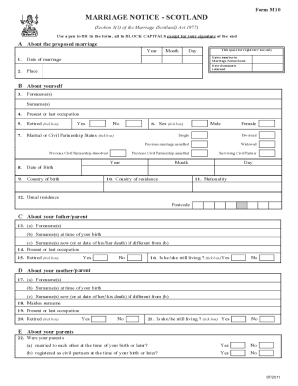
Get Uk Scotland M10 2011
How it works
-

Open form follow the instructions
-

Easily sign the form with your finger
-

Send filled & signed form or save
How to fill out the UK Scotland M10 online
The marriage notice application form M10 is an essential document for couples wishing to legally marry in Scotland. This guide provides clear, step-by-step instructions to help you complete the form accurately and efficiently.
Follow the steps to successfully complete your marriage notice form.
- Click ‘Get Form’ button to access the marriage notice application form M10 and open it in your preferred editor.
- In Section A1, enter the proposed date of marriage. Make sure this is within the legal timeframe for notice submission, which is no less than 15 days and ideally four weeks prior to the marriage.
- Complete Section A2 with the place of the proposed marriage, ensuring it aligns with your plans.
- In Section B, provide your personal details: Forename(s), Surname(s), Date of Birth, and other personal information as required. Make sure to indicate your current marital status by ticking the appropriate box.
- Move to Sections C and D to fill out information about your parents. This includes their names, current or last occupations, and any other relevant details.
- Fill out Section E, which involves confirming the marital status of your parents as part of the background information required for your marriage schedule.
- If applicable, complete Section F regarding the celebrant who is to solemnize the marriage, including their name and denomination.
- In Section G, enter the details of the other party to the marriage, ensuring all information matches the other person's documentation.
- Gather all required documents listed in Section H and ensure you check the corresponding boxes to confirm their inclusion with your application. These documents may include your birth certificate, and if applicable, proof of termination of any previous marriages or civil partnerships.
- Finally, complete the declaration section, confirming the accuracy of the information provided. Sign and date the form as required.
- After reviewing all sections for completeness and accuracy, you can save changes, download, print, or share the completed form as needed.
Start filling out your marriage notice application form M10 online today to take the next step towards your marriage.
Get form
Experience a faster way to fill out and sign forms on the web. Access the most extensive library of templates available.
To get married in Gretna Green, you need to complete the UK Scotland M10 form and provide valid identification. It's also essential to submit documentation regarding any prior marriages, if applicable. Ensuring that you have all required paperwork organized will facilitate a smooth marriage process at this historic location.
Get This Form Now!
Use professional pre-built templates to fill in and sign documents online faster. Get access to thousands of forms.