Loading
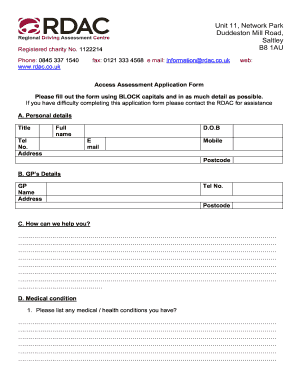
Get Uk Rdac Access Assessment Application Form
How it works
-

Open form follow the instructions
-

Easily sign the form with your finger
-

Send filled & signed form or save
How to fill out the UK RDAC Access Assessment Application Form online
Filling out the UK RDAC Access Assessment Application Form online is a straightforward process that allows individuals to request an access assessment. This guide provides detailed steps to assist you in completing the form accurately and comprehensively.
Follow the steps to successfully complete the UK RDAC Access Assessment Application Form.
- Use the ‘Get Form’ button to obtain the application form, ensuring you have all the required details ready to fill in.
- Begin with Section A, where you need to provide personal details. Fill in your title, full name, telephone number, email, and address using BLOCK capitals for clarity.
- In Section B, enter your general practitioner’s details. Include their name, address, telephone number, and postcode.
- Move to Section C and describe how the RDAC can assist you. Provide detailed information about your requirements or the challenges you face.
- In Section D, list any medical or health conditions and the duration of these conditions. If applicable, mention if a medical condition is due to an accident, including details of any associated solicitor or case manager.
- Section E focuses on your current abilities. Indicate if you can walk unaided, the distance you can walk, and whether you use any mobility aids. Also, state if you can independently transfer into a vehicle.
- For Section F, select which centre you prefer to attend for your assessment.
- In Section G, answer questions regarding your financial situation and other relevant booking information that may assist RDAC in planning your visit.
- Proceed to Section H to provide payment details. Remember that the assessment fee is £20, and specify your preferred payment method.
- Section I requests your demographic details for monitoring purposes. Share as much as you feel comfortable.
- In Section J, indicate if you consent to share your assessment details with any third parties.
- Review Section K regarding your consent under the Data Protection Act, sign where indicated, and confirm your understanding of data processing.
- Finally, Section L requires you to declare the accuracy of the information provided. Sign and date the form before submission.
Complete your application online now to take the next step toward receiving the assistance you need.