Loading
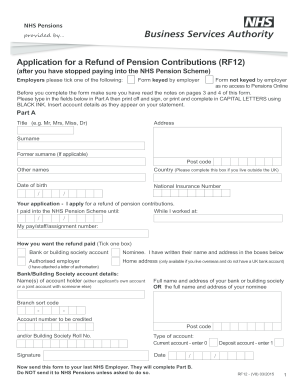
Get Uk Nhs Rf12 2015
How it works
-

Open form follow the instructions
-

Easily sign the form with your finger
-

Send filled & signed form or save
How to fill out the UK NHS RF12 online
Filling out the UK NHS RF12 form for a refund of pension contributions is an important task for former members of the NHS Pension Scheme. This guide offers clear, step-by-step instructions to ensure you complete the form accurately and effectively.
Follow the steps to successfully complete your application for a refund.
- Click ‘Get Form’ button to obtain the RF12 form and open it in your document manager.
- In Part A, begin by filling in your title (e.g. Mr, Mrs, Miss, Dr) and your current address.
- Provide your surname and any former surname if applicable, along with your postcode.
- Enter any other names you may have, followed by the country if you are outside the UK.
- Fill in your date of birth and National Insurance number.
- State your application by selecting the option that you are applying for a refund of pension contributions.
- Indicate the date until you contributed to the NHS Pension Scheme and the organization where you worked.
- Fill in your pay/staff/assignment number for accurate processing.
- Choose how you want your refund paid by ticking the relevant box for your preferred payment method (bank account, nominee, authorized employer, or home address if overseas).
- If opting for a bank or building society account, provide all required details including account holders' names, sort code, account number, and branch information.
- Sign the form and include the date along with selecting the type of account.
- Once completed, send the form to your last NHS employer for them to complete Part B of the form. Do not send it directly to NHS Pensions unless instructed.
Complete your application for a refund of pension contributions online today!
Get form
Experience a faster way to fill out and sign forms on the web. Access the most extensive library of templates available.
To opt out of the NHS Pension Scheme, start by requesting an opt-out form from your administrator. Fill out the form accurately and return it promptly to prevent further contributions. Ensure you understand the implications of your choice on your retirement planning. Seek assistance from resources like US Legal Forms if you need help with forms or additional information.
Get This Form Now!
Use professional pre-built templates to fill in and sign documents online faster. Get access to thousands of forms.