Loading
Get Uk Mem 1 2001-2026
How it works
-

Open form follow the instructions
-

Easily sign the form with your finger
-

Send filled & signed form or save
How to fill out the UK Mem 1 online
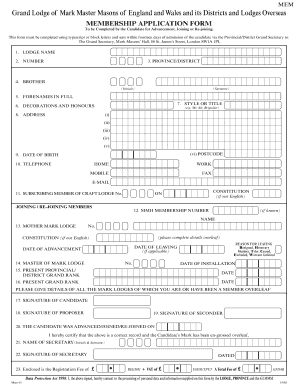
Completing the UK Mem 1 form is an essential step for individuals seeking advancement, joining, or re-joining. This guide will walk you through each section of the form with clear instructions to ensure you submit accurate information.
Follow the steps to successfully complete the UK Mem 1 form online.
- Press the ‘Get Form’ button to retrieve the form and open it in the online editor.
- Begin by filling in the lodge name in the specified field. Ensure the spelling is correct and matches official documentation.
- Next, enter the lodge number as provided by your lodge’s administrative records.
- Indicate the province or district associated with your lodge. This helps to identify the jurisdiction of the lodge.
- Provide your initials and surname in the 'Brother' section. This identifies you formally in the application.
- Enter your forenames in full as required, ensuring to follow any specified format or character limits.
- Select your style or title, such as Mr., Sir, or Brigadier, if applicable.
- Fill in your address details clearly, including all lines and the postcode, as this will be used for correspondence.
- Input your date of birth to verify eligibility. Make sure you use the correct format.
- Complete the telephone section with your home, work, mobile, and fax numbers if available. This is crucial for communication.
- If you are a subscribing member of a Craft Lodge, enter the lodge number and constitution details.
- If you have a known MMH membership number, please include it in the indicated section.
- Provide the name and number of your Mother Mark Lodge, including any necessary constitution details.
- Detail your reason for leaving previous lodges if applicable, such as resigned or excluded, and include the date of leaving.
- Enter the name and mark lodge number of the current Master, along with their date of installation.
- Indicate your present provincial or district grand rank including the date it was conferred.
- Then, provide your present grand rank and the respective date.
- List all mark lodges you have been associated with, their lodge numbers and relevant dates for installation or leaving.
- Sign the application as the candidate, followed by the signatures of the proposer and seconder.
- Provide the date of advancement or joining and ensure all details are correct.
- The secretary must certify the record, and they should sign and include their initials and surname.
- Finally, include the registration fee amount, noting relevant VAT as applicable.
- Review all information for accuracy, then save changes, and decide whether to download, print, or share the completed form.
Complete your UK Mem 1 form online today to ensure a smooth advancement process.
Filling out a customs form in the UK requires you to declare all items you are bringing into the country. Make sure to list each item clearly and provide accurate values to avoid penalties. Follow the instructions on the form, and don’t hesitate to seek assistance if unsure about any section. US Legal Forms can provide templates to help you ensure compliance and ease the paperwork burden.