Loading
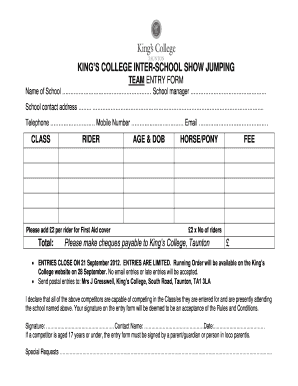
Get Uk King's College Inter-school Show Jumping Team Entry Form
How it works
-

Open form follow the instructions
-

Easily sign the form with your finger
-

Send filled & signed form or save
How to fill out the UK King's College Inter-School Show Jumping Team Entry Form online
Filling out the UK King's College Inter-School Show Jumping Team Entry Form online can be straightforward and efficient. This guide will provide clear instructions on how to complete each section of the form, ensuring a smooth entry process for participants.
Follow the steps to successfully complete the form online.
- Press the ‘Get Form’ button to access the entry form and open it in your preferred online document editor.
- Begin by entering the name of your school in the designated field at the top of the form.
- Next, include the name of the school manager in the corresponding section.
- Fill in the full school contact address, ensuring all required details are accurate and complete.
- Provide the school's telephone and mobile numbers, along with a valid email address for correspondence.
- Under the CLASS section, enter the details of each rider participating in the competition.
- For each rider, include their age and date of birth in the specified fields.
- List the horse or pony that each rider will be using in the appropriate section of the form.
- Calculate the fee based on the number of riders, which includes an additional £2 per rider for First Aid cover.
- Make sure to indicate the total fee in the designated area and ensure that cheques are payable to King’s College, Taunton.
- Remember that entries close on 21 September 2012, and late entries will not be accepted.
- Sign the form where indicated, confirming that all listed competitors are eligible and understand the rules.
- If a competitor is under 18, make sure a parent, guardian, or person in loco parentis signs the entry form.
- Include any special requests in the provided section, ensuring you communicate any necessary information.
- Finally, save your changes, download the completed form, and print or share it as needed.
Begin your entry process now by filling out the form online.