Loading
Form preview
  • US Legal Forms
  • Other Templates
  • More Forms
  • More Multi-State Forms
  • Ca Adopt-331 2008

Get Ca Adopt-331 2008-2026

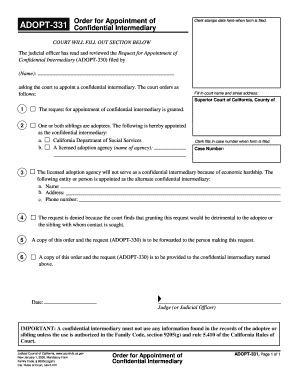
For Appointment of Confidential Intermediary (ADOPT-330) filed by To keep other people from seeing what you entered on your form, please press the Clear This Form button at the end of the form when finished. (Name): asking the court to appoint a confidential intermediary. The court orders as follows: Fill in court name and street address: Superior Court of California, County of 5 1 The request for appointment of confidential intermediary is granted. 5 2 One or both siblings are adoptees.

How it works

  1. Open form

    Open form follow the instructions

  2. Easily sign form

    Easily sign the form with your finger

  3. Share form

    Send filled & signed form or save

How to fill out and sign CA ADOPT-331 online?

Get your online template and fill it in using progressive features. Enjoy smart fillable fields and interactivity.Follow the simple instructions below:

Tips on how to fill out, edit and sign CA ADOPT-331 online

How to edit CA ADOPT-331: customize forms online

Choose a reliable document editing option you can rely on. Modify, execute, and sign CA ADOPT-331 safely online.

Too often, editing documents, like CA ADOPT-331, can be a challenge, especially if you received them in a digital format but don’t have access to specialized tools. Of course, you can find some workarounds to get around it, but you can end up getting a form that won't fulfill the submission requirements. Utilizing a printer and scanner isn’t a way out either because it's time- and resource-consuming.

We provide an easier and more streamlined way of completing files. A rich catalog of document templates that are easy to change and certify, making fillable for others. Our platform extends way beyond a set of templates. One of the best parts of utilizing our services is that you can revise CA ADOPT-331 directly on our website.

Since it's an online-based solution, it saves you from having to download any computer software. Additionally, not all corporate policies allow you to install it on your corporate laptop. Here's the best way to easily and safely execute your paperwork with our solution.

  1. Hit the Get Form > you’ll be immediately redirected to our editor.
  2. Once opened, you can start the editing process.
  3. Select checkmark or circle, line, arrow and cross and other choices to annotate your document.
  4. Pick the date field to include a particular date to your document.
  5. Add text boxes, pictures and notes and more to enrich the content.
  6. Utilize the fillable fields option on the right to create fillable {fields.
  7. Select Sign from the top toolbar to create and create your legally-binding signature.
  8. Hit DONE and save, print, and pass around or download the document.

Forget about paper and other ineffective methods for executing your CA ADOPT-331 or other files. Use our tool instead that includes one of the richest libraries of ready-to-edit forms and a powerful document editing services. It's easy and secure, and can save you lots of time! Don’t take our word for it, give it a try yourself!

Get form

Experience a faster way to fill out and sign forms on the web. Access the most extensive library of templates available.
Get form

Related links form

CA JV-536 S 2014 CA 60SF 2000 CA CD-200 2006 CA JV-644 2012

Get This Form Now!

Use professional pre-built templates to fill in and sign documents online faster. Get access to thousands of forms.
Get form
If you believe that this page should be taken down, please follow our DMCA take down processhere.
Get CA ADOPT-331
Get form
  • Adoption
  • Bankruptcy
  • Contractors
  • Divorce
  • Home Sales
  • Employment
  • Identity Theft
  • Incorporation
  • Landlord Tenant
  • Living Trust
  • Name Change
  • Personal Planning
  • Small Business
  • Wills & Estates
  • Packages A-Z
  • Affidavits
  • Bankruptcy
  • Bill of Sale
  • Corporate - LLC
  • Divorce
  • Employment
  • Identity Theft
  • Internet Technology
  • Landlord Tenant
  • Living Wills
  • Name Change
  • Power of Attorney
  • Real Estate
  • Small Estates
  • Wills
  • All Forms
  • Forms A-Z
  • Other Templates
  • Legal Hub
  • About Us
  • Help Portal
  • Legal Resources
  • Blog
  • Affiliates
  • Contact Us
  • Delete My Account
  • Site Map
  • Industries
  • Forms in Spanish
  • Localized Forms
  • State-specific Forms
  • Forms Kit
  • Real Estate Handbook
  • All Guides
  • Notarize
  • Incorporation services
  • For Consumers
  • For Small Business
  • For Attorneys
  • USLegal
  • FormsPass
  • pdfFiller
  • signNow
  • altaFlow
  • DocHub
  • Instapage
Form Packages
  • Adoption
  • Bankruptcy
  • Contractors
  • Divorce
  • Home Sales
  • Employment
  • Identity Theft
  • Incorporation
  • Landlord Tenant
  • Living Trust
  • Name Change
  • Personal Planning
  • Small Business
  • Wills & Estates
  • Packages A-Z
Form Categories
  • Affidavits
  • Bankruptcy
  • Bill of Sale
  • Corporate - LLC
  • Divorce
  • Employment
  • Identity Theft
  • Internet Technology
  • Landlord Tenant
  • Living Wills
  • Name Change
  • Power of Attorney
  • Real Estate
  • Small Estates
  • Wills
  • All Forms
  • Forms A-Z
  • Other Templates
Customer Service
  • Legal Hub
  • About Us
  • Help Portal
  • Legal Resources
  • Blog
  • Affiliates
  • Contact Us
  • Delete My Account
  • Site Map
  • Industries
  • Forms in Spanish
  • Localized Forms
  • State-specific Forms
  • Forms Kit
Legal Guides
  • Real Estate Handbook
  • All Guides
Prepared for you
  • Notarize
  • Incorporation services
Our Customers
  • For Consumers
  • For Small Business
  • For Attorneys
Our Sites
  • USLegal
  • FormsPass
  • pdfFiller
  • signNow
  • altaFlow
  • DocHub
  • Instapage
Social Media
Call us now toll free:
+1 833 426 79 33
As seen in:
© Copyright 1999-2026 airSlate Legal Forms, Inc. 17 Station Street, Ste. 203, Brookline, MA 02445
  • Your Privacy Choices
  • Terms of Service
  • Privacy Notice
  • Content Takedown Policy
  • Bug Bounty Program