Loading
Form preview
  • US Legal Forms
  • Other Templates
  • More Forms
  • More Multi-State Forms
  • Ca Gc-400(a)(4) 2008

Get Ca Gc-400(a)(4) 2008-2026

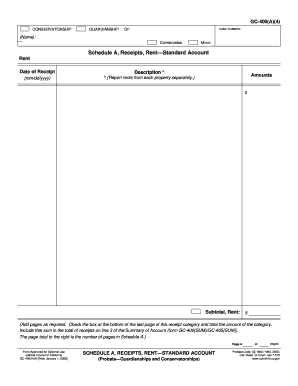
GC-400(A)(4) CONSERVATORSHIP GUARDIANSHIP OF CASE NUMBER: (Name): Conservatee Minor Schedule A, Receipts, Rent Standard Account Rent Date of Receipt Description * (mm/dd/yyyy) * (Report rents from each property separately.) Amounts $ Subtotal, Rent: $ (Add pages as required. Check the box at the bottom of the last page of this receipt category and total the amount of the category. Include that sum in the total of receipts on line 3 of the Summary of Account (form GC-400(SUM)/GC.

How it works

  1. Open form

    Open form follow the instructions

  2. Easily sign form

    Easily sign the form with your finger

  3. Share form

    Send filled & signed form or save

How to fill out and sign CA GC-400(A)(4) online?

Get your online template and fill it in using progressive features. Enjoy smart fillable fields and interactivity.Follow the simple instructions below:

Tips on how to fill out, edit and sign CA GC-400(A)(4) online

How to edit CA GC-400(A)(4): customize forms online

Put the right document management tools at your fingertips. Execute CA GC-400(A)(4) with our trusted tool that combines editing and eSignature functionality}.

If you want to complete and sign CA GC-400(A)(4) online without any inconvenience, then our online cloud-based option is the ideal solution. We offer a rich template-based catalog of ready-to-use paperwork you can edit and fill out online. Moreover, you don't need to print out the form or use third-party solutions to make it fillable. All the needed tools will be available for your use once you open the file in the editor.

Let’s go through our online editing tools and their main features. The editor has a intuitive interface, so it won't take a lot of time to learn how to use it. We’ll check out three major parts that let you:

  • Modify and annotate the template
  • The top toolbar has the tools that help you highlight and blackout text, without images and graphical aspects (lines, arrows and checkmarks etc.), add your signature to, initialize, date the document, and more.

  • Arrange your paperwork
  • Use the toolbar on the left if you wish to re-order the document or/and remove pages.

  • Prepare them for sharing
  • If you want to make the document fillable for other people and share it, you can use the tools on the right and insert different fillable fields, signature and date, text box, etc.).

Aside from the capabilities mentioned above, you can protect your file with a password, put a watermark, convert the file to the necessary format, and much more.

Our editor makes modifying and certifying the CA GC-400(A)(4) a breeze. It enables you to make just about everything when it comes to dealing with documents. Moreover, we always make sure that your experience modifying documents is safe and compliant with the main regulatory criteria. All these factors make using our solution even more enjoyable.

Get CA GC-400(A)(4), make the needed edits and tweaks, and get it in the preferred file format. Give it a try today!

Get form

Experience a faster way to fill out and sign forms on the web. Access the most extensive library of templates available.
Get form

Related links form

FR Cerfa 11436 2015 FR Cerfa 15586 2021 FR Cerfa 11543 2016 FR Cerfa 15286 2022

Get This Form Now!

Use professional pre-built templates to fill in and sign documents online faster. Get access to thousands of forms.
Get form
If you believe that this page should be taken down, please follow our DMCA take down processhere.
Get CA GC-400(A)(4)
Get form
  • Adoption
  • Bankruptcy
  • Contractors
  • Divorce
  • Home Sales
  • Employment
  • Identity Theft
  • Incorporation
  • Landlord Tenant
  • Living Trust
  • Name Change
  • Personal Planning
  • Small Business
  • Wills & Estates
  • Packages A-Z
  • Affidavits
  • Bankruptcy
  • Bill of Sale
  • Corporate - LLC
  • Divorce
  • Employment
  • Identity Theft
  • Internet Technology
  • Landlord Tenant
  • Living Wills
  • Name Change
  • Power of Attorney
  • Real Estate
  • Small Estates
  • Wills
  • All Forms
  • Forms A-Z
  • Other Templates
  • Legal Hub
  • About Us
  • Help Portal
  • Legal Resources
  • Blog
  • Affiliates
  • Contact Us
  • Delete My Account
  • Site Map
  • Industries
  • Forms in Spanish
  • Localized Forms
  • State-specific Forms
  • Forms Kit
  • Real Estate Handbook
  • All Guides
  • Notarize
  • Incorporation services
  • For Consumers
  • For Small Business
  • For Attorneys
  • USLegal
  • FormsPass
  • pdfFiller
  • signNow
  • altaFlow
  • DocHub
  • Instapage
Form Packages
  • Adoption
  • Bankruptcy
  • Contractors
  • Divorce
  • Home Sales
  • Employment
  • Identity Theft
  • Incorporation
  • Landlord Tenant
  • Living Trust
  • Name Change
  • Personal Planning
  • Small Business
  • Wills & Estates
  • Packages A-Z
Form Categories
  • Affidavits
  • Bankruptcy
  • Bill of Sale
  • Corporate - LLC
  • Divorce
  • Employment
  • Identity Theft
  • Internet Technology
  • Landlord Tenant
  • Living Wills
  • Name Change
  • Power of Attorney
  • Real Estate
  • Small Estates
  • Wills
  • All Forms
  • Forms A-Z
  • Other Templates
Customer Service
  • Legal Hub
  • About Us
  • Help Portal
  • Legal Resources
  • Blog
  • Affiliates
  • Contact Us
  • Delete My Account
  • Site Map
  • Industries
  • Forms in Spanish
  • Localized Forms
  • State-specific Forms
  • Forms Kit
Legal Guides
  • Real Estate Handbook
  • All Guides
Prepared for you
  • Notarize
  • Incorporation services
Our Customers
  • For Consumers
  • For Small Business
  • For Attorneys
Our Sites
  • USLegal
  • FormsPass
  • pdfFiller
  • signNow
  • altaFlow
  • DocHub
  • Instapage
Social Media
Call us now toll free:
+1 833 426 79 33
As seen in:
© Copyright 1999-2026 airSlate Legal Forms, Inc. 17 Station Street, Ste. 203, Brookline, MA 02445
  • Your Privacy Choices
  • Terms of Service
  • Privacy Notice
  • Content Takedown Policy
  • Bug Bounty Program