Loading
Form preview
  • US Legal Forms
  • Other Templates
  • More Forms
  • More Multi-State Forms
  • Ca Sv-260 2012

Get Ca Sv-260 2012-2026

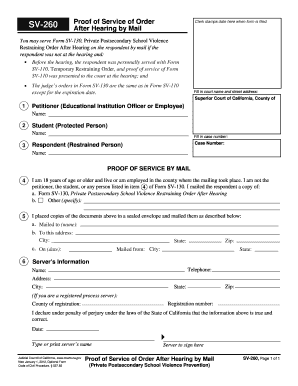
Button at the end of the form when finished. You may serve Form SV-130, Private Postsecondary School Violence Restraining Order After Hearing on the respondent by mail if the respondent was not at the hearing and: Before the hearing, the respondent was personally served with Form SV-110, Temporary Restraining Order, and proof of service of Form SV-110 was presented to the court at the hearing; and The judge s orders in Form SV-130 are the same as in Form SV-110 Fill in court name an.

How it works

  1. Open form

    Open form follow the instructions

  2. Easily sign form

    Easily sign the form with your finger

  3. Share form

    Send filled & signed form or save

How to fill out and sign CA SV-260 online?

Get your online template and fill it in using progressive features. Enjoy smart fillable fields and interactivity.Follow the simple instructions below:

Tips on how to fill out, edit and sign CA SV-260 online

How to edit CA SV-260: customize forms online

Select a rock-solid file editing service you can rely on. Revise, complete, and certify CA SV-260 safely online.

Very often, editing documents, like CA SV-260, can be a challenge, especially if you got them in a digital format but don’t have access to specialized software. Of course, you can find some workarounds to get around it, but you can end up getting a form that won't meet the submission requirements. Using a printer and scanner isn’t a way out either because it's time- and resource-consuming.

We provide a smoother and more streamlined way of completing forms. A rich catalog of document templates that are straightforward to customize and certify, to make fillable for other individuals. Our platform extends way beyond a collection of templates. One of the best parts of using our option is that you can change CA SV-260 directly on our website.

Since it's a web-based platform, it saves you from having to get any application. Additionally, not all corporate rules allow you to install it on your corporate laptop. Here's how you can effortlessly and safely complete your documents with our platform.

  1. Click the Get Form > you’ll be immediately taken to our editor.
  2. Once opened, you can start the customization process.
  3. Choose checkmark or circle, line, arrow and cross and other options to annotate your form.
  4. Pick the date field to add a particular date to your document.
  5. Add text boxes, photos and notes and more to complement the content.
  6. Use the fillable fields option on the right to add fillable {fields.
  7. Choose Sign from the top toolbar to create and add your legally-binding signature.
  8. Hit DONE and save, print, and share or get the document.

Say goodbye to paper and other ineffective methods for modifying your CA SV-260 or other documents. Use our solution instead that includes one of the richest libraries of ready-to-customize forms and a robust file editing option. It's easy and safe, and can save you lots of time! Don’t take our word for it, try it out yourself!

Get form

Experience a faster way to fill out and sign forms on the web. Access the most extensive library of templates available.
Get form

Related links form

FR Cerfa 13749 2020 FR Attestation Sur L'honneur 2026 FR Acte De Caution 2026 FR Cerfa 14997 2025

Get This Form Now!

Use professional pre-built templates to fill in and sign documents online faster. Get access to thousands of forms.
Get form
If you believe that this page should be taken down, please follow our DMCA take down processhere.
Get CA SV-260
Get form
  • Adoption
  • Bankruptcy
  • Contractors
  • Divorce
  • Home Sales
  • Employment
  • Identity Theft
  • Incorporation
  • Landlord Tenant
  • Living Trust
  • Name Change
  • Personal Planning
  • Small Business
  • Wills & Estates
  • Packages A-Z
  • Affidavits
  • Bankruptcy
  • Bill of Sale
  • Corporate - LLC
  • Divorce
  • Employment
  • Identity Theft
  • Internet Technology
  • Landlord Tenant
  • Living Wills
  • Name Change
  • Power of Attorney
  • Real Estate
  • Small Estates
  • Wills
  • All Forms
  • Forms A-Z
  • Other Templates
  • Legal Hub
  • About Us
  • Help Portal
  • Legal Resources
  • Blog
  • Affiliates
  • Contact Us
  • Delete My Account
  • Site Map
  • Industries
  • Forms in Spanish
  • Localized Forms
  • State-specific Forms
  • Forms Kit
  • Real Estate Handbook
  • All Guides
  • Notarize
  • Incorporation services
  • For Consumers
  • For Small Business
  • For Attorneys
  • USLegal
  • FormsPass
  • pdfFiller
  • signNow
  • altaFlow
  • DocHub
  • Instapage
Form Packages
  • Adoption
  • Bankruptcy
  • Contractors
  • Divorce
  • Home Sales
  • Employment
  • Identity Theft
  • Incorporation
  • Landlord Tenant
  • Living Trust
  • Name Change
  • Personal Planning
  • Small Business
  • Wills & Estates
  • Packages A-Z
Form Categories
  • Affidavits
  • Bankruptcy
  • Bill of Sale
  • Corporate - LLC
  • Divorce
  • Employment
  • Identity Theft
  • Internet Technology
  • Landlord Tenant
  • Living Wills
  • Name Change
  • Power of Attorney
  • Real Estate
  • Small Estates
  • Wills
  • All Forms
  • Forms A-Z
  • Other Templates
Customer Service
  • Legal Hub
  • About Us
  • Help Portal
  • Legal Resources
  • Blog
  • Affiliates
  • Contact Us
  • Delete My Account
  • Site Map
  • Industries
  • Forms in Spanish
  • Localized Forms
  • State-specific Forms
  • Forms Kit
Legal Guides
  • Real Estate Handbook
  • All Guides
Prepared for you
  • Notarize
  • Incorporation services
Our Customers
  • For Consumers
  • For Small Business
  • For Attorneys
Our Sites
  • USLegal
  • FormsPass
  • pdfFiller
  • signNow
  • altaFlow
  • DocHub
  • Instapage
Social Media
Call us now toll free:
+1 833 426 79 33
As seen in:
© Copyright 1999-2026 airSlate Legal Forms, Inc. 17 Station Street, Ste. 203, Brookline, MA 02445
  • Your Privacy Choices
  • Terms of Service
  • Privacy Notice
  • Content Takedown Policy
  • Bug Bounty Program