Loading
Form preview
  • US Legal Forms
  • Other Templates
  • More Forms
  • More Multi-State Forms
  • Ca F 7004-1.summons.adv.proc 2016

Get Ca F 7004-1.summons.adv.proc 2016-2026

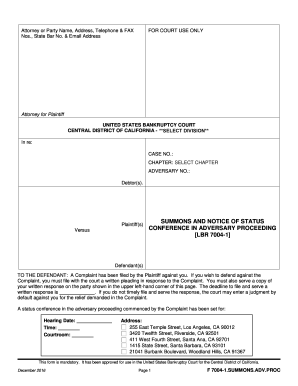
LECT DIVISION**DIVISION In re: CASE NO.: CHAPTER: SELECT CHAPTER ADVERSARY NO.: Debtor(s). Plaintiff(s) Versus SUMMONS AND NOTICE OF STATUS CONFERENCE IN ADVERSARY PROCEEDING LBR 7004-1 Defendant(s) TO THE DEFENDANT: A Complaint has been filed by the Plaintiff against you. If you wish to defend against the Complaint, you must file with the court a written pleading in response to the Complaint. You must also serve a copy of your written response on the party shown in the upper left-hand corn.

How it works

  1. Open form

    Open form follow the instructions

  2. Easily sign form

    Easily sign the form with your finger

  3. Share form

    Send filled & signed form or save

How to fill out and sign CA F 7004-1.SUMMONS.ADV.PROC online?

Get your online template and fill it in using progressive features. Enjoy smart fillable fields and interactivity.Follow the simple instructions below:

Tips on how to fill out, edit and sign CA F 7004-1.SUMMONS.ADV.PROC online

How to edit CA F 7004-1.SUMMONS.ADV.PROC: customize forms online

Use our advanced editor to turn a simple online template into a completed document. Read on to learn how to edit CA F 7004-1.SUMMONS.ADV.PROC online easily.

Once you discover a perfect CA F 7004-1.SUMMONS.ADV.PROC, all you need to do is adjust the template to your needs or legal requirements. Apart from completing the fillable form with accurate data, you may need to remove some provisions in the document that are irrelevant to your case. Alternatively, you may want to add some missing conditions in the original template. Our advanced document editing features are the best way to fix and adjust the document.

The editor enables you to change the content of any form, even if the document is in PDF format. You can add and erase text, insert fillable fields, and make further changes while keeping the initial formatting of the document. You can also rearrange the structure of the form by changing page order.

You don’t have to print the CA F 7004-1.SUMMONS.ADV.PROC to sign it. The editor comes along with electronic signature capabilities. Most of the forms already have signature fields. So, you simply need to add your signature and request one from the other signing party with a few clicks.

Follow this step-by-step guide to make your CA F 7004-1.SUMMONS.ADV.PROC:

  1. Open the preferred template.
  2. Use the toolbar to adjust the template to your preferences.
  3. Complete the form providing accurate details.
  4. Click on the signature field and add your eSignature.
  5. Send the document for signature to other signers if needed.

After all parties sign the document, you will receive a signed copy which you can download, print, and share with others.

Our solutions allow you to save tons of your time and minimize the risk of an error in your documents. Improve your document workflows with effective editing tools and a powerful eSignature solution.

Get form

Experience a faster way to fill out and sign forms on the web. Access the most extensive library of templates available.
Get form

Related links form

FR Promesse D'embauche 2026 FR Contrat De Travail CDI 2026 FR Procuration 2026 FR Autorisation Parentale 2026

Get This Form Now!

Use professional pre-built templates to fill in and sign documents online faster. Get access to thousands of forms.
Get form
If you believe that this page should be taken down, please follow our DMCA take down processhere.
Get CA F 7004-1.SUMMONS.ADV.PROC
Get form
  • Adoption
  • Bankruptcy
  • Contractors
  • Divorce
  • Home Sales
  • Employment
  • Identity Theft
  • Incorporation
  • Landlord Tenant
  • Living Trust
  • Name Change
  • Personal Planning
  • Small Business
  • Wills & Estates
  • Packages A-Z
  • Affidavits
  • Bankruptcy
  • Bill of Sale
  • Corporate - LLC
  • Divorce
  • Employment
  • Identity Theft
  • Internet Technology
  • Landlord Tenant
  • Living Wills
  • Name Change
  • Power of Attorney
  • Real Estate
  • Small Estates
  • Wills
  • All Forms
  • Forms A-Z
  • Other Templates
  • Legal Hub
  • About Us
  • Help Portal
  • Legal Resources
  • Blog
  • Affiliates
  • Contact Us
  • Delete My Account
  • Site Map
  • Industries
  • Forms in Spanish
  • Localized Forms
  • State-specific Forms
  • Forms Kit
  • Real Estate Handbook
  • All Guides
  • Notarize
  • Incorporation services
  • For Consumers
  • For Small Business
  • For Attorneys
  • USLegal
  • FormsPass
  • pdfFiller
  • signNow
  • altaFlow
  • DocHub
  • Instapage
Form Packages
  • Adoption
  • Bankruptcy
  • Contractors
  • Divorce
  • Home Sales
  • Employment
  • Identity Theft
  • Incorporation
  • Landlord Tenant
  • Living Trust
  • Name Change
  • Personal Planning
  • Small Business
  • Wills & Estates
  • Packages A-Z
Form Categories
  • Affidavits
  • Bankruptcy
  • Bill of Sale
  • Corporate - LLC
  • Divorce
  • Employment
  • Identity Theft
  • Internet Technology
  • Landlord Tenant
  • Living Wills
  • Name Change
  • Power of Attorney
  • Real Estate
  • Small Estates
  • Wills
  • All Forms
  • Forms A-Z
  • Other Templates
Customer Service
  • Legal Hub
  • About Us
  • Help Portal
  • Legal Resources
  • Blog
  • Affiliates
  • Contact Us
  • Delete My Account
  • Site Map
  • Industries
  • Forms in Spanish
  • Localized Forms
  • State-specific Forms
  • Forms Kit
Legal Guides
  • Real Estate Handbook
  • All Guides
Prepared for you
  • Notarize
  • Incorporation services
Our Customers
  • For Consumers
  • For Small Business
  • For Attorneys
Our Sites
  • USLegal
  • FormsPass
  • pdfFiller
  • signNow
  • altaFlow
  • DocHub
  • Instapage
Social Media
Call us now toll free:
+1 833 426 79 33
As seen in:
© Copyright 1999-2026 airSlate Legal Forms, Inc. 17 Station Street, Ste. 203, Brookline, MA 02445
  • Your Privacy Choices
  • Terms of Service
  • Privacy Notice
  • Content Takedown Policy
  • Bug Bounty Program