Loading
Get Uk 102-gp
How it works
-

Open form follow the instructions
-

Easily sign the form with your finger
-

Send filled & signed form or save
How to fill out the UK 102-GP online
Filling out the UK 102-GP form online can be straightforward with the right guidance. This document serves as a comprehensive and user-friendly guide to assist you in completing the form accurately and efficiently.
Follow the steps to successfully complete the UK 102-GP form online.
- Click ‘Get Form’ button to obtain the form and open it in a suitable online editor.
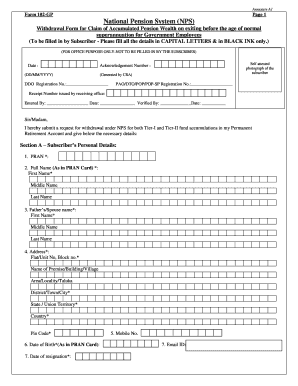
- Begin by filling in the personal details in Section A. Ensure you provide your Permanent Retirement Account Number (PRAN), full name as per the PRAN card, and your date of birth. Use capital letters and black ink only.
- Complete the address section with your current residential details, including area, town or city, and pin code. Double-check that all information is accurate.
- In Section B, specify the withdrawal details for your Tier-I account. Indicate the lump-sum amount you wish to withdraw and the amount for annuity purchase. Ensure the total adds up to 100%.
- Proceed to Section C to provide your bank details for electronic transfer. Attach a cancelled cheque or bank certificate confirming your account details.
- In Section D, enter the annuity details. Provide the name and scheme of the Annuity Service Provider (ASP), as well as any relevant ID numbers.
- Read and sign the declaration statement to confirm that the information provided is true. If required, affix your thumb impression.
- Fill out the nomination details carefully in the annexure section, ensuring that the relationship and details of nominees are correct. Don’t forget to sign and date this section.
- Finally, review your completed form for any errors, then save your changes. You can choose to download, print, or share the completed form as needed.
Take the next step and start filling out your documents online today.