Loading
Get Irs 941 2025-2026
How it works
-

Open form follow the instructions
-

Easily sign the form with your finger
-

Send filled & signed form or save
How to fill out the IRS 941 online
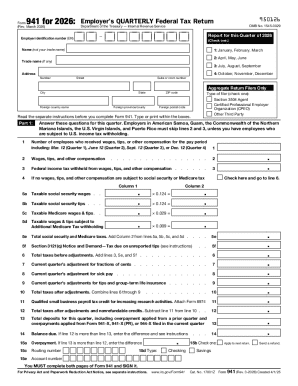
Filing Form 941, the Employer's Quarterly Federal Tax Return, is essential for reporting employment taxes. This guide provides clear, step-by-step instructions for completing the form online, ensuring you meet your obligations with confidence.
Follow the steps to complete your IRS 941 online.
- Click ‘Get Form’ button to obtain the form and open it in the editor.
- Enter your employer identification number (EIN) in the designated field. Ensure this number is correct to avoid delays or issues.
- Fill in the name of your business, not including your trade name, along with your trade name if applicable.
- Complete the address section, ensuring to include the street number, suite or room number (if applicable), city, state, ZIP code, and any relevant foreign specifics.
- In Part 1, answer the questions regarding the number of employees and total wages, tips, and other compensation for the quarter.
- Calculate the federal income tax withheld from the wages and enter this amount in the designated field.
- Provide the taxable social security wages and tips, as well as taxable Medicare wages and tips, in the appropriate boxes.
- Add up total social security and Medicare taxes, and include the current quarter’s adjustments for any fractions of cents, sick pay, or other relevant adjustments.
- In Section 11, note if the qualified small business payroll tax credit applies by attaching Form 8974.
- Check the box relevant to your deposit schedule and fill in the tax liability totals accordingly.
- In Part 3, provide information about your business, including any relevant closures or status changes.
- If applicable, authorize a third-party designee to discuss this return with the IRS by providing their name and contact details.
- Sign the form as required, ensuring all necessary declarations are made under penalties of perjury.
- Review the completed form for accuracy and save changes before downloading or printing.
Complete your IRS 941 form online today to ensure timely and accurate filing.
Select Reports, then search for the Tax and Wage Summary report. Next to Date Range select a quarter, then select Apply. Look for the totals under Federal Taxes (941/944) (Federal Withholding, Medicare Company, Medicare Employee, Social Security Company, and Social Security Employee taxes).