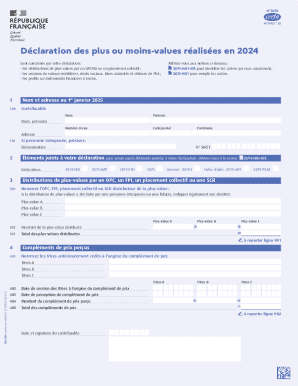
Les cessions de valeurs mobili res, droits sociaux, titres assimil s et cl tures de PEA ; les profits sur instruments financiers terme. 1 Nom et adresse au 1er janvier 2025 100 Contribuable R f rez-vous aux notices ci-dessous : 2074-NOT-BIS pour identifier les cadres qui vous concernent ; 2074-NOT pour remplir les cadres. Nom Pr nom Nom, pr noms Num ro et rue Adresse 110 Si personne interpos e, pr cisez: D nomination 2 Code.
Open form follow the instructions
Easily sign the form with your finger
Send filled & signed form or save
Tips on how to fill out, edit and sign FR 2074 online
How to edit FR 2074
Take full advantage of our comprehensive online document editor while preparing your forms. Fill out the FR 2074, indicate the most significant details, and effortlessly make any other essential adjustments to its content.
Preparing documentation electronically is not only time-saving but also comes with an opportunity to modify the template according to your needs. If you’re about to work on FR 2074, consider completing it with our robust online editing tools. Whether you make a typo or enter the requested data into the wrong field, you can easily make changes to the form without the need to restart it from the beginning as during manual fill-out. Aside from that, you can point out the crucial information in your paperwork by highlighting certain pieces of content with colors, underlining them, or circling them.
Follow these quick and simple actions to fill out and edit your FR 2074 online:
- Open the form in the editor.
- Type in the necessary information in the blank areas using Text, Check, and Cross tools.
- Follow the document navigation to avoid missing any required areas in the template.
- Circle some of the important details and add a URL to it if needed.
- Use the Highlight or Line tools to stress on the most significant pieces of content.
- Choose colors and thickness for these lines to make your sample look professional.
- Erase or blackout the data you don’t want to be visible to others.
- Replace pieces of content that contain mistakes and type in text that you need.
- Finish modifcations with the Done button after you make sure everything is correct in the document.
Our robust online solutions are the best way to complete and modify FR 2074 based on your requirements. Use it to manage personal or business documentation from anywhere. Open it in a browser, make any alterations in your documents, and return to them at any time in the future - they all will be securely kept in the cloud.
How to sign the PA BCO-10 form electronically
airSlate SignNow makes it easy to add a legally-binding electronic signature to your PA BCO-10 form from any device.
- Open the completed PA BCO-10 form in the editor.
- Click My Signature and choose your preferred signature type.
- Place the signature in the designated field and click Done.
- Download or send the signed document directly from the platform.
How to edit FR 2074
Take full advantage of our comprehensive online document editor while preparing your forms. Fill out the FR 2074, indicate the most significant details, and effortlessly make any other essential adjustments to its content.
Preparing documentation electronically is not only time-saving but also comes with an opportunity to modify the template according to your needs. If you’re about to work on FR 2074, consider completing it with our robust online editing tools. Whether you make a typo or enter the requested data into the wrong field, you can easily make changes to the form without the need to restart it from the beginning as during manual fill-out. Aside from that, you can point out the crucial information in your paperwork by highlighting certain pieces of content with colors, underlining them, or circling them.
Follow these quick and simple actions to fill out and edit your FR 2074 online:
- Open the form in the editor.
- Type in the necessary information in the blank areas using Text, Check, and Cross tools.
- Follow the document navigation to avoid missing any required areas in the template.
- Circle some of the important details and add a URL to it if needed.
- Use the Highlight or Line tools to stress on the most significant pieces of content.
- Choose colors and thickness for these lines to make your sample look professional.
- Erase or blackout the data you don’t want to be visible to others.
- Replace pieces of content that contain mistakes and type in text that you need.
- Finish modifcations with the Done button after you make sure everything is correct in the document.
Our robust online solutions are the best way to complete and modify FR 2074 based on your requirements. Use it to manage personal or business documentation from anywhere. Open it in a browser, make any alterations in your documents, and return to them at any time in the future - they all will be securely kept in the cloud.
Experience a faster way to fill out and sign forms on the web. Access the most extensive library of templates available.
Related content
Multiple documents found for the citation 88 FR 2074. Proposed Collection; Comment...
Free & Open Sources · Federal Digital System · Federal Register · Library of Congress...
Feb 26, 2023 — This is a tracking category that covers anniversary variants across...
Use professional pre-built templates to fill in and sign documents online faster. Get access to thousands of forms.
If you believe that this page should be taken down, please follow our DMCA take down process here.