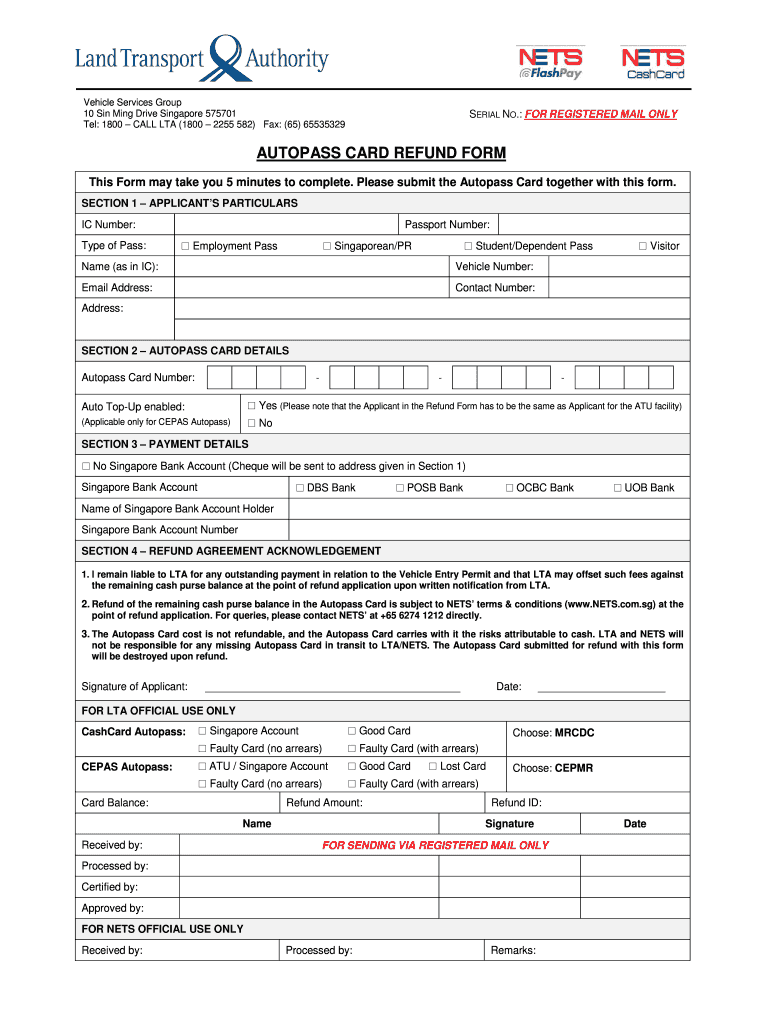
D MAIL ONLY Processed by: Certified by: Approved by: FOR NETS OFFICIAL USE ONLY Received by: Processed by: Remarks: Date .
Loading

Open form follow the instructions

Easily sign the form with your finger

Send filled & signed form or save
How to fill out the SG LTA Autopass Card Refund Form online
Filing for a refund of your SG LTA Autopass Card can be a straightforward process if you follow the right steps. This guide provides clear instructions to help you efficiently complete the Autopass Card Refund Form online.
Follow the steps to fill out the form accurately and efficiently.
- Press the ‘Get Form’ button to access the Autopass Card Refund Form and open it in your document editor.
- In Section 1, enter your particulars. Fill in your IC number, type of pass, passport number if applicable, name as in IC, vehicle number, email address, contact number, and address.
- Move to Section 2 for Autopass Card details. Provide your Autopass Card number and indicate whether Auto Top-Up is enabled by selecting 'Yes' or 'No'.
- Proceed to Section 3, where you will detail your payment information. Choose if you want the refund by cheque (if you have no Singapore bank account) or provide your Singapore bank account details including bank name and account number.
- In Section 4, read and acknowledge the refund agreement. You must sign and date the form to confirm your understanding and agreement with the terms.
- After completing all sections, review the information for accuracy. You can now save your changes, download the completed form, and print or share it as needed.
Complete your SG LTA Autopass Card Refund Form online today for a smooth refund process.
Experience a faster way to fill out and sign forms on the web. Access the most extensive library of templates available.
Related content
Refunds will be in the form of a direct transfer to credit card accounts or a Bank Cheque...
Get answers to your most pressing questions about US Legal Forms API.
Is autopass the same as CashCard?
The Autopass Card and CashCard serve different purposes in Singapore. The Autopass Card is primarily used for vehicle entry duties, while the CashCard can be used for electronic payments and parking fees. It's important to understand each card’s functionality to utilize them effectively.
How do I check the balance on my Singapore Autopass card?
You can check your Autopass Card balance conveniently at various locations, including kiosks and terminals set up for card services. Additionally, some service stations have the capability to check your balance upon request. Keeping track of your balance will help you ensure smooth usage on the roads.
Do I need to apply for VEP every time I enter Singapore?
You only need to apply for the Vehicle Entry Permit (VEP) once every month or for specific entries, depending on your vehicle type. It is not necessary to apply each time you enter Singapore. Remember that having an Autopass will ease your entry as it links directly to your VEP.
Where can I top up autopass in Singapore?
Topping up your Autopass Card is straightforward and can be done at various locations such as petrol stations, MRT stations, and AXS kiosks. Look for designated points that display the Autopass topping up services. With this easy access, you'll never find yourself without funds on your Autopass.
How to top up autopass using NETS App in Singapore?
To top up your Autopass using the NETS App, first ensure you have the app installed on your smartphone. Open the app, register or log in, and link your payment method. After selecting the option to top up your Autopass, follow the prompts to complete the transaction quickly and easily.
How to bring a car to Singapore?
Bringing a car to Singapore involves several steps. First, you must meet the import regulations set by the Singapore Land Transport Authority (LTA). You will need to submit the SG LTA Autopass Card Refund Form and obtain a Vehicle Entry Permit (VEP). Additionally, ensure your vehicle complies with local standards regarding emissions and safety.
Where can I top up my Touch N Go card in Singapore?
You can top up your Touch N Go card at several places, including convenience stores, kiosks, and designated topping-up stations. Additionally, some shopping malls may offer top-up services. Having access to the SG LTA Autopass Card Refund Form may assist you in managing your vehicle expenses effectively.
How do I check my autopass balance?
How to check Autopass Card Balance and Transaction History? NETS App (up to the last 30 transactions) NETS Top-Up Machines (up to the last 25 transactions) NETS Self-Service Stations. NETS Customers Service Centre. Singapore Bank ATMs (DBS/POSB/OCBC/UOB) (up to the last 10 transactions)
How to register for VEP in Singapore?
Download the Touch and Go App and link it to your Touch and Go card. Visit https://vep.jpj.gov.my and register your vehicle using same email as your Touch and Go App. You will receive a Confirmation Email. Try to print all documents that they send via email - you will need to bring this with you.
How much is VEP in Singapore?
Vehicles Entry Permit (VEP) Fees Waived for the first 10 days that you need to pay the VEP fees in each calendar year, then $35 a day that your car is in Singapore thereafter. You do not need to pay VEP fees: On Saturdays, Sundays and Singapore public holidays.
Use professional pre-built templates to fill in and sign documents online faster. Get access to thousands of forms.
If you believe that this page should be taken down, please follow our DMCA take down process here.