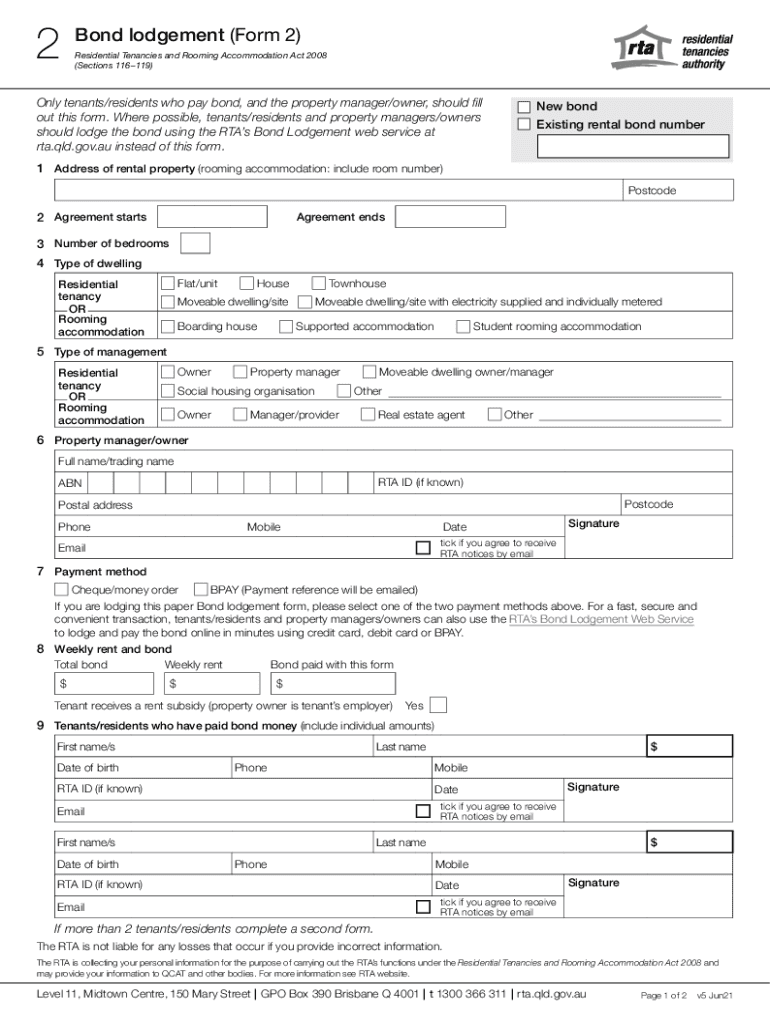
Er, should fill out this form. Where possible, tenants/residents and property managers/owners should lodge the bond using the RTA s Bond Lodgement web service at rta.qld.gov.au instead of this form. New bond Existing rental bond number 1 Address of rental property (rooming accommodation: include room number) Postcode 2 Agreement starts Agreement ends 3 Number of bedrooms 4 Type of dwelling Flat/unit Residential tenancy OR Rooming accommodation House Townhouse Moveable dwelling/site Bo.
Loading

Open form follow the instructions

Easily sign the form with your finger

Send filled & signed form or save
Tips on how to fill out, edit and sign AU QLD Bond Lodgement - Queensland online
How to edit AU QLD Bond Lodgement - Queensland
Doing papers is more comfortable with smart online instruments. Get rid of paperwork with easily downloadable AU QLD Bond Lodgement - Queensland templates you can edit online and print out.
Preparing papers and forms needs to be more accessible, whether it is a day-to-day element of one’s job or occasional work. When a person must file a AU QLD Bond Lodgement - Queensland, studying regulations and tutorials on how to complete a form properly and what it should include may take a lot of time and effort. Nevertheless, if you find the right AU QLD Bond Lodgement - Queensland template, finishing a document will stop being a struggle with a smart editor at hand.
Discover a wider range of features you can add to your document flow routine. No need to print out, complete, and annotate forms manually. With a smart modifying platform, all of the essential document processing features are always at hand. If you want to make your work process with AU QLD Bond Lodgement - Queensland forms more efficient, find the template in the catalog, click on it, and discover a less complicated method to fill it in.
- If you need to add text in a random part of the form or insert a text field, use the Text and Text field instruments and expand the text in the form as much as you need.
- Utilize the Highlight instrument to stress the main parts of the form. If you need to cover or remove some text pieces, use the Blackout or Erase instruments.
- Customize the form by adding default graphic elements to it. Use the Circle, Check, and Cross instruments to add these components to the forms, if possible.
- If you need additional annotations, use the Sticky note tool and place as many notes on the forms page as required.
- If the form needs your initials or date, the editor has instruments for that too. Minimize the possibility of errors using the Initials and Date instruments.
- It is also easy to add custom visual elements to the form. Use the Arrow, Line, and Draw instruments to change the file.
The more instruments you are familiar with, the easier it is to work with AU QLD Bond Lodgement - Queensland. Try the solution that offers everything essential to find and edit forms in one tab of your browser and forget about manual paperwork.
How to sign the PA BCO-10 form electronically
airSlate SignNow makes it easy to add a legally-binding electronic signature to your PA BCO-10 form from any device.
- Open the completed PA BCO-10 form in the editor.
- Click My Signature and choose your preferred signature type.
- Place the signature in the designated field and click Done.
- Download or send the signed document directly from the platform.
How to edit AU QLD Bond Lodgement - Queensland
Doing papers is more comfortable with smart online instruments. Get rid of paperwork with easily downloadable AU QLD Bond Lodgement - Queensland templates you can edit online and print out.
Preparing papers and forms needs to be more accessible, whether it is a day-to-day element of one’s job or occasional work. When a person must file a AU QLD Bond Lodgement - Queensland, studying regulations and tutorials on how to complete a form properly and what it should include may take a lot of time and effort. Nevertheless, if you find the right AU QLD Bond Lodgement - Queensland template, finishing a document will stop being a struggle with a smart editor at hand.
Discover a wider range of features you can add to your document flow routine. No need to print out, complete, and annotate forms manually. With a smart modifying platform, all of the essential document processing features are always at hand. If you want to make your work process with AU QLD Bond Lodgement - Queensland forms more efficient, find the template in the catalog, click on it, and discover a less complicated method to fill it in.
- If you need to add text in a random part of the form or insert a text field, use the Text and Text field instruments and expand the text in the form as much as you need.
- Utilize the Highlight instrument to stress the main parts of the form. If you need to cover or remove some text pieces, use the Blackout or Erase instruments.
- Customize the form by adding default graphic elements to it. Use the Circle, Check, and Cross instruments to add these components to the forms, if possible.
- If you need additional annotations, use the Sticky note tool and place as many notes on the forms page as required.
- If the form needs your initials or date, the editor has instruments for that too. Minimize the possibility of errors using the Initials and Date instruments.
- It is also easy to add custom visual elements to the form. Use the Arrow, Line, and Draw instruments to change the file.
The more instruments you are familiar with, the easier it is to work with AU QLD Bond Lodgement - Queensland. Try the solution that offers everything essential to find and edit forms in one tab of your browser and forget about manual paperwork.
Experience a faster way to fill out and sign forms on the web. Access the most extensive library of templates available.
Related content
... QUEENSLAND STATE: C3 ZIP: 4001 BUSINESS PHONE: 61738424600 MAIL ADDRESS: STREET 1:...
Stamp duty in Queensland is primarily based on the market value or purchase price of the...
This Annual Report is a summary of the operational activities during FY15 and the...
Use professional pre-built templates to fill in and sign documents online faster. Get access to thousands of forms.
If you believe that this page should be taken down, please follow our DMCA take down process here.