Loading
Get Sg Dbs Bank Rem-01 2003-2026
How it works
-

Open form follow the instructions
-

Easily sign the form with your finger
-

Send filled & signed form or save
How to fill out the SG DBS Bank REM-01 online
Filling out the SG DBS Bank REM-01 form for overseas remittances can be straightforward if you follow the right steps. This guide provides a comprehensive overview of each section of the form, ensuring you complete it accurately and efficiently.
Follow the steps to fill out the SG DBS Bank REM-01 form online.
- Click ‘Get Form’ button to obtain the form and open it in the editor.
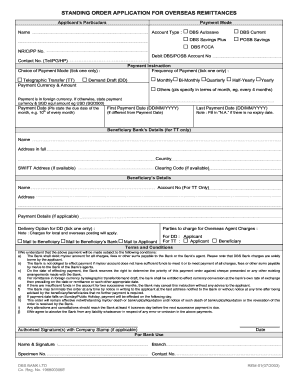
- Provide your personal information in the 'Applicant's Particulars' section. Fill in your name, NRIC or Passport Number, contact number, and the debit DBS/POSB account number you wish to use.
- Select your 'Account Type' from the options available: DBS Autosave, DBS Current, DBS Savings Plus, POSB Savings, or DBS FCCA.
- In the 'Payment Instruction' section, tick the frequency of payment that suits your needs, whether it be Monthly, Bi-Monthly, Quarterly, Half-Yearly, or Yearly. If you have a different preference, specify it.
- Choose between 'Telegraphic Transfer (TT)' or 'Demand Draft (DD)' under 'Choice of Payment Mode'. Enter the payment currency and amount, specifying foreign currency when applicable.
- Indicate the payment date along with the first payment date and last payment date in the required format (DD/MM/YYYY). If there is no expiry date for your instructions, simply write 'N.A.'.
- For telegraphic transfer, complete the 'Beneficiary Bank’s Details' section with the necessary information about the bank, including the SWIFT address if available.
- Fill in the beneficiary’s details, including their name, account number, and address.
- Select a delivery option for the demand draft, ticking either 'Mail to Beneficiary' or 'Mail to Beneficiary’s Bank', keeping in mind that charges may apply.
- Review the 'Terms and Conditions' and ensure you understand the implications of the payments you are authorizing.
- Finally, provide your authorized signature and company stamp (if applicable), and make sure to save your changes, download, print, or share the completed form as necessary.
Complete your SG DBS Bank REM-01 form online today and ensure your overseas remittances are processed smoothly.
To fill out a DBS cheque, begin by writing the date at the top right corner. Next, write the name of the recipient on the 'Payee' line, followed by the amount in numbers and words. Finally, sign the cheque at the bottom right corner, ensuring all information is clear and accurate to avoid any issues with processing.