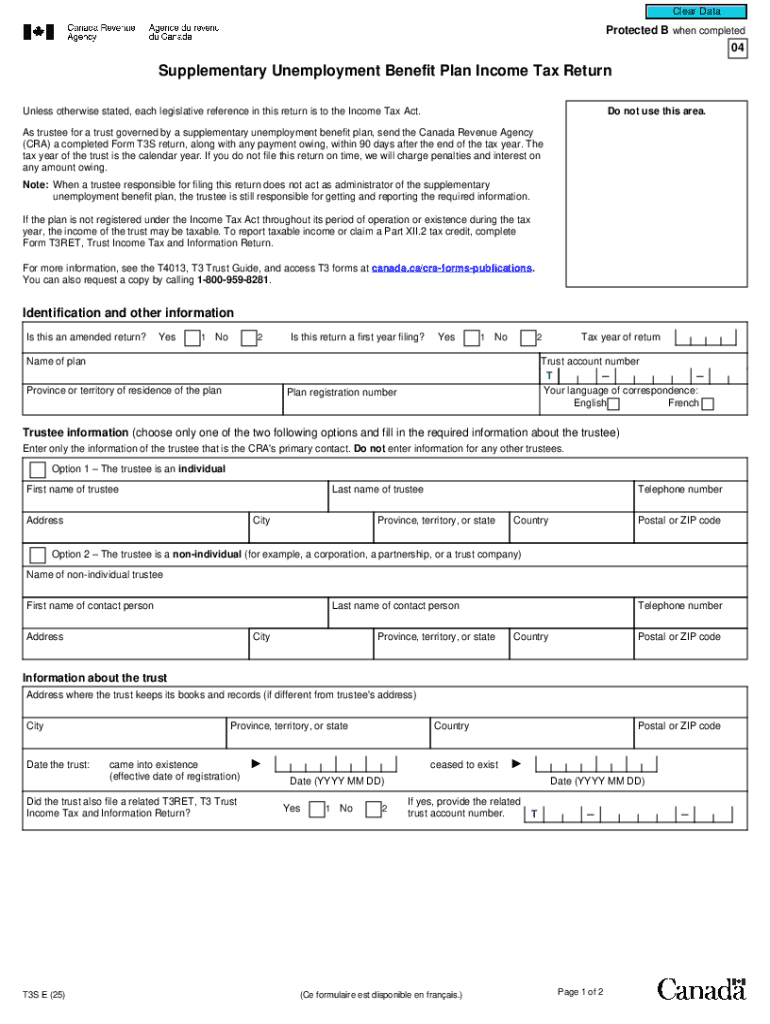
Income Tax Act. As trustee for a trust governed by a supplementary unemployment benefit plan, send the Canada Revenue Agency (CRA) a completed Form T3S return, along with any payment owing, within 90 days after the end of the tax year. The tax year of the trust is the calendar year. If you do not file this return on time, we will charge penalties and interest on any amount owing. Note: When a trustee responsible for filing this return does not act as administrator of the supplementary unemployme.
Loading

Open form follow the instructions

Easily sign the form with your finger

Send filled & signed form or save
Tips on how to fill out, edit and sign CA T3S online
How to edit CA T3S
Check out a single service to deal with all your paperwork easily. Find, edit, and finish your CA T3S in a single interface with the help of smart instruments.
The times when people needed to print forms or even write them by hand are over. Right now, all it takes to find and finish any form, like CA T3S, is opening just one browser tab. Here, you will find the CA T3S form and customize it any way you need, from inserting the text directly in the document to drawing it on a digital sticky note and attaching it to the document. Discover instruments that will simplify your paperwork without extra effort.
Just click the Get form button to prepare your CA T3S paperwork quickly and start modifying it instantly. In the editing mode, you can easily fill in the template with your information for submission. Simply click on the field you need to change and enter the data right away. The editor's interface does not need any specific skills to use it. When done with the edits, check the information's accuracy once more and sign the document. Click on the signature field and follow the instructions to eSign the form in a moment.
Use Additional instruments to customize your form:
- Use Cross, Check, or Circle instruments to pinpoint the document's data.
- Add text or fillable text fields with text customization tools.
- Erase, Highlight, or Blackout text blocks in the document using corresponding instruments.
- Add a date, initials, or even an image to the document if necessary.
- Use the Sticky note tool to annotate the form.
- Use the Arrow and Line, or Draw tool to add visual elements to your file.
Preparing CA T3S paperwork will never be confusing again if you know where to search for the suitable template and prepare it easily. Do not hesitate to try it yourself.
How to sign the PA BCO-10 form electronically
airSlate SignNow makes it easy to add a legally-binding electronic signature to your PA BCO-10 form from any device.
- Open the completed PA BCO-10 form in the editor.
- Click My Signature and choose your preferred signature type.
- Place the signature in the designated field and click Done.
- Download or send the signed document directly from the platform.
How to edit CA T3S
Check out a single service to deal with all your paperwork easily. Find, edit, and finish your CA T3S in a single interface with the help of smart instruments.
The times when people needed to print forms or even write them by hand are over. Right now, all it takes to find and finish any form, like CA T3S, is opening just one browser tab. Here, you will find the CA T3S form and customize it any way you need, from inserting the text directly in the document to drawing it on a digital sticky note and attaching it to the document. Discover instruments that will simplify your paperwork without extra effort.
Just click the Get form button to prepare your CA T3S paperwork quickly and start modifying it instantly. In the editing mode, you can easily fill in the template with your information for submission. Simply click on the field you need to change and enter the data right away. The editor's interface does not need any specific skills to use it. When done with the edits, check the information's accuracy once more and sign the document. Click on the signature field and follow the instructions to eSign the form in a moment.
Use Additional instruments to customize your form:
- Use Cross, Check, or Circle instruments to pinpoint the document's data.
- Add text or fillable text fields with text customization tools.
- Erase, Highlight, or Blackout text blocks in the document using corresponding instruments.
- Add a date, initials, or even an image to the document if necessary.
- Use the Sticky note tool to annotate the form.
- Use the Arrow and Line, or Draw tool to add visual elements to your file.
Preparing CA T3S paperwork will never be confusing again if you know where to search for the suitable template and prepare it easily. Do not hesitate to try it yourself.
Experience a faster way to fill out and sign forms on the web. Access the most extensive library of templates available.
Related content
by JS LoPresti · 1991 · Cited by 24 — The sulfated conjugate of T3 (T3S) has long been...
Map of Southern California in the region T3S to T5N and R9W to R29W, showing circles at...
Dec 8, 2025 — LNG Canada Terminal, also known as Shell British Columbia LNG Terminal, is...
Use professional pre-built templates to fill in and sign documents online faster. Get access to thousands of forms.
If you believe that this page should be taken down, please follow our DMCA take down process here.