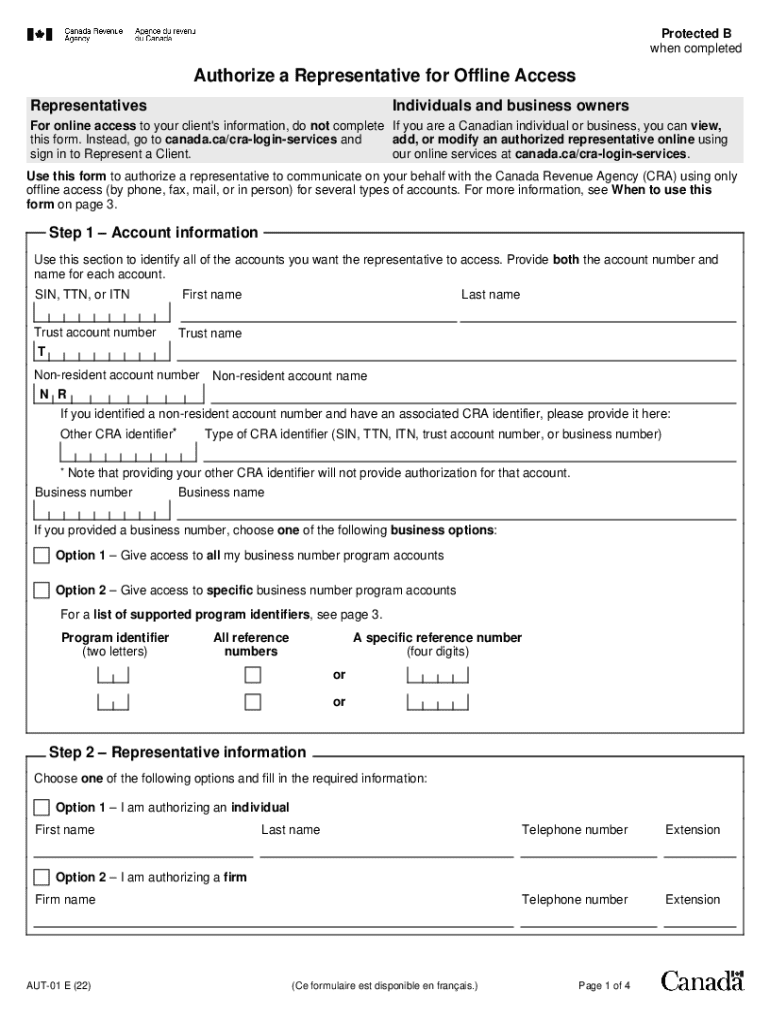
Are a Canadian individual or business, you can view, this form. Instead, go to canada.ca/cra-login-services and add, or modify an authorized representative online using sign in to Represent a Client. our online services at canada.ca/cra-login-services. Use this form to authorize a representative to communicate on your behalf with the Canada Revenue Agency (CRA) using only offline access (by phone, fax, mail, or in person) for several types of accounts. For more information, see When to use this.
Loading

Open form follow the instructions

Easily sign the form with your finger

Send filled & signed form or save
Tips on how to fill out, edit and sign CA AUT-01 online
How to edit CA AUT-01
Make the best use of our comprehensive online document editor while completing your paperwork. Complete the CA AUT-01, emphasize on the most important details, and easily make any other essential alterations to its content.
Completing documents electronically is not only time-saving but also gives a possibility to modify the sample according to your requirements. If you’re about to work on CA AUT-01, consider completing it with our comprehensive online editing solutions. Whether you make a typo or enter the requested data into the wrong field, you can quickly make changes to the form without the need to restart it from the beginning as during manual fill-out. Apart from that, you can point out the critical data in your paperwork by highlighting certain pieces of content with colors, underlining them, or circling them.
Follow these quick and simple steps to complete and edit your CA AUT-01 online:
- Open the form in the editor.
- Type in the necessary information in the empty areas using Text, Check, and Cross tools.
- Adhere to the document navigation not to miss any mandatory areas in the sample.
- Circle some of the important details and add a URL to it if necessary.
- Use the Highlight or Line tools to point out the most important facts.
- Choose colors and thickness for these lines to make your sample look professional.
- Erase or blackout the facts you don’t want to be visible to other people.
- Substitute pieces of content that contain errors and type in text that you need.
- End up editing with the Done key as soon as you make certain everything is correct in the document.
Our powerful online solutions are the most effective way to complete and customize CA AUT-01 according to your demands. Use it to prepare personal or business documents from anyplace. Open it in a browser, make any changes in your documents, and get back to them at any time in the future - they all will be securely kept in the cloud.
How to sign the PA BCO-10 form electronically
airSlate SignNow makes it easy to add a legally-binding electronic signature to your PA BCO-10 form from any device.
- Open the completed PA BCO-10 form in the editor.
- Click My Signature and choose your preferred signature type.
- Place the signature in the designated field and click Done.
- Download or send the signed document directly from the platform.
How to edit CA AUT-01
Make the best use of our comprehensive online document editor while completing your paperwork. Complete the CA AUT-01, emphasize on the most important details, and easily make any other essential alterations to its content.
Completing documents electronically is not only time-saving but also gives a possibility to modify the sample according to your requirements. If you’re about to work on CA AUT-01, consider completing it with our comprehensive online editing solutions. Whether you make a typo or enter the requested data into the wrong field, you can quickly make changes to the form without the need to restart it from the beginning as during manual fill-out. Apart from that, you can point out the critical data in your paperwork by highlighting certain pieces of content with colors, underlining them, or circling them.
Follow these quick and simple steps to complete and edit your CA AUT-01 online:
- Open the form in the editor.
- Type in the necessary information in the empty areas using Text, Check, and Cross tools.
- Adhere to the document navigation not to miss any mandatory areas in the sample.
- Circle some of the important details and add a URL to it if necessary.
- Use the Highlight or Line tools to point out the most important facts.
- Choose colors and thickness for these lines to make your sample look professional.
- Erase or blackout the facts you don’t want to be visible to other people.
- Substitute pieces of content that contain errors and type in text that you need.
- End up editing with the Done key as soon as you make certain everything is correct in the document.
Our powerful online solutions are the most effective way to complete and customize CA AUT-01 according to your demands. Use it to prepare personal or business documents from anyplace. Open it in a browser, make any changes in your documents, and get back to them at any time in the future - they all will be securely kept in the cloud.
Experience a faster way to fill out and sign forms on the web. Access the most extensive library of templates available.
Related content
This guide can help you compare policies and make informed decisions when you buy auto...
The Butte College Automotive Technology program is an ASE/NATEF certified school and is...
Jan 6, 2023 — A trusted CA is one whose root certificate is noted as trusted in the key...
Use professional pre-built templates to fill in and sign documents online faster. Get access to thousands of forms.
If you believe that this page should be taken down, please follow our DMCA take down process here.