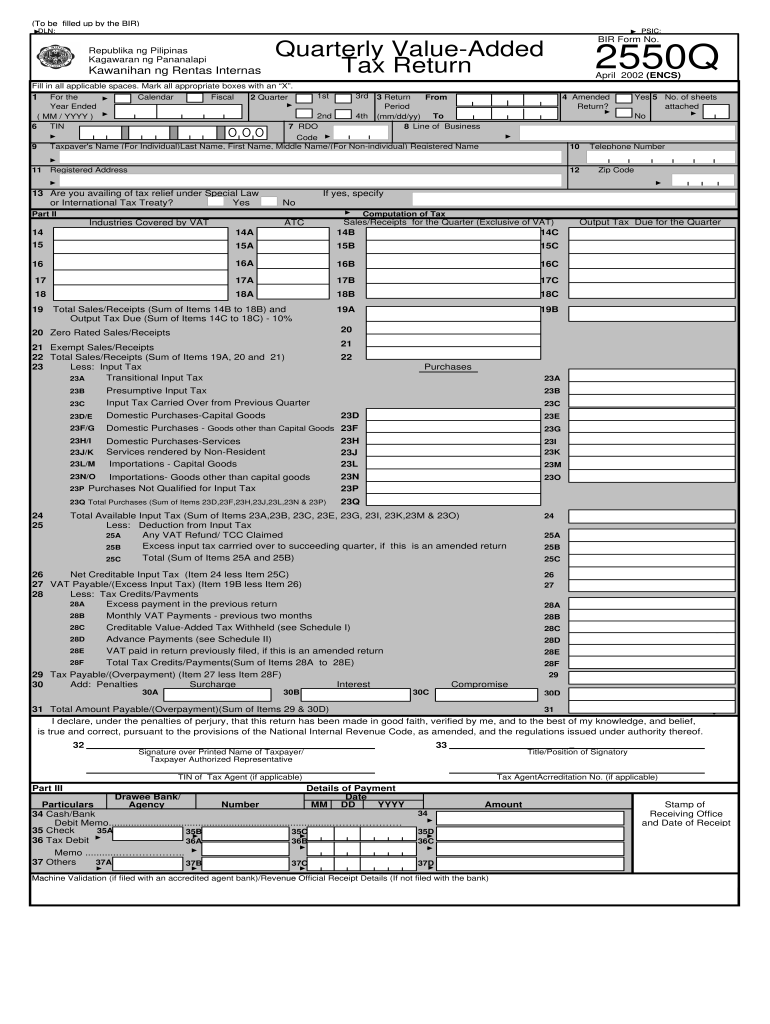
……………….. 37 Others 37A 37B 37D 37C Amount 34 Machine Validation (if filed with an accredited agent bank)/Revenue Official Receipt Details (If not filed with the bank) Stamp of Receiving Office and Date of Receipt Schedule 1 Period Covered BIR Form 2550Q - April, 2002 (ENCS) Page 2 Tax Withheld Claimed as Tax Credit (Attach additional sheets, if necessary) Name of Withholding Agent Income Payment Total Applied Tax Withheld Previous 2 Mos. Current Mo. Total (To Item 28C ) S.
Loading

Open form follow the instructions

Easily sign the form with your finger

Send filled & signed form or save
How to fill out the PH BIR 2550Q online
The PH BIR 2550Q is the quarterly value-added tax return that all VAT-registered individuals and entities must complete. This guide will provide a comprehensive overview of the form's components and step-by-step instructions for filling it out online.
Follow the steps to complete the PH BIR 2550Q efficiently.
- Click ‘Get Form’ button to access the PH BIR 2550Q online and open it for editing.
- Fill in the applicable spaces at the top of the form. Include your Taxpayer Identification Number (TIN), registered address, and the relevant quarter and year for which you are filing.
- Indicate whether this is an amended return by marking the appropriate box. Confirm if you are availing of tax relief under special law or international tax treaty by selecting 'Yes' or 'No'.
- Complete Part II, which includes calculating your sales/receipts for the quarter. Enter the total sales excluding VAT in the corresponding fields under the computation of tax.
- Calculate the output tax due by summing your total sales and multiplying it by the applicable tax rate. Report the output tax in the correct fields.
- Document any zero-rated sales or exempt sales received during the quarter, if applicable. Input this information accurately.
- Proceed to calculate your total purchases and allowable input tax. Complete the necessary fields to report your purchases and input VAT accordingly.
- Sum your total tax credits and deductions. Make sure all calculations add up to reflect your net VAT payable.
- Finish by reviewing the declaration section of the form. Sign and provide your printed name, and include any required information about your authorized representative if applicable.
- Once completed, save your changes. You can then download, print, or share the PH BIR 2550Q for your records or submission.
Complete your tax documents online efficiently to ensure compliance and streamline your filing process.
Experience a faster way to fill out and sign forms on the web. Access the most extensive library of templates available.
Related content
... P H "T ,@ W #L 0 !% $H 3P!4 M %D 7@!C &@ ;0!R '< ? "! (8 BP"0 )4 F@"? *0 J0...
Dec 18, 2018 — 15, Exhibit "56", RHC' 5 2nd Quarter Value Added Tax ("V AT") Return...
Get answers to your most pressing questions about US Legal Forms API.
How to claim VAT refund in the Philippines?
To claim a VAT refund in the Philippines, you must first prepare the necessary documents, including the VAT 2550Q demonstrating your eligible input VAT. Then, submit these documents to the BIR along with a refund application. The process can be intricate, so utilizing resources from platforms like US Legal Forms can simplify the submission and help you track your refund efficiently.
Can I file my VAT return myself?
Yes, you can file your VAT return yourself. With the right knowledge about your business transactions and the use of the VAT 2550Q form, you can complete the process without hiring an expert. However, many find it beneficial to use platforms like US Legal Forms to help guide them through the filing process, ensuring accuracy and compliance.
When to file VAT return in the Philippines?
In the Philippines, the due date for filing the VAT return, specifically the 2550Q, is on or before the 25th of the month following the end of a quarter. For example, for transactions from January to March, you must file by April 25. Staying on schedule is essential to ensure compliance with tax rules and avoid fines.
How do I file my PH tax online?
Filing your PH tax online involves registering for the BIR’s eFPS or eBIRForms system, where you can complete necessary forms like the VAT 2550Q. After registering, log in to the system and fill out your tax forms electronically. Review your entries for accuracy before submitting them to ensure compliance with tax regulations. Online filing saves you time and reduces paperwork.
How to file VAT 2550Q?
To file VAT 2550Q, you need to obtain the official form from the Bureau of Internal Revenue (BIR) in the Philippines. Complete the form with accurate financial information related to your business’s sales and purchases. Once filled, you can submit it either manually at your local BIR office or electronically through the BIR's e-filing system. Utilizing platforms like US Legal Forms can help simplify this process.
When should VAT be filed?
You should file your VAT quarterly, specifically on or before the 25th day of the month following the end of each quarter. Filing your VAT in a timely manner allows you to avoid interest and penalties. Utilizing the PH BIR 2550Q effectively ensures you meet all necessary tax obligations without any hassles.
When should VAT returns be submitted?
VAT returns in the Philippines must be submitted on a quarterly basis. Each return is due on the 25th of the month following the end of each quarter. It’s essential to keep track of these deadlines to avoid penalties and fines associated with late submissions of the PH BIR 2550Q.
What is the threshold for VAT in the Philippines?
In the Philippines, the threshold for VAT registration is currently set at 3 million pesos in gross sales or receipts in a 12-month period. Businesses that exceed this amount must register for VAT and file the PH BIR 2550Q. Staying informed about these thresholds helps you manage your tax obligations effectively.
Who is exempted from VAT in the Philippines?
Certain individuals and businesses in the Philippines may be exempt from VAT, including those whose gross sales do not exceed the threshold set by the Bureau of Internal Revenue. Additionally, specific types of transactions, such as export sales and certain agricultural products, may also be exempt. Understanding your VAT status is crucial to ensure proper filing of the PH BIR 2550Q.
Who should file quarterly taxes in the Philippines?
Businesses engaged in the sale of goods or services are generally required to file quarterly taxes in the Philippines. This includes individual entrepreneurs, corporations, and partnerships that meet the VAT registration thresholds. By filing the PH BIR 2550Q, you contribute to the government’s revenue, aiding national development.
Use professional pre-built templates to fill in and sign documents online faster. Get access to thousands of forms.
If you believe that this page should be taken down, please follow our DMCA take down process here.