Loading
Form preview
  • US Legal Forms
  • Form Library
  • Foreign Forms
  • Foreign Philippines Other Forms
  • Philippine Airlines Tarf 2015

Get Philippine Airlines Tarf 2015-2026

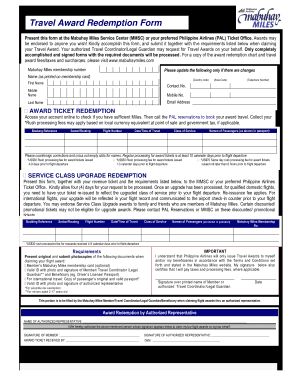
accomplish this form, and submit it together with th e requirements listed below when claiming your Travel Award. Your authorized Travel Coordinator/Legal Guardian may request for Travel Awards on your behalf. Only completely accomplished and signed forms with the required documents will be processed. For a copy of the award redemption chart and travel award fees/taxes and surcharges, please visit www.mabuhaymiles.com Mabuhay Miles membership number Please update the following only if there ar.

How it works

  1. Open form

    Open form follow the instructions

  2. Easily sign form

    Easily sign the form with your finger

  3. Share form

    Send filled & signed form or save

How to fill out the Philippine Airlines TARF online

The Philippine Airlines Travel Award Redemption Form (TARF) is essential for claiming travel awards through the Mabuhay Miles program. This guide will walk you through each section of the form to ensure you complete it accurately and efficiently.

Follow the steps to successfully complete the TARF online.

  1. Press the ‘Get Form’ button to acquire the Travel Award Redemption Form and open it in your preferred editor.
  2. Enter your Mabuhay Miles membership number, ensuring it matches the number on your membership card.
  3. If there have been any changes, update your name as printed on the membership card, including your first, middle, and last names.
  4. Fill in your contact details, including your country code, telephone number, mobile number, and email address. Accuracy is important for communication.
  5. Proceed to the Award Ticket Redemption section. Confirm your account online to check your available Miles, then contact PAL reservations to book your award travel.
  6. Fill in the booking reference, sector/routing, flight number, date and time of travel, class of service, and names of passengers as they appear in their passports.
  7. If you have made corrections, countersign them and cross out any empty name slots to ensure clarity.
  8. Review the rush processing fees applicable to your award ticket, which vary based on how soon before the flight you request the ticket.
  9. For service class upgrades, present your revenue ticket alongside the completed form to the MMSC or your preferred PAL Ticket Office, allowing at least four days for processing.
  10. Complete the requirements section by acknowledging which documents are necessary for your award claim, and ensure you gather the originals and photocopies as specified.
  11. Lastly, sign the form over your printed name and date it. If claiming through an authorized representative, complete the respective sections with the representative’s information and signature.
  12. Once you have filled out the form completely, you can save changes, download a copy, print it, or share it as needed.

Start completing your documents online today to claim your travel awards!

Get form

Experience a faster way to fill out and sign forms on the web. Access the most extensive library of templates available.
Get form

Related content

TRADE AGREEMENTS ACT OF 1979 HEARINGS
(Switzerland Airlines) stated that in their decision to purchase aircraft, if all things...
Learn more
Delta Worldwide Timetable April 2, 2000 - Digital...
This is the Delta Worldwide Timetable from April 2, 2000, created by Delta Air Lines, Inc...
Learn more
gulf war - NamuWiki
Sep 18, 2025 — Gulf means a bay of the sea .[9] The name of the area where the war took...
Learn more

Related links form

Ica Syllabus 2020 Majestacare 30 Hour Tower Crane Safety Course Form Nurse Aide Handbook Form

Questions & Answers

Get answers to your most pressing questions about US Legal Forms API.

Contact support

To determine if a ticket from Philippine Airlines TARF includes travel tax, check the fare breakdown during the booking process. This information is usually detailed on the final payment page. If you are uncertain, contacting Philippine Airlines customer support can clarify any questions regarding taxes and fees associated with your ticket.

Yes, the travel tax is included in Philippine Airlines TARF tickets for international flights departing from the Philippines. This tax is collected to support the country's tourism initiatives and infrastructure. Always check the breakdown of your ticket during the booking process to confirm the inclusion of travel taxes.

Philippine Airlines TARF has specific baggage allowance policies depending on the booked fare class and destination. Generally, economy class passengers can check in a certain number of kilos without additional charges. It's best to review the baggage policy on the Philippine Airlines website or through customer support to avoid any surprises at the airport.

To determine if travel tax is included in your ticket for a Philippine Airlines TARF flight, review the breakdown of charges during the booking process. The total fare display usually clarifies taxes and fees separately. For any uncertainties, contacting Philippine Airlines support can provide your needed clarification.

Travel tax is typically not included in Philippine Airlines TARF tickets. Travelers should verify this information when purchasing their tickets. To ensure a smooth travel experience, you can prepare in advance by checking the current travel tax rates and regulations.

PAL Mabuhay Miles is a frequent flyer program that rewards travelers for flying with Philippine Airlines and its partners. As you travel, you earn miles that can be redeemed for flights, upgrades, and other perks. It's essential to keep track of your miles and stay informed about redemption options to maximize the benefits of your travels.

Yes, you can use your Mabuhay Miles to book a flight for someone else. When booking, simply input the passenger's details instead of your own. This allows you to share the benefits of your accumulated miles while helping friends or family enjoy travel with Philippine Airlines.

Achieving elite status with Philippine Airlines requires earning a specific number of qualifying miles or segments. Focus on flying with PAL or its partner airlines, and check the criteria for the elite tiers. Once you meet the requirements, your elite status will be automatically updated in your Mabuhay Miles account.

Using Mabuhay Miles for flights is simple and rewarding. Log in to your Philippine Airlines account, navigate to the flight booking option, and select the 'Use Mabuhay Miles' feature. Make sure to review the required miles for your desired route, and complete your booking by following the on-screen instructions.

If you discover missing miles on your Philippine Airlines account, you can initiate a claim through their website. Look for the missing miles claim form under the Mabuhay Miles section, fill it out with the required details, and submit it. The airline will investigate the issue and credit the miles to your account if the claim is valid.

Get This Form Now!

Use professional pre-built templates to fill in and sign documents online faster. Get access to thousands of forms.
Get form
If you believe that this page should be taken down, please follow our DMCA take down processhere.

Industry-leading security and compliance

US Legal Forms protects your data by complying with industry-specific security standards.
  • In businnes since 1997
    25+ years providing professional legal documents.
  • Accredited business
    Guarantees that a business meets BBB accreditation standards in the US and Canada.
  • Secured by Braintree
    Validated Level 1 PCI DSS compliant payment gateway that accepts most major credit and debit card brands from across the globe.
Get Philippine Airlines TARF
Get form
  • Adoption
  • Bankruptcy
  • Contractors
  • Divorce
  • Home Sales
  • Employment
  • Identity Theft
  • Incorporation
  • Landlord Tenant
  • Living Trust
  • Name Change
  • Personal Planning
  • Small Business
  • Wills & Estates
  • Packages A-Z
  • Affidavits
  • Bankruptcy
  • Bill of Sale
  • Corporate - LLC
  • Divorce
  • Employment
  • Identity Theft
  • Internet Technology
  • Landlord Tenant
  • Living Wills
  • Name Change
  • Power of Attorney
  • Real Estate
  • Small Estates
  • Wills
  • All Forms
  • Forms A-Z
  • Form Library
  • Legal Hub
  • About Us
  • Help Portal
  • Legal Resources
  • Blog
  • Affiliates
  • Contact Us
  • Delete My Account
  • Site Map
  • Industries
  • Forms in Spanish
  • Localized Forms
  • State-specific Forms
  • Forms Kit
  • Real Estate Handbook
  • All Guides
  • Notarize
  • Incorporation services
  • For Consumers
  • For Small Business
  • For Attorneys
  • USLegal
  • FormsPass
  • pdfFiller
  • signNow
  • altaFlow
  • DocHub
  • Instapage
Form Packages
  • Adoption
  • Bankruptcy
  • Contractors
  • Divorce
  • Home Sales
  • Employment
  • Identity Theft
  • Incorporation
  • Landlord Tenant
  • Living Trust
  • Name Change
  • Personal Planning
  • Small Business
  • Wills & Estates
  • Packages A-Z
Form Categories
  • Affidavits
  • Bankruptcy
  • Bill of Sale
  • Corporate - LLC
  • Divorce
  • Employment
  • Identity Theft
  • Internet Technology
  • Landlord Tenant
  • Living Wills
  • Name Change
  • Power of Attorney
  • Real Estate
  • Small Estates
  • Wills
  • All Forms
  • Forms A-Z
  • Form Library
Customer Service
  • Legal Hub
  • About Us
  • Help Portal
  • Legal Resources
  • Blog
  • Affiliates
  • Contact Us
  • Delete My Account
  • Site Map
  • Industries
  • Forms in Spanish
  • Localized Forms
  • State-specific Forms
  • Forms Kit
Legal Guides
  • Real Estate Handbook
  • All Guides
Prepared for you
  • Notarize
  • Incorporation services
Our Customers
  • For Consumers
  • For Small Business
  • For Attorneys
Our Sites
  • USLegal
  • FormsPass
  • pdfFiller
  • signNow
  • altaFlow
  • DocHub
  • Instapage
Social Media
Call us now toll free:
+1 833 426 79 33
As seen in:
© Copyright 1999-2026 airSlate Legal Forms, Inc. 3720 Flowood Dr, Flowood, Mississippi 39232
  • Your Privacy Choices
  • Terms of Service
  • Privacy Notice
  • Content Takedown Policy
  • Bug Bounty Program