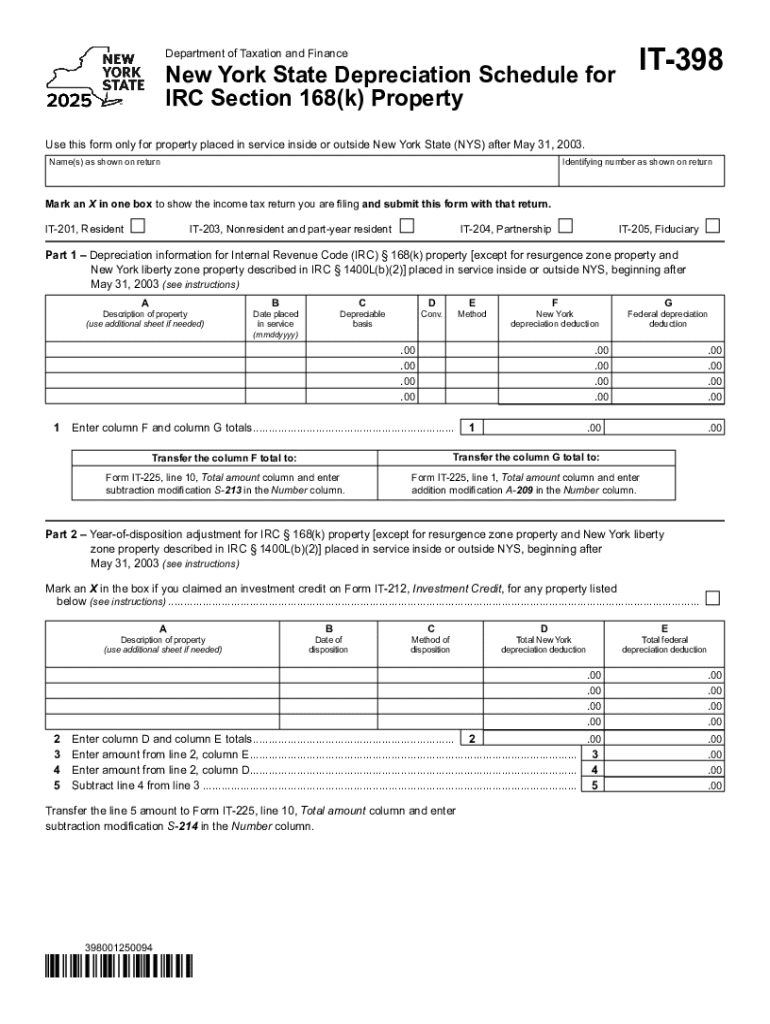
E (NYS) after May 31, 2003. Name(s) as shown on return Identifying number as shown on return Mark an X in one box to show the income tax return you are filing and submit this form with that return. IT-201, Resident IT-203, Nonresident and part-year resident IT-204, Partnership IT-205, Fiduciary Part 1 Depreciation information for Internal Revenue Code (IRC) 168(k) property except for resurgence zone property and New York liberty zone property described in IRC 1400L(b)(2) placed.
Loading

Open form follow the instructions

Easily sign the form with your finger

Send filled & signed form or save
Tips on how to fill out, edit and sign New York State Depreciation Schedule For IT-398 online
How to edit New York State Depreciation Schedule For IT-398
Check out a single service to manage all of your paperwork effortlessly. Find, modify, and finish your New York State Depreciation Schedule For IT-398 in a single interface with the help of smart tools.
The times when people had to print forms or even write them by hand are gone. Nowadays, all it takes to get and finish any form, like New York State Depreciation Schedule For IT-398, is opening a single browser tab. Here, you can find the New York State Depreciation Schedule For IT-398 form and customize it any way you need, from inserting the text directly in the document to drawing it on a digital sticky note and attaching it to the document. Discover tools that will simplify your paperwork without additional effort.
Click the Get form button to prepare your New York State Depreciation Schedule For IT-398 paperwork easily and start editing it instantly. In the editing mode, you can easily complete the template with your information for submission. Just click on the field you need to modify and enter the information right away. The editor's interface does not demand any specific skills to use it. When finished with the edits, check the information's accuracy once more and sign the document. Click on the signature field and follow the instructions to eSign the form in a moment.
Use Additional tools to customize your form:
- Use Cross, Check, or Circle tools to pinpoint the document's data.
- Add textual content or fillable text fields with text customization tools.
- Erase, Highlight, or Blackout text blocks in the document using corresponding tools.
- Add a date, initials, or even an image to the document if necessary.
- Make use of the Sticky note tool to annotate the form.
- Use the Arrow and Line, or Draw tool to add graphic elements to your file.
Preparing New York State Depreciation Schedule For IT-398 forms will never be perplexing again if you know where to look for the suitable template and prepare it easily. Do not hesitate to try it yourself.
How to sign the PA BCO-10 form electronically
airSlate SignNow makes it easy to add a legally-binding electronic signature to your PA BCO-10 form from any device.
- Open the completed PA BCO-10 form in the editor.
- Click My Signature and choose your preferred signature type.
- Place the signature in the designated field and click Done.
- Download or send the signed document directly from the platform.
How to edit New York State Depreciation Schedule For IT-398
Check out a single service to manage all of your paperwork effortlessly. Find, modify, and finish your New York State Depreciation Schedule For IT-398 in a single interface with the help of smart tools.
The times when people had to print forms or even write them by hand are gone. Nowadays, all it takes to get and finish any form, like New York State Depreciation Schedule For IT-398, is opening a single browser tab. Here, you can find the New York State Depreciation Schedule For IT-398 form and customize it any way you need, from inserting the text directly in the document to drawing it on a digital sticky note and attaching it to the document. Discover tools that will simplify your paperwork without additional effort.
Click the Get form button to prepare your New York State Depreciation Schedule For IT-398 paperwork easily and start editing it instantly. In the editing mode, you can easily complete the template with your information for submission. Just click on the field you need to modify and enter the information right away. The editor's interface does not demand any specific skills to use it. When finished with the edits, check the information's accuracy once more and sign the document. Click on the signature field and follow the instructions to eSign the form in a moment.
Use Additional tools to customize your form:
- Use Cross, Check, or Circle tools to pinpoint the document's data.
- Add textual content or fillable text fields with text customization tools.
- Erase, Highlight, or Blackout text blocks in the document using corresponding tools.
- Add a date, initials, or even an image to the document if necessary.
- Make use of the Sticky note tool to annotate the form.
- Use the Arrow and Line, or Draw tool to add graphic elements to your file.
Preparing New York State Depreciation Schedule For IT-398 forms will never be perplexing again if you know where to look for the suitable template and prepare it easily. Do not hesitate to try it yourself.
Experience a faster way to fill out and sign forms on the web. Access the most extensive library of templates available.
Related content
New York State Depreciation Schedule for. IRC Section 168(k) Property. IT-398. Name(s) as...
Oct 1, 2009 — The standard deductions and exemptions for 2009, based on tax status, are...
398. $. 399. Fair value. $. 1,391. $. 1,268. Note 12. Depreciation, Amortization and...
Get answers to your most pressing questions about US Legal Forms API.
How to fill out a depreciation schedule?
Filling out a depreciation schedule involves listing your assets, determining their useful lives, and calculating annual depreciation. Start by gathering all necessary documentation and refer to the New York State Depreciation Schedule For IT-398 for guidance. For added convenience, consider using templates available through US Legal Forms to ensure accuracy and compliance.
Does NYC allow section 179?
Yes, New York City allows Section 179 deductions, which can significantly benefit businesses. However, the amount you can deduct may differ from federal limits. When you prepare your New York State Depreciation Schedule For IT-398, ensure you account for any local regulations. Utilizing resources like US Legal Forms can provide clarity and assistance.
Does New York State follow the Federal Tax Treaty?
New York State does not fully follow the Federal Tax Treaty, which can impact how you report depreciation. Certain deductions and credits may vary, so it is important to be aware of these differences. The New York State Depreciation Schedule For IT-398 outlines specific requirements to help you navigate these rules. Always refer to state guidelines for accurate reporting.
Does New York follow federal bonus depreciation?
New York does not allow federal bonus depreciation for state tax purposes. This means that while you may claim bonus depreciation on your federal return, you will need to make adjustments on your New York State Depreciation Schedule For IT-398. Understanding this distinction is crucial to avoid errors in your tax filings.
Which states do not follow the Federal Tax Treaty?
Several states do not adhere to the Federal Tax Treaty, leading to different tax treatment for depreciation. States like New Jersey and Ohio have specific rules that diverge from federal guidelines. Understanding these differences is essential when preparing your New York State Depreciation Schedule For IT-398. Always research state-specific regulations to ensure compliance.
Does New York follow federal depreciation?
Yes, New York generally follows federal depreciation rules, but there are exceptions. For instance, certain deductions may differ at the state level. It is crucial to refer to the New York State Depreciation Schedule For IT-398 for specific state-related adjustments. Consulting with a tax professional can also clarify any uncertainties.
Can I do my own depreciation schedule?
Yes, you can create your own depreciation schedule. However, it is important to understand the specific rules and calculations involved. The New York State Depreciation Schedule For IT-398 provides clear guidelines to help you accurately fill out your schedule. If you need assistance, consider using platforms like US Legal Forms for reliable templates.
Is Form 4562 a depreciation schedule?
Form 4562 is used to report depreciation and amortization, but it is not a complete depreciation schedule itself. It serves as a tool for reporting your depreciation deductions, including those outlined in the New York State Depreciation Schedule For IT-398. Ensure you understand how to use this form to maximize your tax benefits.
How do I do a depreciation schedule?
To create a depreciation schedule, start by listing all your assets along with their acquisition costs and useful lives. Then, apply the relevant depreciation method, as outlined in the New York State Depreciation Schedule For IT-398. If you need guidance, uslegalforms offers resources to help you construct an accurate schedule.
Where can I get a depreciation schedule?
A depreciation schedule can be acquired online or through professional tax services. Websites offering tax forms often have the New York State Depreciation Schedule For IT-398 readily available. Utilizing uslegalforms can simplify this process by providing easy access to these necessary documents.
Use professional pre-built templates to fill in and sign documents online faster. Get access to thousands of forms.
If you believe that this page should be taken down, please follow our DMCA take down process here.