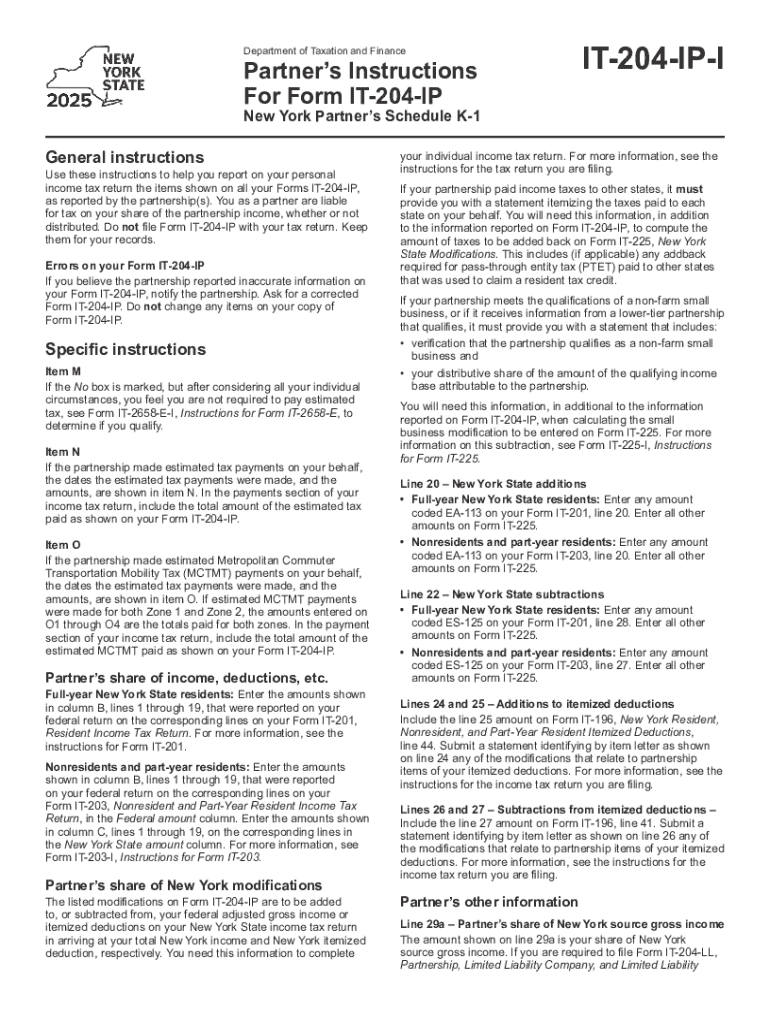
Department of Taxation and FinancePartners Instructions For Form IT204IPIT204IPINew York Partners Schedule K1General instructionsUse these instructions to help you report on your personal income tax.
Loading

Open form follow the instructions

Easily sign the form with your finger

Send filled & signed form or save
Tips on how to fill out, edit and sign Partner's Instructions For Form IT-204-IP - Tax.NY.gov online
How to edit Partner's Instructions For Form IT-204-IP - Tax.NY.gov
Facilitate your document preparation process and adapt it to your demands within clicks. Fill out and sign Partner's Instructions For Form IT-204-IP - Tax.NY.gov using a robust yet intuitive online editor.
Managing paperwork is always burdensome, especially when you deal with it from time to time. It demands you strictly follow all the formalities and precisely fill out all fields with full and precise information. However, it often occurs that you need to modify the document or insert extra fields to fill out. If you need to improve Partner's Instructions For Form IT-204-IP - Tax.NY.gov prior to submitting it, the most effective way to do it is by using our robust yet easy-to-use online editing tools.
This comprehensive PDF editing tool allows you to quickly and easily complete legal paperwork from any internet-connected device, make simple changes to the template, and add more fillable fields. The service allows you to pick a specific area for each data type, like Name, Signature, Currency and SSN and so on. You can make them required or conditional and decide who should complete each field by assigning them to a defined recipient.
Make the steps listed below to optimize your Partner's Instructions For Form IT-204-IP - Tax.NY.gov online:
- Open needed sample from the catalog.
- Fill out the blanks with Text and place Check and Cross tools to the tickboxes.
- Utilize the right-side panel to adjust the form with new fillable areas.
- Choose the fields depending on the type of data you want to be collected.
- Make these fields required, optional, and conditional and customize their order.
- Assign each field to a specific party with the Add Signer tool.
- Verify that you’ve made all the required modifications and click Done.
Our editor is a universal multi-featured online solution that can help you easily and quickly optimize Partner's Instructions For Form IT-204-IP - Tax.NY.gov and other templates according to your requirements. Optimize document preparation and submission time and make your forms look professional without hassle.
How to sign the PA BCO-10 form electronically
airSlate SignNow makes it easy to add a legally-binding electronic signature to your PA BCO-10 form from any device.
- Open the completed PA BCO-10 form in the editor.
- Click My Signature and choose your preferred signature type.
- Place the signature in the designated field and click Done.
- Download or send the signed document directly from the platform.
How to edit Partner's Instructions For Form IT-204-IP - Tax.NY.gov
Facilitate your document preparation process and adapt it to your demands within clicks. Fill out and sign Partner's Instructions For Form IT-204-IP - Tax.NY.gov using a robust yet intuitive online editor.
Managing paperwork is always burdensome, especially when you deal with it from time to time. It demands you strictly follow all the formalities and precisely fill out all fields with full and precise information. However, it often occurs that you need to modify the document or insert extra fields to fill out. If you need to improve Partner's Instructions For Form IT-204-IP - Tax.NY.gov prior to submitting it, the most effective way to do it is by using our robust yet easy-to-use online editing tools.
This comprehensive PDF editing tool allows you to quickly and easily complete legal paperwork from any internet-connected device, make simple changes to the template, and add more fillable fields. The service allows you to pick a specific area for each data type, like Name, Signature, Currency and SSN and so on. You can make them required or conditional and decide who should complete each field by assigning them to a defined recipient.
Make the steps listed below to optimize your Partner's Instructions For Form IT-204-IP - Tax.NY.gov online:
- Open needed sample from the catalog.
- Fill out the blanks with Text and place Check and Cross tools to the tickboxes.
- Utilize the right-side panel to adjust the form with new fillable areas.
- Choose the fields depending on the type of data you want to be collected.
- Make these fields required, optional, and conditional and customize their order.
- Assign each field to a specific party with the Add Signer tool.
- Verify that you’ve made all the required modifications and click Done.
Our editor is a universal multi-featured online solution that can help you easily and quickly optimize Partner's Instructions For Form IT-204-IP - Tax.NY.gov and other templates according to your requirements. Optimize document preparation and submission time and make your forms look professional without hassle.
Experience a faster way to fill out and sign forms on the web. Access the most extensive library of templates available.
Related content
... FORM TYPE: N-CSR SEC ACT: 1940 Act SEC FILE NUMBER: 811-04704 FILM NUMBER: 181046715...
With the development of service marketing concepts comes the need to test theory against...
Get answers to your most pressing questions about US Legal Forms API.
Who must file a NY partnership return?
Any partnership with business activities in New York or earning income from New York sources must file a NY partnership return. This includes both local and out-of-state partnerships with New York-based partners. For further details, please refer to the Partner's Instructions For Form IT-204-IP - Tax.NY.
What is form IT-204 partnership return?
Form IT-204 is a tax return specifically designed for partnerships in New York. It reports the income, deductions, and credits of the partnership. For comprehensive guidance on the form, you should consult the Partner's Instructions For Form IT-204-IP - Tax.NY.
Who is required to file a partnership return?
A partnership is required to file a return if it has any income, deductions, or credits to report. This includes situations where a partnership is created in New York or operates a business there. For specific instructions, check out the Partner's Instructions For Form IT-204-IP - Tax.NY.
Who must file a New York partnership return?
All partnerships that operate in New York, generate income, or have any partners who are residents of New York must file a New York partnership return. This requirement applies regardless of income level. For filing guidelines, refer to the Partner's Instructions For Form IT-204-IP - Tax.NY.
Does a partnership have to file a return if there is no activity?
Yes, even if a partnership has no business activity, it is still required to file a return unless it has been specifically dissolved. Filing maintains compliance and keeps the partnership in good standing. For more information on filing requirements, see the Partner's Instructions For Form IT-204-IP - Tax.NY.
Who must file NYC 204?
The NYC 204 form must be filed by partnerships that conduct business in New York City and have income from New York City sources. Additionally, partnerships with partners who reside in the city are also required to file. For more comprehensive details, refer to the Partner's Instructions For Form IT-204-IP - Tax.NY.
Who needs to file a NY return?
Any partnership doing business in New York, earning income from New York sources, or having partners who are New York residents must file a New York return. This includes both domestic and foreign partnerships. To ensure you meet all requirements, check the Partner's Instructions For Form IT-204-IP - Tax.NY.
What is the difference between IT-204 CP and IT-204 IP?
The IT-204 CP is a partnership tax return that includes specific credits and other adjustments, while the IT-204 IP is for reporting income and losses from partnerships that elect to be treated as pass-through entities. Understanding these differences is crucial for compliance. For detailed guidance, you can refer to the Partner's Instructions For Form IT-204-IP - Tax.NY.
Use professional pre-built templates to fill in and sign documents online faster. Get access to thousands of forms.
If you believe that this page should be taken down, please follow our DMCA take down process here.