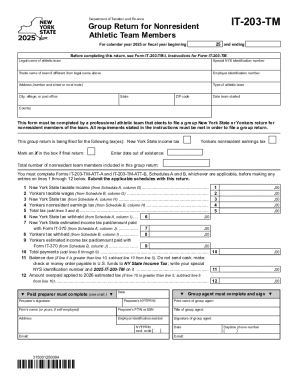
IT203TMDepartment of Taxation and FinanceGroup Return for Nonresident Athletic Team Members25 and endingFor calendar year 2025 or fiscal year beginningBefore completing this return, see Form IT203TMI,.

How it works
  • Open form

    Open form follow the instructions

  • Easily sign form

    Easily sign the form with your finger

  • Share form

    Send filled & signed form or save

Tips on how to fill out, edit and sign Instructions For Form IT-203-TM - Tax.NY.gov online

How to edit Instructions For Form IT-203-TM - Tax.NY.gov

Fill out and sign your Instructions For Form IT-203-TM - Tax.NY.gov quickly and error-free. Get and edit, and sign customizable form samples in a comfort of a single tab.

Your document workflow can be a lot more efficient if all you need for modifying and managing the flow is arranged in one place. If you are searching for a Instructions For Form IT-203-TM - Tax.NY.gov form sample, this is a place to get it and fill it out without searching for third-party solutions. With this intelligent search engine and editing tool, you won’t need to look any further.

Simply type the name of the Instructions For Form IT-203-TM - Tax.NY.gov or any other form and find the right sample. If the sample seems relevant, you can start modifying it right on the spot by clicking Get form. No need to print out or even download it. Hover and click on the interactive fillable fields to insert your information and sign the form in a single editor.

Use more modifying instruments to customize your template:

  • Check interactive checkboxes in forms by clicking on them. Check other areas of the Instructions For Form IT-203-TM - Tax.NY.gov form text with the help of the Cross, Check, and Circle instruments
  • If you need to insert more textual content into the file, utilize the Text tool or add fillable fields with the respective button. You can even specify the content of each fillable field.
  • Add pictures to forms with the Image button. Add pictures from your device or capture them with your computer camera.
  • Add custom graphic components to the document. Use Draw, Line, and Arrow instruments to draw on the form.
  • Draw over the text in the document if you wish to conceal it or stress it. Cover text fragments with theErase and Highlight, or Blackout instrument.
  • Add custom components like Initials or Date with the respective instruments. They will be generated automatically.
  • Save the form on your computer or convert its format to the one you want.

When equipped with a smart forms catalog and a powerful document modifying solution, working with documentation is easier. Find the form look for, fill it out instantly, and sign it on the spot without downloading it. Get your paperwork routine simplified with a solution tailored for modifying forms.

Get form

Experience a faster way to fill out and sign forms on the web. Access the most extensive library of templates available.

Related content

Instructions for Form IT-203-TM Group Return for...

Dec 12, 2025 — This is the official New York State Tax Department 2025 Form IT-203-TM-I...

Learn more
Reforming the Charitable Contribution...

by EP Aprill · Cited by 22 — Increased use of technology should also involve tax...

Learn more
XE-A20S Operation Manual - Sharp

When taxable is selected, tax is applied to the amount obtained after premium or discount...

Learn more
Questions & Answers

Get answers to your most pressing questions about US Legal Forms API.

Contact support

Is form IT-201 or 203 required for NY State income tax return?

Whether you need to file form IT-201 or IT-203 depends on your residency status. Non-residents and part-year residents should use form IT-203, while full-year residents typically file form IT-201. For a detailed overview of which form is appropriate for your situation, visit Instructions For Form IT-203-TM - Tax.NY.

Form IT-203 on your tax return indicates that you are filing as a non-resident or part-year resident of New York. This form helps you report your income earned in New York and calculate any tax owed. For a thorough understanding of its implications, refer to Instructions For Form IT-203-TM - Tax.NY, which offers clear explanations.

The number of exemptions you should claim depends on your personal situation, such as your marital status and number of dependents. It’s essential to consider your overall tax liability when making this decision. For detailed guidance on determining the right number of exemptions, consult Instructions For Form IT-203-TM - Tax.NY.

To speak to someone at the New York State tax department, you can call their customer service number, which is available on their official website. Be prepared to provide your personal information for verification. If you need specific forms or instructions, you can also check Instructions For Form IT-203-TM - Tax.NY for helpful resources.

The amount you receive as a refund in your Income Tax Return (ITR) depends on various factors, including your total income, deductions, and tax credits. To estimate your refund, consider using the refund calculator available on the New York State tax website. For more insight into how to maximize your refund, see Instructions For Form IT-203-TM - Tax.NY.

To fill out the NY IT 2104 form, start by providing your personal information, including your name and Social Security number. Follow the instructions carefully, making sure to indicate the correct exemptions you wish to claim. For a complete guide on this process, refer to Instructions For Form IT-203-TM - Tax.NY, where you will find useful tips.

Form IT-203 is used by non-residents and part-year residents of New York State to report their income and calculate their tax liability. This form allows you to claim any eligible deductions and credits. For detailed instructions on completing this form, check the Instructions For Form IT-203-TM - Tax.NY, which offers comprehensive guidance.

Tax topic 203 does not necessarily mean you will not receive your refund. It may indicate that your return is under review, which is a standard process for some taxpayers. You can find detailed guidance by visiting Instructions For Form IT-203-TM - Tax.NY, which can help clarify your situation and provide next steps.

Get This Form Now!

Use professional pre-built templates to fill in and sign documents online faster. Get access to thousands of forms.

If you believe that this page should be taken down, please follow our DMCA take down process here.

Get Instructions For Form IT-203-TM - Tax.NY.gov