Loading
Form preview
  • US Legal Forms
  • Other Templates
  • More Forms
  • More Multi-State Forms
  • Form 5500-ez Annual Return

Get Form 5500-ez Annual Return

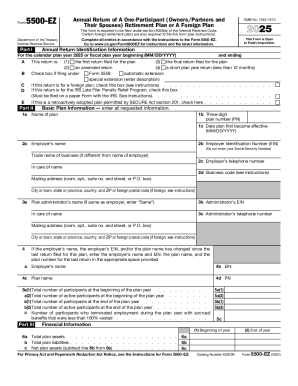
Form 5500-EZ Department of the Treasury Internal Revenue Service Part I Annual Return of A One-Participant (Owners/Partners and Their Spouses) Retirement Plan or A Foreign Plan OMB No. 1545-1610 2025.

How it works

  1. Open form

    Open form follow the instructions

  2. Easily sign form

    Easily sign the form with your finger

  3. Share form

    Send filled & signed form or save

How to fill out and sign Form 5500-EZ Annual Return online?

Get your online template and fill it in using progressive features. Enjoy smart fillable fields and interactivity.Follow the simple instructions below:

Tips on how to fill out, edit and sign Form 5500-EZ Annual Return online

How to modify Form 5500-EZ Annual Return: customize forms online

Check out a single service to handle all your paperwork easily. Find, modify, and complete your Form 5500-EZ Annual Return in a single interface with the help of smart instruments.

The times when people had to print forms or even write them manually are gone. These days, all it takes to find and complete any form, like Form 5500-EZ Annual Return, is opening just one browser tab. Here, you can find the Form 5500-EZ Annual Return form and customize it any way you need, from inserting the text directly in the document to drawing it on a digital sticky note and attaching it to the document. Discover instruments that will simplify your paperwork without additional effort.

Simply click the Get form button to prepare your Form 5500-EZ Annual Return paperwork rapidly and start editing it instantly. In the editing mode, you can easily complete the template with your details for submission. Just click on the field you need to modify and enter the information right away. The editor's interface does not need any specific skills to use it. When finished with the edits, check the information's accuracy once again and sign the document. Click on the signature field and follow the instructions to eSign the form in a moment.

Use More instruments to customize your form:

  • Use Cross, Check, or Circle instruments to pinpoint the document's data.
  • Add text or fillable text fields with text customization tools.
  • Erase, Highlight, or Blackout text blocks in the document using corresponding instruments.
  • Add a date, initials, or even an image to the document if necessary.
  • Use the Sticky note tool to annotate the form.
  • Use the Arrow and Line, or Draw tool to add visual components to your document.

Preparing Form 5500-EZ Annual Return paperwork will never be complicated again if you know where to search for the suitable template and prepare it easily. Do not hesitate to try it yourself.

Get form

Experience a faster way to fill out and sign forms on the web. Access the most extensive library of templates available.
Get form

Related content

About Form 5500-EZ, Annual Return of A...
Nov 12, 2025 — Form 5500-EZ is used by one-participant plans and certain foreign plans...
Learn more
Form 5500-EZ, annual return of one-participant...
Instructions for Form 5500-EZ, annual return of one-participant (owners and their spouses)...
Learn more
Reporting and Disclosure Guide for Employee...
The Department of Labor, in conjunction with the Internal Revenue. Service (IRS) and the...
Learn more

Related links form

8.4 CERTIFICATE OF SERVICE AND NOTICE OF CITATION TO SURVIVING SPOUSE TO EXERCISE ELECTIVE RIGHTS CERTIFICATE OF SERVICE OF NOTICE OF PROBATE OF WILL 239144 (23990144) Katten Muchin Rosenman LLP Minority Scholarship Application

Questions & Answers

Get answers to your most pressing questions about US Legal Forms API.

Contact support

Form 5500 must be filed electronically through the IRS e-File system. This electronic submission ensures that your form is processed efficiently and you receive prompt confirmation. If you feel overwhelmed by the process, platforms like USLegalForms can provide guidance and tools to help you navigate your filing effectively. It's essential to follow all instructions carefully to avoid any issues.

Form 5500-EZ must generally be filed by the last day of the seventh month after the end of the plan year. If you need extra time, you can file for an extension, which allows you to submit the form by the 15th day of the third month following the extension request. Staying informed about these deadlines is important for compliance. Using services like USLegalForms can help keep you on track.

You can submit Form 5500-EZ by completing the form and then filing it electronically via the IRS e-File system. Ensure that all information is correct to avoid delays in processing. If you prefer assistance, platforms like USLegalForms provide tools and resources to help you navigate the submission process smoothly. This can save you time and reduce stress.

To submit IRS Form 5500-EZ, you need to complete the form accurately and then file it electronically through the IRS e-File system. It's important to gather all necessary information before you start the submission process. Using a platform like USLegalForms can guide you through each step to ensure your submission meets all requirements. Once submitted, you should receive confirmation from the IRS.

The key difference between Form 5500 and Form 5500-EZ lies in the type of plans they cover. Form 5500 is generally used for larger retirement plans, while Form 5500-EZ is specifically for one-participant plans and certain small plans. Understanding this distinction is crucial for compliance. If you're unsure which form to use, consider consulting resources like USLegalForms for assistance.

Form 5500-EZ must be filed electronically using the IRS e-File system. This requirement helps streamline the filing process and ensures that your submission is processed quickly. By filing electronically, you also receive immediate confirmation of receipt. Using platforms like USLegalForms can simplify this process for you.

The 5500 annual return is a comprehensive report that retirement plan sponsors must file with the Department of Labor. It includes important information about the plan's financial condition, investments, and operations. For those using the Form 5500-EZ Annual Return, the requirements are tailored for smaller plans. Utilizing uslegalforms can simplify the reporting process, making compliance easier for you.

Yes, most plans are required to file the Form 5500 annually, while the Form 5500-EZ Annual Return has similar annual requirements for those who qualify. Annual filing helps maintain transparency and compliance with regulatory standards. Failing to file can lead to penalties, so it's essential to stay on top of these requirements. Uslegalforms can assist you in managing your filing deadlines efficiently.

The Form 5500-EZ must be filed by plan sponsors of one-participant retirement plans or foreign plans that meet specific criteria. If you are a sole proprietor, partner, or owner of a corporation, you may fall under this category. Filing the Form 5500-EZ Annual Return ensures compliance with federal regulations. Uslegalforms can help streamline this process for you.

The Form 5500 and Form 5500-EZ serve different purposes in reporting retirement plans. The Form 5500 is generally required for larger plans, while the Form 5500-EZ Annual Return is specifically for one-participant plans or certain foreign plans. Understanding the distinctions can help you determine which form applies to your situation. If you need assistance, uslegalforms provides resources to guide you through the filing process.

Get This Form Now!

Use professional pre-built templates to fill in and sign documents online faster. Get access to thousands of forms.
Get form
If you believe that this page should be taken down, please follow our DMCA take down processhere.
Get Form 5500-EZ Annual Return
Get form
  • Adoption
  • Bankruptcy
  • Contractors
  • Divorce
  • Home Sales
  • Employment
  • Identity Theft
  • Incorporation
  • Landlord Tenant
  • Living Trust
  • Name Change
  • Personal Planning
  • Small Business
  • Wills & Estates
  • Packages A-Z
  • Affidavits
  • Bankruptcy
  • Bill of Sale
  • Corporate - LLC
  • Divorce
  • Employment
  • Identity Theft
  • Internet Technology
  • Landlord Tenant
  • Living Wills
  • Name Change
  • Power of Attorney
  • Real Estate
  • Small Estates
  • Wills
  • All Forms
  • Forms A-Z
  • Other Templates
  • Legal Hub
  • About Us
  • Help Portal
  • Legal Resources
  • Blog
  • Affiliates
  • Contact Us
  • Delete My Account
  • Site Map
  • Industries
  • Forms in Spanish
  • Localized Forms
  • State-specific Forms
  • Forms Kit
  • Real Estate Handbook
  • All Guides
  • Notarize
  • Incorporation services
  • For Consumers
  • For Small Business
  • For Attorneys
  • USLegal
  • FormsPass
  • pdfFiller
  • signNow
  • altaFlow
  • DocHub
  • Instapage
Form Packages
  • Adoption
  • Bankruptcy
  • Contractors
  • Divorce
  • Home Sales
  • Employment
  • Identity Theft
  • Incorporation
  • Landlord Tenant
  • Living Trust
  • Name Change
  • Personal Planning
  • Small Business
  • Wills & Estates
  • Packages A-Z
Form Categories
  • Affidavits
  • Bankruptcy
  • Bill of Sale
  • Corporate - LLC
  • Divorce
  • Employment
  • Identity Theft
  • Internet Technology
  • Landlord Tenant
  • Living Wills
  • Name Change
  • Power of Attorney
  • Real Estate
  • Small Estates
  • Wills
  • All Forms
  • Forms A-Z
  • Other Templates
Customer Service
  • Legal Hub
  • About Us
  • Help Portal
  • Legal Resources
  • Blog
  • Affiliates
  • Contact Us
  • Delete My Account
  • Site Map
  • Industries
  • Forms in Spanish
  • Localized Forms
  • State-specific Forms
  • Forms Kit
Legal Guides
  • Real Estate Handbook
  • All Guides
Prepared for you
  • Notarize
  • Incorporation services
Our Customers
  • For Consumers
  • For Small Business
  • For Attorneys
Our Sites
  • USLegal
  • FormsPass
  • pdfFiller
  • signNow
  • altaFlow
  • DocHub
  • Instapage
Social Media
Call us now toll free:
+1 833 426 79 33
As seen in:
© Copyright 1999-2026 airSlate Legal Forms, Inc. 17 Station Street, Ste. 203, Brookline, MA 02445
  • Your Privacy Choices
  • Terms of Service
  • Privacy Notice
  • Content Takedown Policy
  • Bug Bounty Program