Loading
Form preview
  • US Legal Forms
  • Other Templates
  • More Forms
  • More Multi-State Forms
  • Arizona Form 120s - Ftp Directory Listing

Get Arizona Form 120s - Ftp Directory Listing

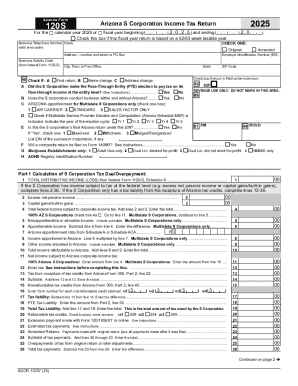
Arizona Form120S2025Arizona S Corporation Income Tax ReturnFor thecalendar year 2025 orfiscal year beginning M M D D 2 0 2 5 and ending M M D D 2 0 Y Y .Check this box if this fiscal year return is.

How it works

  1. Open form

    Open form follow the instructions

  2. Easily sign form

    Easily sign the form with your finger

  3. Share form

    Send filled & signed form or save

How to fill out and sign Arizona Form 120S - FTP Directory Listing online?

Get your online template and fill it in using progressive features. Enjoy smart fillable fields and interactivity.Follow the simple instructions below:

Tips on how to fill out, edit and sign Arizona Form 120S - FTP Directory Listing online

How to edit Arizona Form 120S - FTP Directory Listing: customize forms online

Sign and share Arizona Form 120S - FTP Directory Listing along with any other business and personal paperwork online without wasting time and resources on printing and postal delivery. Take the most out of our online document editor using a built-in compliant eSignature option.

Signing and submitting Arizona Form 120S - FTP Directory Listing templates electronically is quicker and more efficient than managing them on paper. However, it requires making use of online solutions that guarantee a high level of data security and provide you with a compliant tool for generating eSignatures. Our powerful online editor is just the one you need to complete your Arizona Form 120S - FTP Directory Listing and other individual and business or tax templates in a precise and appropriate manner in line with all the requirements. It features all the essential tools to quickly and easily complete, modify, and sign documentation online and add Signature fields for other people, specifying who and where should sign.

It takes just a few simple actions to complete and sign Arizona Form 120S - FTP Directory Listing online:

  1. Open the selected file for further managing.
  2. Utilize the top panel to add Text, Initials, Image, Check, and Cross marks to your template.
  3. Underline the key details and blackout or remove the sensitive ones if required.
  4. Click on the Sign option above and choose how you prefer to eSign your sample.
  5. Draw your signature, type it, upload its picture, or use an alternative option that suits you.
  6. Switch to the Edit Fillable Fileds panel and drop Signature areas for others.
  7. Click on Add Signer and enter your recipient’s email to assign this field to them.
  8. Check that all information provided is complete and correct before you click Done.
  9. Share your document with others utilizing one of the available options.

When approving Arizona Form 120S - FTP Directory Listing with our robust online editor, you can always be sure to get it legally binding and court-admissible. Prepare and submit documentation in the most beneficial way possible!

Get form

Experience a faster way to fill out and sign forms on the web. Access the most extensive library of templates available.
Get form

Related content

Form 120 Instructions
Arizona Form 120. 22. Schedule F - Schedule of Tax Payments. Complete this schedule to...
Learn more
THE ICON PROGRAMMING LANGUAGE
Oct 12, 1996 — The address for anonymous FTP is ftp.cs.arizona.edu. 355. Page 378...
Learn more
Content Manager OnDemand: Indexing Reference - IBM
Edition notice. This edition applies to Version 10 Release 5 of IBM® Content Manager...
Learn more

Related links form

2009 Minority Scholarship Application ICICI Prudential Regular Savings Fund Sdatawp51Agency Complaints269979 26990078 Bb - Bell County Key Information Memorandum

Questions & Answers

Get answers to your most pressing questions about US Legal Forms API.

Contact support

Generally, you are not required to include a copy of your federal return when you file your Arizona state return. However, it is beneficial to keep a copy for your records. If you are filing Arizona Form 120S and have specific questions about your situation, consider contacting a tax professional or checking the Arizona Form 120S - FTP Directory Listing for more guidance.

You can file Arizona Form 120S online through the Arizona Department of Revenue's e-filing system. This method is convenient and helps speed up the processing of your return. If you choose to file by mail, ensure to send your completed form to the correct address as outlined on the Arizona Form 120S - FTP Directory Listing. Always check for the latest filing requirements and instructions.

Arizona Form 120 should be mailed to the specific address mentioned in the instructions of the form itself. Typically, this address is catered to ensure efficient processing. You can find detailed information about the mailing address on the Arizona Form 120S - FTP Directory Listing as well. Double-check the address to ensure your return reaches the correct department.

Mail your Arizona tax forms to the appropriate address listed on the Arizona Department of Revenue's website. Each form, including Arizona Form 120S, has a designated mailing address based on the type of return you are filing. Make sure to verify the mailing instructions to avoid any delays in processing your return.

You can file your Arizona Form 120S electronically through the Arizona Department of Revenue's website. This method is efficient and allows for quick processing of your tax return. If you prefer to file by mail, you can send it to the address provided for Arizona Form 120S - FTP Directory Listing. Ensure you follow the specific instructions for your filing method.

An Arizona 120S informational return is a tax document that S corporations must file to report their financial activities. This return helps the state assess the corporation's tax responsibilities and compliance with Arizona tax laws. Filing this return correctly is essential for maintaining good standing. You can find helpful templates and guidance on US Legal Forms to ensure your compliance.

To mail an Arizona tax return, including Arizona Form 120S - FTP Directory Listing, you should send it to the address indicated in the form's instructions. Typically, this address depends on whether you are including a payment or not. It is crucial to ensure that your return is sent to the correct location to avoid any processing delays. US Legal Forms can provide you with the latest mailing addresses and requirements.

Arizona Form 120S - FTP Directory Listing is a tax form designed for S corporations operating in Arizona. This form allows S corporations to report their income, deductions, and credits for state tax purposes. Understanding this form can help ensure compliance and optimize tax benefits for your business. Explore resources on US Legal Forms for a deeper understanding.

You can file Arizona Form 120S - FTP Directory Listing either electronically or by mail. If you choose to file electronically, use the Arizona Department of Revenue's e-file system. For mail submissions, send your completed form to the address specified in the form instructions. US Legal Forms can help you find the latest filing guidelines and options.

Yes, Arizona Form 120S - FTP Directory Listing accepts federal extensions. If you filed for a federal extension, you can use it to extend your Arizona tax return submission as well. However, it's essential to file your Arizona extension request to avoid any penalties. Consult US Legal Forms for accurate forms and instructions related to extensions.

Get This Form Now!

Use professional pre-built templates to fill in and sign documents online faster. Get access to thousands of forms.
Get form
If you believe that this page should be taken down, please follow our DMCA take down processhere.
Get Arizona Form 120S - FTP Directory Listing
Get form
  • Adoption
  • Bankruptcy
  • Contractors
  • Divorce
  • Home Sales
  • Employment
  • Identity Theft
  • Incorporation
  • Landlord Tenant
  • Living Trust
  • Name Change
  • Personal Planning
  • Small Business
  • Wills & Estates
  • Packages A-Z
  • Affidavits
  • Bankruptcy
  • Bill of Sale
  • Corporate - LLC
  • Divorce
  • Employment
  • Identity Theft
  • Internet Technology
  • Landlord Tenant
  • Living Wills
  • Name Change
  • Power of Attorney
  • Real Estate
  • Small Estates
  • Wills
  • All Forms
  • Forms A-Z
  • Other Templates
  • Legal Hub
  • About Us
  • Help Portal
  • Legal Resources
  • Blog
  • Affiliates
  • Contact Us
  • Delete My Account
  • Site Map
  • Industries
  • Forms in Spanish
  • Localized Forms
  • State-specific Forms
  • Forms Kit
  • Real Estate Handbook
  • All Guides
  • Notarize
  • Incorporation services
  • For Consumers
  • For Small Business
  • For Attorneys
  • USLegal
  • FormsPass
  • pdfFiller
  • signNow
  • altaFlow
  • DocHub
  • Instapage
Form Packages
  • Adoption
  • Bankruptcy
  • Contractors
  • Divorce
  • Home Sales
  • Employment
  • Identity Theft
  • Incorporation
  • Landlord Tenant
  • Living Trust
  • Name Change
  • Personal Planning
  • Small Business
  • Wills & Estates
  • Packages A-Z
Form Categories
  • Affidavits
  • Bankruptcy
  • Bill of Sale
  • Corporate - LLC
  • Divorce
  • Employment
  • Identity Theft
  • Internet Technology
  • Landlord Tenant
  • Living Wills
  • Name Change
  • Power of Attorney
  • Real Estate
  • Small Estates
  • Wills
  • All Forms
  • Forms A-Z
  • Other Templates
Customer Service
  • Legal Hub
  • About Us
  • Help Portal
  • Legal Resources
  • Blog
  • Affiliates
  • Contact Us
  • Delete My Account
  • Site Map
  • Industries
  • Forms in Spanish
  • Localized Forms
  • State-specific Forms
  • Forms Kit
Legal Guides
  • Real Estate Handbook
  • All Guides
Prepared for you
  • Notarize
  • Incorporation services
Our Customers
  • For Consumers
  • For Small Business
  • For Attorneys
Our Sites
  • USLegal
  • FormsPass
  • pdfFiller
  • signNow
  • altaFlow
  • DocHub
  • Instapage
Social Media
Call us now toll free:
+1 833 426 79 33
As seen in:
© Copyright 1999-2026 airSlate Legal Forms, Inc. 17 Station Street, Ste. 203, Brookline, MA 02445
  • Your Privacy Choices
  • Terms of Service
  • Privacy Notice
  • Content Takedown Policy
  • Bug Bounty Program