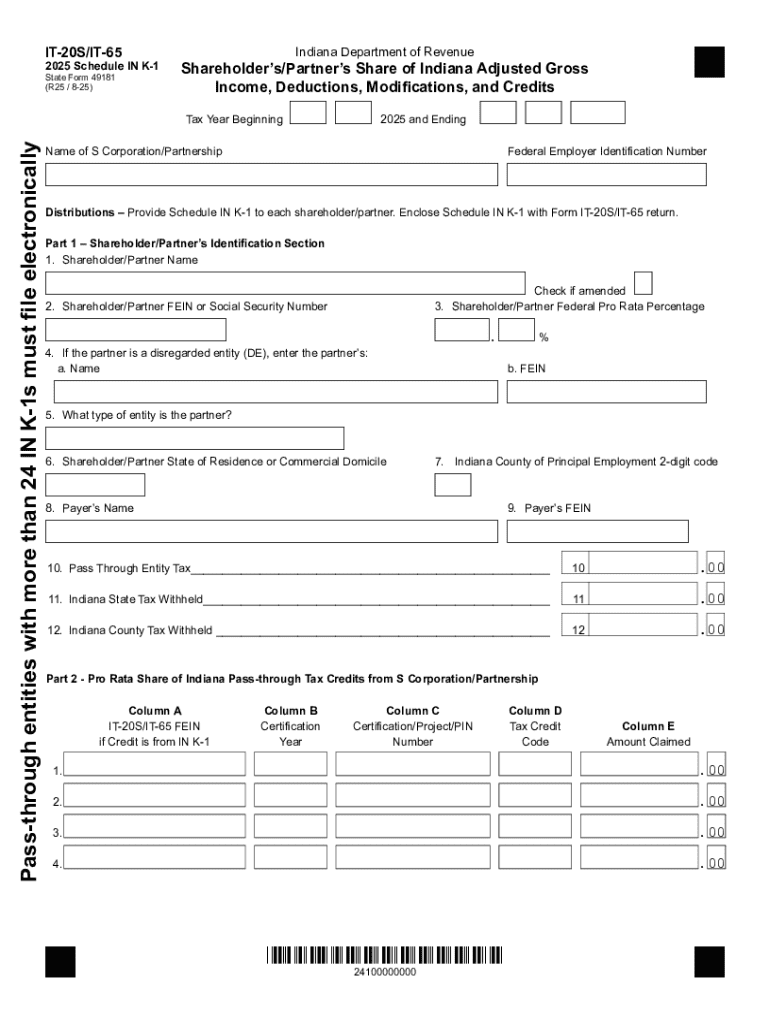
IT20S/IT652025 Schedule IN K1 State Form 49181 (R25 / 825)Indiana Department of RevenueShareholders/Partners Share of Indiana Adjusted Gross Income, Deductions, Modifications, and CreditsPassthrough.
Loading

Open form follow the instructions

Easily sign the form with your finger

Send filled & signed form or save
Tips on how to fill out, edit and sign Instructions For Schedule IN K-1 - FTP Directory Listing online
How to edit Instructions For Schedule IN K-1 - FTP Directory Listing
Remove the mess from your paperwork routine. Discover the most effective way to find and edit, and file a Instructions For Schedule IN K-1 - FTP Directory Listing
The process of preparing Instructions For Schedule IN K-1 - FTP Directory Listing demands accuracy and attention, especially from those who are not well familiar with this sort of job. It is essential to get a suitable template and fill it in with the correct information. With the proper solution for handling documents, you can get all the tools at hand. It is easy to streamline your editing process without learning new skills. Identify the right sample of Instructions For Schedule IN K-1 - FTP Directory Listing and fill it out quickly without switching between your browser tabs. Discover more tools to customize your Instructions For Schedule IN K-1 - FTP Directory Listing form in the modifying mode.
While on the Instructions For Schedule IN K-1 - FTP Directory Listing page, click on the Get form button to start modifying it. Add your data to the form on the spot, as all the needed tools are at hand right here. The sample is pre-designed, so the effort required from the user is minimal. Use the interactive fillable fields in the editor to easily complete your paperwork. Simply click on the form and proceed to the editor mode without delay. Fill out the interactive field, and your document is good to go.
Try more tools to customize your form:
- Place more textual content around the document if needed. Use the Text and Text Box tools to insert text in a separate box.
- Add pre-designed visual components like Circle, Cross, and Check with respective tools.
- If needed, capture or upload images to the document with the Image tool.
- If you need to draw something in the document, use Line, Arrow, and Draw tools.
- Try the Highlight, Erase, and Blackout tools to change the text in the document.
- If you need to add comments to specific document parts, click the Sticky tool and place a note where you want.
Sometimes, a small error can wreck the whole form when someone completes it by hand. Forget about inaccuracies in your paperwork. Find the samples you require in moments and complete them electronically using a smart modifying solution.
How to sign the PA BCO-10 form electronically
airSlate SignNow makes it easy to add a legally-binding electronic signature to your PA BCO-10 form from any device.
- Open the completed PA BCO-10 form in the editor.
- Click My Signature and choose your preferred signature type.
- Place the signature in the designated field and click Done.
- Download or send the signed document directly from the platform.
How to edit Instructions For Schedule IN K-1 - FTP Directory Listing
Remove the mess from your paperwork routine. Discover the most effective way to find and edit, and file a Instructions For Schedule IN K-1 - FTP Directory Listing
The process of preparing Instructions For Schedule IN K-1 - FTP Directory Listing demands accuracy and attention, especially from those who are not well familiar with this sort of job. It is essential to get a suitable template and fill it in with the correct information. With the proper solution for handling documents, you can get all the tools at hand. It is easy to streamline your editing process without learning new skills. Identify the right sample of Instructions For Schedule IN K-1 - FTP Directory Listing and fill it out quickly without switching between your browser tabs. Discover more tools to customize your Instructions For Schedule IN K-1 - FTP Directory Listing form in the modifying mode.
While on the Instructions For Schedule IN K-1 - FTP Directory Listing page, click on the Get form button to start modifying it. Add your data to the form on the spot, as all the needed tools are at hand right here. The sample is pre-designed, so the effort required from the user is minimal. Use the interactive fillable fields in the editor to easily complete your paperwork. Simply click on the form and proceed to the editor mode without delay. Fill out the interactive field, and your document is good to go.
Try more tools to customize your form:
- Place more textual content around the document if needed. Use the Text and Text Box tools to insert text in a separate box.
- Add pre-designed visual components like Circle, Cross, and Check with respective tools.
- If needed, capture or upload images to the document with the Image tool.
- If you need to draw something in the document, use Line, Arrow, and Draw tools.
- Try the Highlight, Erase, and Blackout tools to change the text in the document.
- If you need to add comments to specific document parts, click the Sticky tool and place a note where you want.
Sometimes, a small error can wreck the whole form when someone completes it by hand. Forget about inaccuracies in your paperwork. Find the samples you require in moments and complete them electronically using a smart modifying solution.
Experience a faster way to fill out and sign forms on the web. Access the most extensive library of templates available.
Related content
INSTRUCTIONS. FOR. SCHEDULE I. BUSINESS SUMMARY BY TAXING JURISDICTION. This...
Services For Related Titles. Shareholder's instructions for Schedule K-1 (Form 1120S)...
FreeFileSync is a free open source data backup software to compare and synchronize files...
Get answers to your most pressing questions about US Legal Forms API.
What is line 13AC on K1?
Line 13AC on Schedule K-1 refers to certain types of income or deductions that may be subject to different tax rules. It’s crucial to read the accompanying instructions carefully to understand how this line impacts your tax situation. If you need clarification, the US Legal Forms platform offers detailed guidance to help you interpret this information correctly.
Is Schedule K-1 sent to the IRS?
Yes, Schedule K-1 is typically sent to the IRS by the issuing entity. They must file it along with their own tax return, and you should receive a copy for your records. To ensure you understand the filing process, check the Instructions For Schedule IN K-1 - FTP Directory Listing available on the US Legal Forms platform.
Where do you get schedule K-1?
Schedule K-1 is obtained from the entity that you are involved with, such as a partnership or S corporation. You should receive it directly from them, either by mail or electronically. If you're looking for more streamlined access to such documents, consider visiting the US Legal Forms platform for additional resources.
Where can I find schedule K-1?
You can find your Schedule K-1 through the partnership or corporation that issued it. It may also be available digitally via email or on their online portal. If you have trouble locating it, the US Legal Forms platform can help you navigate the process and provide further instructions.
Do I need to report schedule K-1?
Yes, you must report the information from your Schedule K-1 on your tax return. This document includes income, deductions, and credits that affect your overall tax liability. Failing to report K-1 information can lead to penalties, so it’s important to follow the Instructions For Schedule IN K-1 - FTP Directory Listing to ensure compliance.
Where do I enter schedule K-1 information?
You enter Schedule K-1 information on your personal income tax return, specifically on IRS Form 1040. Depending on the type of entity that issued your K-1, the information may need to be reported on different lines or schedules. For step-by-step guidance, check out the resources available on the US Legal Forms platform.
Who sends out Schedule K-1?
Schedule K-1 is typically sent out by partnerships, S corporations, estates, or trusts to report income, deductions, and credits to their partners or shareholders. These entities are required to provide this schedule to ensure that all income is reported accurately on your tax return. For more assistance, consider exploring the US Legal Forms platform for detailed instructions.
Where can I find my schedule K-1?
You can find your Schedule K-1 in the tax documents provided by your partnership, S corporation, or trust. If you are unsure where to locate it, check your email for any digital copies or contact the entity that issued it. Additionally, you can visit the US Legal Forms platform for guidance on accessing these important documents.
Use professional pre-built templates to fill in and sign documents online faster. Get access to thousands of forms.
If you believe that this page should be taken down, please follow our DMCA take down process here.