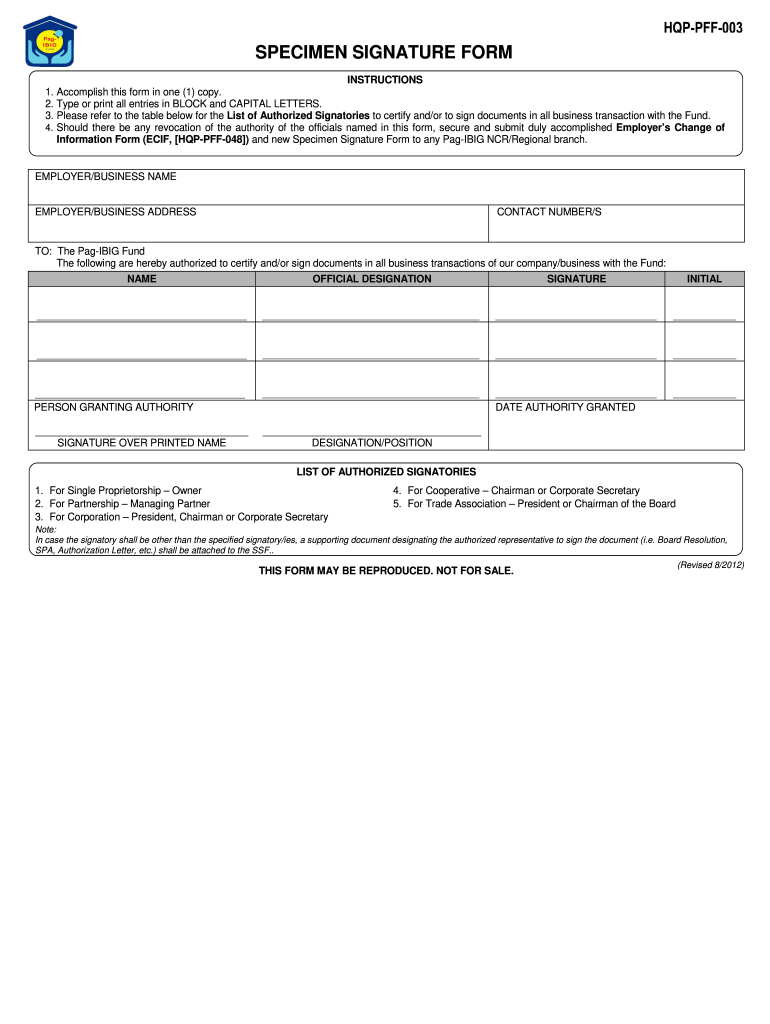
HQP-PFF-003 SPECIMEN SIGNATURE FORM INSTRUCTIONS 1. Accomplish this form in one 1 copy. 2. Type or print all entries in BLOCK and CAPITAL LETTERS. 3. Should there be any revocation of the authority of the officials named in this form secure and submit duly accomplished Employer s Change of Information Form ECIF HQP-PFF-048 and new Specimen Signature Form to any Pag-IBIG NCR/Regional branch. Please refer to the table below for the List of Authorized Signatories to certify and/or to sign documents in all business transaction with the Fund* 4. EMPLOYER/BUSINESS NAME CONTACT NUMBER/S TO The Pag-IBIG Fund The following are hereby authorized to certify and/or sign documents in all business transactions of our company/business with the Fund NAME OFFICIAL DESIGNATION SIGNATURE INITIAL PERSON GRANTING AUTHORITY SIGNATURE OVER PRINTED NAME DATE AUTHORITY GRANTED DESIGNATION/POSITION LIST OF AUTHORIZED SIGNATORIES 1. For Single Proprietorship Owner 2. For Partnership Managing Partner 3. For Cor....

Open form follow the instructions

Easily sign the form with your finger

Send filled & signed form or save
How to fill out the PH Pag-IBIG HQP-PFF-003 online
This guide provides step-by-step instructions to assist users in completing the PH Pag-IBIG HQP-PFF-003 form online. Filling out this form accurately is crucial for ensuring smooth business transactions with the Pag-IBIG Fund.
Follow the steps to successfully complete the form online.
- Click the ‘Get Form’ button to access the PH Pag-IBIG HQP-PFF-003 form online.
- Begin by filling in the employer or business name clearly in block letters. Ensure that this reflects the official name registered with the Pag-IBIG Fund.
- Next, provide the complete business address, including street name, city, and postal code, using capital letters for clarity.
- Enter the contact number(s) for the business. These should be current and accessible for any communication required by Pag-IBIG.
- List the names of authorized individuals who can certify and sign documents for transactions. Include their official designations next to each name.
- Each authorized signatory must provide their signature and initials in the designated sections provided. Make sure that this is done legibly.
- The person granting authority must sign above their printed name in the designated area. Ensure the signature you provide is consistent with official documents.
- Record the date when the authority was granted, ensuring the format is consistent with your regional standards.
- Check the list of authorized signatories for accuracy based on your organization's structure, such as single proprietorship, partnership, corporation, cooperative, or trade association.
- If there are any changes or if a different person will sign, attach a supporting document like a board resolution, special power of attorney, or authorization letter.
- Once all sections are completed, review the form for any errors before finalizing.
- Finally, save changes to the document, download a copy for your records, print the form for submission, or share it as required.
Complete your documents online today to ensure a smooth process with the Pag-IBIG Fund.
Experience a faster way to fill out and sign forms on the web. Access the most extensive library of templates available.
Related content
HQP-PFF-039 FOR Pag-IBIG Fund USE ONLY MEMBER'S DATA Pag-IBIG MID NUMBER ... (PSOC). 3...
Get answers to your most pressing questions about US Legal Forms API.
How to fill up pag-ibig membership form online?
To fill up the Pag-IBIG membership form online, navigate to the Pag-IBIG official website. Follow the prompts to enter your personal and employment information accurately. Once completed, remember to print the PH Pag-IBIG HQP-PFF-003 for your signature, which is needed for validation.
What to write in a specimen signature?
When filling out a specimen signature, write your typical signature as you would on any official document. The PH Pag-IBIG HQP-PFF-003 requires your authentic signature to verify your identity. This ensures that your signature matches in all your transactions, providing consistency and security.
How can I claim Pag-Ibig provident fund?
To claim your Pag-Ibig provident fund, you must complete the necessary request forms, such as the PH Pag-IBIG HQP-PFF-003 for signature verification. Submit your completed forms along with required documents to your nearest Pag-IBIG branch. Make sure to keep copies of everything submitted for your records.
How to update pag-ibig information?
Updating your Pag-IBIG information is a straightforward process. You can visit the official Pag-IBIG website and complete the required forms, including the PH Pag-IBIG HQP-PFF-003 if a signature is necessary. Alternatively, you can visit a Pag-IBIG branch to assist with the update, ensuring your records remain accurate.
How to fill up specimen signature form pag-ibig?
To fill up the specimen signature form for Pag-IBIG, start by accurately writing your name at the top of the PH Pag-IBIG HQP-PFF-003 form. Then, provide your signature in the specified section. Ensure that your signature is consistent with other documents you have submitted to Pag-IBIG, which will aid in verifying your identity.
What is specimen signature form pag-ibig?
The specimen signature form for Pag-IBIG is an official document that helps verify your identity through your signature. Specifically, the PH Pag-IBIG HQP-PFF-003 is designed to capture your unique signature, which is used for various transactions and documentation with Pag-IBIG. This form is crucial for ensuring the authenticity of your requests and claims.
How do you fill a specimen signature?
To fill a specimen signature, you need to write your signature in the designated area on the PH Pag-IBIG HQP-PFF-003 form. Make sure to use a blue or black pen for clarity. Take your time to ensure the signature is neat and matches your regular signature. This helps maintain consistency in your official documents.
What is ssf in pag-ibig sample?
In Pag-IBIG, SSF refers to the Specimen Signature Form, which is important for verifying your identity. It requires you to provide your signature, used for official transactions with Pag-IBIG. Completing the SSF correctly is an essential step in your journey through the PH Pag-IBIG HQP-PFF-003 process, ensuring your records are secure and accurate.
How to fill out pag-ibig mdf form?
When filling out the Pag-IBIG MDF form, gather all necessary personal documents first. Download the form from the Pag-IBIG website and fill it out completely with accurate information. Double-check your entries before submitting, either online or at a local Pag-IBIG branch, to ensure compliance with the PH Pag-IBIG HQP-PFF-003 requirements.
How to fill up Pag-IBIG MP2 form online?
Filling out the Pag-IBIG MP2 form online is easy. Access the official Pag-IBIG website and find the MP2 savings program section. Enter the required information, including your contact and savings details, to ensure your participation in the program contributes to your financial growth, as outlined in the PH Pag-IBIG HQP-PFF-003.
Use professional pre-built templates to fill in and sign documents online faster. Get access to thousands of forms.
If you believe that this page should be taken down, please follow our DMCA take down process here.
This form is available in several versions. Select the version you need from the drop-down list below.