Loading
Form preview
  • US Legal Forms
  • Other Templates
  • More Forms
  • More Multi-State Forms
  • Md State Tax... Form 502, Form 505 Or Both? - Turbotax Support

Get Md State Tax... Form 502, Form 505 Or Both? - Turbotax Support

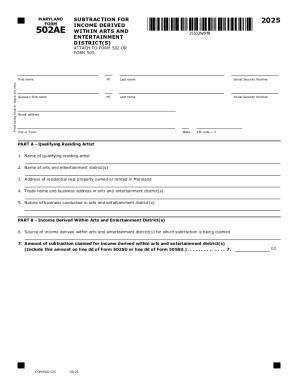
MARYLAND FORM502AE2025SUBTRACTION FOR INCOME DERIVED WITHIN ARTS AND ENTERTAINMENT DISTRICT(S)Print using blue or black ink only.ATTACH TO FORM 502 OR FORM 505.First nameMILast nameSocial Security.

How it works

  1. Open form

    Open form follow the instructions

  2. Easily sign form

    Easily sign the form with your finger

  3. Share form

    Send filled & signed form or save

How to fill out and sign MD State Tax... Form 502, Form 505 Or Both? - TurboTax Support online?

Get your online template and fill it in using progressive features. Enjoy smart fillable fields and interactivity.Follow the simple instructions below:

Tips on how to fill out, edit and sign MD State Tax... Form 502, Form 505 Or Both? - TurboTax Support online

How to edit MD State Tax... Form 502, Form 505 Or Both? - TurboTax Support: customize forms online

Fill out and sign your MD State Tax... Form 502, Form 505 Or Both? - TurboTax Support quickly and error-free. Find and edit, and sign customizable form samples in a comfort of a single tab.

Your document workflow can be much more efficient if everything required for modifying and handling the flow is arranged in one place. If you are searching for a MD State Tax... Form 502, Form 505 Or Both? - TurboTax Support form sample, this is a place to get it and fill it out without looking for third-party solutions. With this intelligent search engine and editing tool, you won’t need to look any further.

Simply type the name of the MD State Tax... Form 502, Form 505 Or Both? - TurboTax Support or any other form and find the right sample. If the sample seems relevant, you can start modifying it right on the spot by clicking Get form. No need to print or even download it. Hover and click on the interactive fillable fields to insert your information and sign the form in a single editor.

Use more modifying tools to customize your form:

  • Check interactive checkboxes in forms by clicking on them. Check other parts of the MD State Tax... Form 502, Form 505 Or Both? - TurboTax Support form text by using the Cross, Check, and Circle tools
  • If you need to insert more textual content into the file, use the Text tool or add fillable fields with the respective button. You can also specify the content of each fillable field.
  • Add pictures to forms with the Image button. Upload pictures from your device or capture them with your computer camera.
  • Add custom visual components to the document. Use Draw, Line, and Arrow tools to draw on the document.
  • Draw over the text in the document if you want to hide it or stress it. Cover text fragments using theErase and Highlight, or Blackout tool.
  • Add custom components such as Initials or Date using the respective tools. They will be generated automatically.
  • Save the form on your computer or convert its format to the one you want.

When equipped with a smart forms catalog and a powerful document modifying solution, working with documentation is easier. Find the form you require, fill it out instantly, and sign it on the spot without downloading it. Get your paperwork routine simplified with a solution designed for modifying forms.

Get form

Experience a faster way to fill out and sign forms on the web. Access the most extensive library of templates available.
Get form

Related content

iFile Choose Form Entrance
Tax Year 2024 iFile Resident Maryland Tax Return. Does NOT support the following forms:...
Learn more
Tax Simplification: So Necessary and So Elusive
by KH Ryesky · 2004 · Cited by 13 — The United States Congress has taken pains to...
Learn more
contents
Jul 17, 2018 — 058. PORSCHE 911 GT3 RS. It's the question that's been asked a thousand...
Learn more

Related links form

IL-2210 Instructions NON-RESIDENT INDIVIDUAL INCOME TAX RETURN Claim For City Of New York School Tax Credit 2003 North Dakota Small Business Corporation Instructions

Questions & Answers

Get answers to your most pressing questions about US Legal Forms API.

Contact support

When mailing MD State Tax Form 505, refer to the form instructions for the correct mailing address. Different addresses may apply depending on whether you are enclosing a payment. Ensure you use the correct postage and allow sufficient time for delivery to avoid late penalties.

To fill out a tax withholding form correctly, start by reviewing your income and deductions. Use the IRS withholding calculator to determine the appropriate number of allowances to claim. Carefully follow the instructions and submit the form to your employer. If needed, TurboTax Support can provide additional guidance.

To include 529 contributions on your tax return using TurboTax, navigate to the education section. Enter the contributions made for qualified expenses, and TurboTax will guide you through any available tax benefits. This ensures you receive the proper deductions for your MD State Tax filing.

MD State Tax Form 502 does include sections for itemizing deductions, including medical expenses. You will need to follow the guidelines provided to determine which medical expenses qualify. If you have more questions about itemizing, TurboTax Support is a great resource for clarification.

You can file MD State Tax Form 502 electronically or by mail. If you file electronically, use TurboTax for a streamlined process. For paper submissions, mail your completed form to the address indicated in the instructions on the form.

You can file MD State Tax Form 505 electronically through the Maryland Comptroller's website or by using TurboTax. If you prefer to file by mail, send your completed form to the address specified in the form instructions. Ensure you double-check the mailing address to avoid any delays.

Your tax liability on MD State Tax Form 502 should reflect the total tax you owe for the year. Calculate your income, subtract allowable deductions, and apply the appropriate tax rates. If you have questions about specific calculations, TurboTax Support can provide valuable insights for accurate reporting.

To fill out MD State Tax Form 502, start by gathering your income documents and tax records. Enter your personal information, including your name and Social Security number. Next, report your income, deductions, and credits as instructed. If you need assistance, consider using TurboTax Support for guidance.

Get This Form Now!

Use professional pre-built templates to fill in and sign documents online faster. Get access to thousands of forms.
Get form
If you believe that this page should be taken down, please follow our DMCA take down processhere.
Get MD State Tax... Form 502, Form 505 Or Both? - TurboTax Support
Get form
  • Adoption
  • Bankruptcy
  • Contractors
  • Divorce
  • Home Sales
  • Employment
  • Identity Theft
  • Incorporation
  • Landlord Tenant
  • Living Trust
  • Name Change
  • Personal Planning
  • Small Business
  • Wills & Estates
  • Packages A-Z
  • Affidavits
  • Bankruptcy
  • Bill of Sale
  • Corporate - LLC
  • Divorce
  • Employment
  • Identity Theft
  • Internet Technology
  • Landlord Tenant
  • Living Wills
  • Name Change
  • Power of Attorney
  • Real Estate
  • Small Estates
  • Wills
  • All Forms
  • Forms A-Z
  • Other Templates
  • Legal Hub
  • About Us
  • Help Portal
  • Legal Resources
  • Blog
  • Affiliates
  • Contact Us
  • Delete My Account
  • Site Map
  • Industries
  • Forms in Spanish
  • Localized Forms
  • State-specific Forms
  • Forms Kit
  • Real Estate Handbook
  • All Guides
  • Notarize
  • Incorporation services
  • For Consumers
  • For Small Business
  • For Attorneys
  • USLegal
  • FormsPass
  • pdfFiller
  • signNow
  • altaFlow
  • DocHub
  • Instapage
Form Packages
  • Adoption
  • Bankruptcy
  • Contractors
  • Divorce
  • Home Sales
  • Employment
  • Identity Theft
  • Incorporation
  • Landlord Tenant
  • Living Trust
  • Name Change
  • Personal Planning
  • Small Business
  • Wills & Estates
  • Packages A-Z
Form Categories
  • Affidavits
  • Bankruptcy
  • Bill of Sale
  • Corporate - LLC
  • Divorce
  • Employment
  • Identity Theft
  • Internet Technology
  • Landlord Tenant
  • Living Wills
  • Name Change
  • Power of Attorney
  • Real Estate
  • Small Estates
  • Wills
  • All Forms
  • Forms A-Z
  • Other Templates
Customer Service
  • Legal Hub
  • About Us
  • Help Portal
  • Legal Resources
  • Blog
  • Affiliates
  • Contact Us
  • Delete My Account
  • Site Map
  • Industries
  • Forms in Spanish
  • Localized Forms
  • State-specific Forms
  • Forms Kit
Legal Guides
  • Real Estate Handbook
  • All Guides
Prepared for you
  • Notarize
  • Incorporation services
Our Customers
  • For Consumers
  • For Small Business
  • For Attorneys
Our Sites
  • USLegal
  • FormsPass
  • pdfFiller
  • signNow
  • altaFlow
  • DocHub
  • Instapage
Social Media
Call us now toll free:
+1 833 426 79 33
As seen in:
© Copyright 1999-2026 airSlate Legal Forms, Inc. 17 Station Street, Ste. 203, Brookline, MA 02445
  • Your Privacy Choices
  • Terms of Service
  • Privacy Notice
  • Content Takedown Policy
  • Bug Bounty Program