Loading
Form preview
  • US Legal Forms
  • Other Templates
  • More Forms
  • More Multi-State Forms
  • Utah Sales Tax Account Number:

Get Utah Sales Tax Account Number:

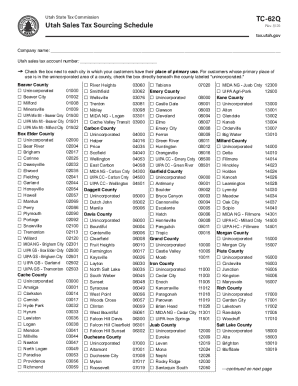
Company name: Utah sales tax account number: t Check the box next to each city in which your customers have their place of primary use. For customers whose primary place of use is in the unincorporated.

How it works

  1. Open form

    Open form follow the instructions

  2. Easily sign form

    Easily sign the form with your finger

  3. Share form

    Send filled & signed form or save

How to fill out and sign Utah Sales Tax Account Number: online?

Get your online template and fill it in using progressive features. Enjoy smart fillable fields and interactivity.Follow the simple instructions below:

Tips on how to fill out, edit and sign Utah Sales Tax Account Number: online

How to edit Utah Sales Tax Account Number:: customize forms online

Sign and share Utah Sales Tax Account Number: along with any other business and personal paperwork online without wasting time and resources on printing and postal delivery. Get the most out of our online form editor using a built-in compliant eSignature option.

Signing and submitting Utah Sales Tax Account Number: templates electronically is quicker and more effective than managing them on paper. However, it requires making use of online solutions that ensure a high level of data protection and provide you with a compliant tool for creating electronic signatures. Our powerful online editor is just the one you need to complete your Utah Sales Tax Account Number: and other personal and business or tax forms in a precise and proper manner in line with all the requirements. It features all the essential tools to quickly and easily complete, edit, and sign paperwork online and add Signature fields for other people, specifying who and where should sign.

It takes only a few simple actions to fill out and sign Utah Sales Tax Account Number: online:

  1. Open the selected file for further managing.
  2. Utilize the upper toolkit to add Text, Initials, Image, Check, and Cross marks to your template.
  3. Underline the key details and blackout or erase the sensitive ones if necessary.
  4. Click on the Sign option above and choose how you want to eSign your document.
  5. Draw your signature, type it, upload its picture, or use another option that suits you.
  6. Switch to the Edit Fillable Fileds panel and drop Signature fields for other parties.
  7. Click on Add Signer and enter your recipient’s email to assign this field to them.
  8. Check that all data provided is complete and correct before you click Done.
  9. Share your documentation with others using one of the available options.

When signing Utah Sales Tax Account Number: with our extensive online solution, you can always be sure to get it legally binding and court-admissible. Prepare and submit documents in the most efficient way possible!

Get form

Experience a faster way to fill out and sign forms on the web. Access the most extensive library of templates available.
Get form

Related content

Create & Manage a Tax Account - Utah State Tax...
Create, Manage, or Update a Business Tax Account · Apply for a tax account(s) - TC-69 ·...
Learn more
Sales Tax License Utah
Website: tax.utah.gov. Sales Tax License and/or Use Tax Certificate of Registration...
Learn more
CRA Guide to Data Reporting and Collection
In response to numerous requests and inquiries, the. Federal Financial Institutions...
Learn more

Related links form

U.S. TREAS Form Treas-irs-5305-b-2004 U.S. TREAS Form Treas-irs-5304-simple-2002 Request For Change MEMBER BAR APPLICATION

Questions & Answers

Get answers to your most pressing questions about US Legal Forms API.

Contact support

Yes, you can obtain a tax ID number online in Utah. The Utah State Tax Commission offers an easy online registration process for businesses. By providing your business information, you can receive your Utah Sales Tax Account Number: quickly and efficiently. This online option makes it convenient for you to handle your tax registration from anywhere.

No, a tax ID number and a tax exempt number are different. A tax ID number, such as the Utah Sales Tax Account Number:, identifies your business for tax purposes, while a tax exempt number allows certain organizations to make purchases without paying sales tax. If you believe you qualify for tax exemption, you must apply separately to receive the appropriate documentation. Understanding these distinctions can help you manage your business finances more effectively.

No, an Employer Identification Number (EIN) is not the same as a sales tax account number. The EIN is primarily used for federal tax purposes, while the Utah Sales Tax Account Number: is specifically for state sales tax collection. It is important to have both numbers if you operate a business in Utah to meet all tax obligations. You can easily obtain both through the appropriate state and federal channels.

To obtain a tax ID number in Utah, you need to register your business with the Utah State Tax Commission. You can complete this process online through their website. After providing the necessary information about your business, you will receive your Utah Sales Tax Account Number: which is essential for collecting sales tax. Make sure to have your business details ready to streamline the application.

To obtain a Utah Sales Tax Account Number, you can apply online through the Utah State Tax Commission's website. The application process is straightforward and requires basic business information. Alternatively, you can use platforms like US Legal Forms to help you navigate the application process more efficiently. Once approved, you will receive your sales tax ID, allowing you to comply with Utah tax requirements.

The Utah tax account number is a unique identifier assigned to businesses for sales tax purposes in Utah. This number allows the state to track sales tax collection and ensure compliance. Obtaining a Utah Sales Tax Account Number is essential for any business involved in selling goods or services in Utah. It simplifies the tax reporting process and helps you operate legally.

You can use your Utah Sales Tax Account Number to collect sales tax from customers during transactions. When filing sales tax returns, you will report the collected amounts using this number. This ensures that you are compliant with Utah tax laws and helps you avoid penalties. Remember to keep your sales tax ID readily available for any tax-related processes.

Utah's 14-digit state number is a unique identifier assigned to businesses for tax purposes. This number is essential for filing taxes and reporting sales. It is different from your sales tax account number, but both are necessary for compliance. If you need help understanding these numbers, US Legal Forms provides valuable resources to guide you through the requirements.

To obtain a tax ID number in Utah, you need to apply through the IRS or the Utah State Tax Commission. You can complete the application online, by mail, or by phone. It is essential to have your business information ready, as this will help speed up the process. If you want to simplify your application, consider using US Legal Forms to assist you with the necessary paperwork.

To find your Utah sales tax number, you can check your registration documents if you have already registered. Alternatively, you can contact the Utah State Tax Commission for assistance. They can help you retrieve your Utah sales tax account number by verifying your business details. US Legal Forms also offers resources that can streamline this process for you.

Get This Form Now!

Use professional pre-built templates to fill in and sign documents online faster. Get access to thousands of forms.
Get form
If you believe that this page should be taken down, please follow our DMCA take down processhere.
Get Utah Sales Tax Account Number:
Get form
  • Adoption
  • Bankruptcy
  • Contractors
  • Divorce
  • Home Sales
  • Employment
  • Identity Theft
  • Incorporation
  • Landlord Tenant
  • Living Trust
  • Name Change
  • Personal Planning
  • Small Business
  • Wills & Estates
  • Packages A-Z
  • Affidavits
  • Bankruptcy
  • Bill of Sale
  • Corporate - LLC
  • Divorce
  • Employment
  • Identity Theft
  • Internet Technology
  • Landlord Tenant
  • Living Wills
  • Name Change
  • Power of Attorney
  • Real Estate
  • Small Estates
  • Wills
  • All Forms
  • Forms A-Z
  • Other Templates
  • Legal Hub
  • About Us
  • Help Portal
  • Legal Resources
  • Blog
  • Affiliates
  • Contact Us
  • Delete My Account
  • Site Map
  • Industries
  • Forms in Spanish
  • Localized Forms
  • State-specific Forms
  • Forms Kit
  • Real Estate Handbook
  • All Guides
  • Notarize
  • Incorporation services
  • For Consumers
  • For Small Business
  • For Attorneys
  • USLegal
  • FormsPass
  • pdfFiller
  • signNow
  • altaFlow
  • DocHub
  • Instapage
Form Packages
  • Adoption
  • Bankruptcy
  • Contractors
  • Divorce
  • Home Sales
  • Employment
  • Identity Theft
  • Incorporation
  • Landlord Tenant
  • Living Trust
  • Name Change
  • Personal Planning
  • Small Business
  • Wills & Estates
  • Packages A-Z
Form Categories
  • Affidavits
  • Bankruptcy
  • Bill of Sale
  • Corporate - LLC
  • Divorce
  • Employment
  • Identity Theft
  • Internet Technology
  • Landlord Tenant
  • Living Wills
  • Name Change
  • Power of Attorney
  • Real Estate
  • Small Estates
  • Wills
  • All Forms
  • Forms A-Z
  • Other Templates
Customer Service
  • Legal Hub
  • About Us
  • Help Portal
  • Legal Resources
  • Blog
  • Affiliates
  • Contact Us
  • Delete My Account
  • Site Map
  • Industries
  • Forms in Spanish
  • Localized Forms
  • State-specific Forms
  • Forms Kit
Legal Guides
  • Real Estate Handbook
  • All Guides
Prepared for you
  • Notarize
  • Incorporation services
Our Customers
  • For Consumers
  • For Small Business
  • For Attorneys
Our Sites
  • USLegal
  • FormsPass
  • pdfFiller
  • signNow
  • altaFlow
  • DocHub
  • Instapage
Social Media
Call us now toll free:
+1 833 426 79 33
As seen in:
© Copyright 1999-2026 airSlate Legal Forms, Inc. 17 Station Street, Ste. 203, Brookline, MA 02445
  • Your Privacy Choices
  • Terms of Service
  • Privacy Notice
  • Content Takedown Policy
  • Bug Bounty Program