Loading
Form preview
  • US Legal Forms
  • Other Templates
  • More Forms
  • More Multi-State Forms
  • Do Not Staple Or Attach This Voucher To Your Payment Or Your Return

Get Do Not Staple Or Attach This Voucher To Your Payment Or Your Return

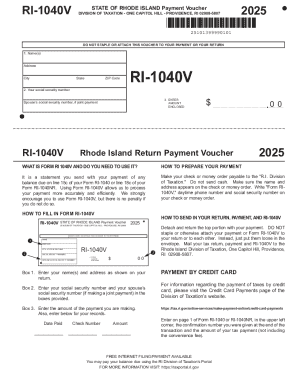
Ddress City State ZIP Code RI-1040V 2. Your social security number 3. ENTER AMOUNT ENCLOSED Spouse s social security number, if joint payment RI-1040V $ Rhode Island Return Payment Voucher 00 2025 WHAT IS FORM RI 1040V AND DO YOU NEED TO USE IT? HOW TO PREPARE YOUR PAYMENT It is a statement you send with your payment of any balance due on line 15c of your Form RI-1040 or line 18c of your Form RI-1040NR. Using Form RI-1040V allows us to process your payment more accurately and eff.

How it works

  1. Open form

    Open form follow the instructions

  2. Easily sign form

    Easily sign the form with your finger

  3. Share form

    Send filled & signed form or save

How to fill out and sign DO NOT STAPLE OR ATTACH THIS VOUCHER TO YOUR PAYMENT OR YOUR RETURN online?

Get your online template and fill it in using progressive features. Enjoy smart fillable fields and interactivity.Follow the simple instructions below:

Tips on how to fill out, edit and sign DO NOT STAPLE OR ATTACH THIS VOUCHER TO YOUR PAYMENT OR YOUR RETURN online

How to edit DO NOT STAPLE OR ATTACH THIS VOUCHER TO YOUR PAYMENT OR YOUR RETURN: customize forms online

Enjoy the functionality of the multi-featured online editor while filling out your DO NOT STAPLE OR ATTACH THIS VOUCHER TO YOUR PAYMENT OR YOUR RETURN. Use the diversity of tools to rapidly fill out the blanks and provide the required information right away.

Preparing paperwork is time-taking and costly unless you have ready-to-use fillable forms and complete them electronically. The most effective way to cope with the DO NOT STAPLE OR ATTACH THIS VOUCHER TO YOUR PAYMENT OR YOUR RETURN is to use our professional and multi-functional online editing tools. We provide you with all the necessary tools for fast form fill-out and allow you to make any adjustments to your forms, adapting them to any demands. Apart from that, you can comment on the updates and leave notes for other parties involved.

Here’s what you can do with your DO NOT STAPLE OR ATTACH THIS VOUCHER TO YOUR PAYMENT OR YOUR RETURN in our editor:

  1. Complete the blank fields using Text, Cross, Check, Initials, Date, and Sign options.
  2. Highlight significant information with a favorite color or underline them.
  3. Conceal confidential data with the Blackout tool or simply erase them.
  4. Add images to visualize your DO NOT STAPLE OR ATTACH THIS VOUCHER TO YOUR PAYMENT OR YOUR RETURN.
  5. Substitute the original text with the one suiting your requirements.
  6. Leave comments or sticky notes to inform others about the updates.
  7. Create extra fillable areas and assign them to particular recipients.
  8. Protect the template with watermarks, add dates, and bates numbers.
  9. Share the document in various ways and save it on your device or the cloud in different formats once you finish adjusting.

Dealing with DO NOT STAPLE OR ATTACH THIS VOUCHER TO YOUR PAYMENT OR YOUR RETURN in our robust online editor is the quickest and most efficient way to manage, submit, and share your paperwork the way you need it from anywhere. The tool works from the cloud so that you can access it from any location on any internet-connected device. All forms you create or prepare are safely kept in the cloud, so you can always access them whenever needed and be assured of not losing them. Stop wasting time on manual document completion and eliminate papers; make it all online with minimum effort.

Get form

Experience a faster way to fill out and sign forms on the web. Access the most extensive library of templates available.
Get form

Related content

Pay by check or money order | Internal Revenue...
Nov 5, 2025 — Enter the amount using all numbers ($###.##). Do not use staples or paper...
Learn more
2025 Form 1040-ES
If you are filing a joint estimated tax payment voucher, enter the SSN that you will show...
Learn more
Annual Return of Withheld Federal Income Tax Sign...
Don't staple Form 945-V or your payment to the return (or to each other). ... ▷ Don't...
Learn more

Related links form

Composition Of Compounds 3 Parents' Code Of Conduct Lesson 10 PLC Fundamentals

Questions & Answers

Get answers to your most pressing questions about US Legal Forms API.

Contact support

A return payment voucher is a document you use when submitting a payment along with your tax return. It provides the IRS with necessary information to track your payment properly. Always remember to DO NOT STAPLE OR ATTACH THIS VOUCHER TO YOUR PAYMENT OR YOUR RETURN to ensure that your submission is processed efficiently.

Yes, you can send a payment to the IRS without a voucher, but it is not recommended. Without a voucher, your payment may take longer to process, and there is a higher chance of misapplication. If you do send a payment without a voucher, be sure to DO NOT STAPLE OR ATTACH THIS VOUCHER TO YOUR PAYMENT OR YOUR RETURN if you include one.

Payment vouchers are essential for organizing and processing your tax payments accurately. They help the IRS identify your payment and apply it correctly to your account. Always keep in mind to DO NOT STAPLE OR ATTACH THIS VOUCHER TO YOUR PAYMENT OR YOUR RETURN for a smooth processing experience.

Your tax return should not be stapled. The IRS specifically instructs taxpayers to DO NOT STAPLE OR ATTACH THIS VOUCHER TO YOUR PAYMENT OR YOUR RETURN. By avoiding staples, you help the IRS process your documents more efficiently, minimizing the chances of errors or delays.

A payment voucher for taxes is a document that you submit along with your payment to the IRS. It includes important details like your name, address, and taxpayer identification number, making it easier for the IRS to credit your payment accurately. Always remember to DO NOT STAPLE OR ATTACH THIS VOUCHER TO YOUR PAYMENT OR YOUR RETURN to ensure prompt processing.

Payment vouchers on your tax return help ensure that your payments are processed correctly. They provide essential information such as the amount due and the tax period for which you are making the payment. It’s crucial to remember, however, to DO NOT STAPLE OR ATTACH THIS VOUCHER TO YOUR PAYMENT OR YOUR RETURN. Following this guideline helps avoid processing delays.

Your tax return includes payment vouchers to facilitate any payments owed to the IRS. They help streamline the payment process and ensure that your payments are accurately processed. Always remember to DO NOT STAPLE OR ATTACH THIS VOUCHER TO YOUR PAYMENT OR YOUR RETURN.

After filling out a payment voucher, send it along with your payment to the IRS or state tax authority. This helps to ensure that your payment is recorded correctly. Remember, you should DO NOT STAPLE OR ATTACH THIS VOUCHER TO YOUR PAYMENT OR YOUR RETURN.

While a payment voucher is not always required, it is highly recommended for tracking payments. Using a voucher can help ensure that your payment is properly credited to your tax account. Just keep in mind, you must DO NOT STAPLE OR ATTACH THIS VOUCHER TO YOUR PAYMENT OR YOUR RETURN.

No, you should never staple your check to your tax return. This can cause processing delays and errors in your payment. To ensure proper processing, remember to DO NOT STAPLE OR ATTACH THIS VOUCHER TO YOUR PAYMENT OR YOUR RETURN.

Get This Form Now!

Use professional pre-built templates to fill in and sign documents online faster. Get access to thousands of forms.
Get form
If you believe that this page should be taken down, please follow our DMCA take down processhere.
Get DO NOT STAPLE OR ATTACH THIS VOUCHER TO YOUR PAYMENT OR YOUR RETURN
Get form
  • Adoption
  • Bankruptcy
  • Contractors
  • Divorce
  • Home Sales
  • Employment
  • Identity Theft
  • Incorporation
  • Landlord Tenant
  • Living Trust
  • Name Change
  • Personal Planning
  • Small Business
  • Wills & Estates
  • Packages A-Z
  • Affidavits
  • Bankruptcy
  • Bill of Sale
  • Corporate - LLC
  • Divorce
  • Employment
  • Identity Theft
  • Internet Technology
  • Landlord Tenant
  • Living Wills
  • Name Change
  • Power of Attorney
  • Real Estate
  • Small Estates
  • Wills
  • All Forms
  • Forms A-Z
  • Other Templates
  • Legal Hub
  • About Us
  • Help Portal
  • Legal Resources
  • Blog
  • Affiliates
  • Contact Us
  • Delete My Account
  • Site Map
  • Industries
  • Forms in Spanish
  • Localized Forms
  • State-specific Forms
  • Forms Kit
  • Real Estate Handbook
  • All Guides
  • Notarize
  • Incorporation services
  • For Consumers
  • For Small Business
  • For Attorneys
  • USLegal
  • FormsPass
  • pdfFiller
  • signNow
  • altaFlow
  • DocHub
  • Instapage
Form Packages
  • Adoption
  • Bankruptcy
  • Contractors
  • Divorce
  • Home Sales
  • Employment
  • Identity Theft
  • Incorporation
  • Landlord Tenant
  • Living Trust
  • Name Change
  • Personal Planning
  • Small Business
  • Wills & Estates
  • Packages A-Z
Form Categories
  • Affidavits
  • Bankruptcy
  • Bill of Sale
  • Corporate - LLC
  • Divorce
  • Employment
  • Identity Theft
  • Internet Technology
  • Landlord Tenant
  • Living Wills
  • Name Change
  • Power of Attorney
  • Real Estate
  • Small Estates
  • Wills
  • All Forms
  • Forms A-Z
  • Other Templates
Customer Service
  • Legal Hub
  • About Us
  • Help Portal
  • Legal Resources
  • Blog
  • Affiliates
  • Contact Us
  • Delete My Account
  • Site Map
  • Industries
  • Forms in Spanish
  • Localized Forms
  • State-specific Forms
  • Forms Kit
Legal Guides
  • Real Estate Handbook
  • All Guides
Prepared for you
  • Notarize
  • Incorporation services
Our Customers
  • For Consumers
  • For Small Business
  • For Attorneys
Our Sites
  • USLegal
  • FormsPass
  • pdfFiller
  • signNow
  • altaFlow
  • DocHub
  • Instapage
Social Media
Call us now toll free:
+1 833 426 79 33
As seen in:
© Copyright 1999-2026 airSlate Legal Forms, Inc. 17 Station Street, Ste. 203, Brookline, MA 02445
  • Your Privacy Choices
  • Terms of Service
  • Privacy Notice
  • Content Takedown Policy
  • Bug Bounty Program