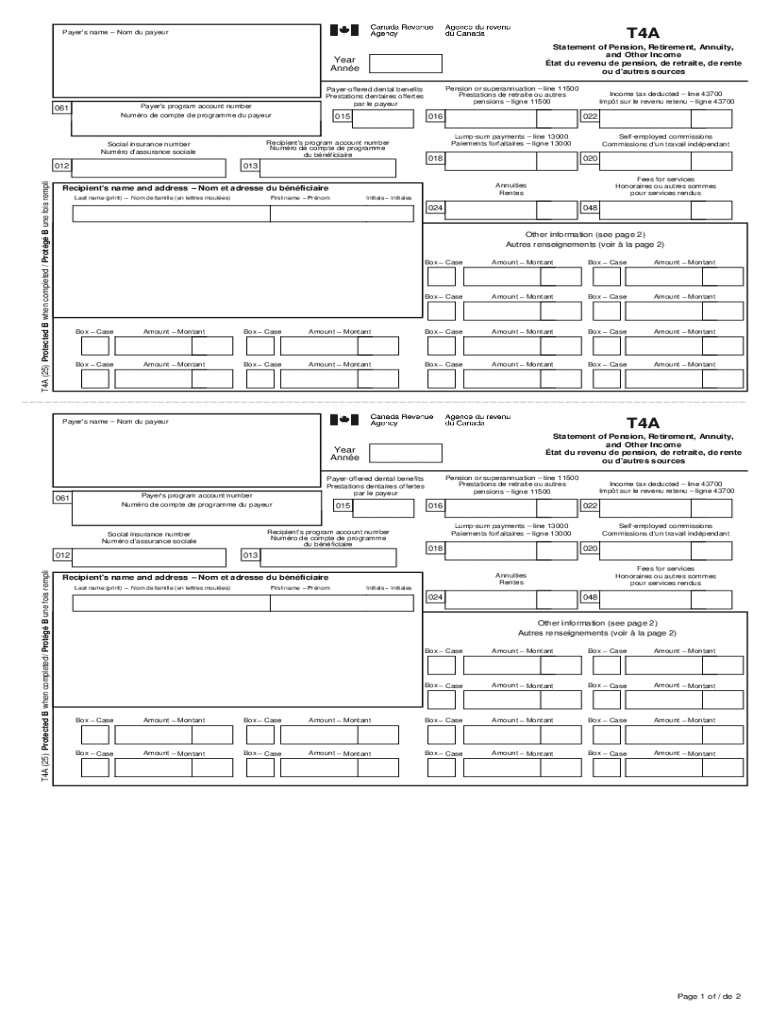
T4APayer's nameNom du payeurStatement of Pension, Retirement, Annuity, and Other Income tat du revenu de pension, de retraite, de rente ou d'autres sourcesYear AnnePayer's program account number061Numro.
Loading

Open form follow the instructions

Easily sign the form with your finger

Send filled & signed form or save
Tips on how to fill out, edit and sign Canada T4A online
How to edit Canada T4A
Say goodbye to an old-fashioned paper-based way of completing Canada T4A. Have the form completed and certified in minutes with our top-notch online editor.
Are you challenged to modify and fill out Canada T4A? With a robust editor like ours, you can perform this task in only minutes without having to print and scan documents over and over again. We provide completely editable and straightforward form templates that will become a start and help you complete the necessary form online.
All forms, by default, contain fillable fields you can complete as soon as you open the template. Nevertheless, if you need to polish the existing content of the document or insert a new one, you can choose from various editing and annotation options. Highlight, blackout, and comment on the document; include checkmarks, lines, text boxes, images and notes, and comments. Moreover, you can swiftly certify the template with a legally-binding signature. The completed document can be shared with others, stored, imported to external programs, or transformed into any popular format.
You’ll never go wrong by choosing our web-based solution to complete Canada T4A because it's:
- Easy to set up and utilize, even for those who haven’t filled the documents electronically in the past.
- Robust enough to allow for multiple editing needs and form types.
- Safe and secure, making your editing experience safeguarded every time.
- Available across different operating systems, making it stress-free to complete the form from anywhere.
- Capable of generating forms based on ready-drafted templates.
- Friendly to various document formats: PDF, DOC, DOCX, PPT and JPEG etc.
Don't waste time editing your Canada T4A obsolete way - with pen and paper. Use our full-featured tool instead. It provides you with a versatile suite of editing options, built-in eSignature capabilities, and convenience. The thing that makes it differ from similar alternatives is the team collaboration options - you can work together on forms with anyone, create a well-organized document approval flow from A to Z, and a lot more. Try our online solution and get the best value for your money!
How to sign the PA BCO-10 form electronically
airSlate SignNow makes it easy to add a legally-binding electronic signature to your PA BCO-10 form from any device.
- Open the completed PA BCO-10 form in the editor.
- Click My Signature and choose your preferred signature type.
- Place the signature in the designated field and click Done.
- Download or send the signed document directly from the platform.
How to edit Canada T4A
Say goodbye to an old-fashioned paper-based way of completing Canada T4A. Have the form completed and certified in minutes with our top-notch online editor.
Are you challenged to modify and fill out Canada T4A? With a robust editor like ours, you can perform this task in only minutes without having to print and scan documents over and over again. We provide completely editable and straightforward form templates that will become a start and help you complete the necessary form online.
All forms, by default, contain fillable fields you can complete as soon as you open the template. Nevertheless, if you need to polish the existing content of the document or insert a new one, you can choose from various editing and annotation options. Highlight, blackout, and comment on the document; include checkmarks, lines, text boxes, images and notes, and comments. Moreover, you can swiftly certify the template with a legally-binding signature. The completed document can be shared with others, stored, imported to external programs, or transformed into any popular format.
You’ll never go wrong by choosing our web-based solution to complete Canada T4A because it's:
- Easy to set up and utilize, even for those who haven’t filled the documents electronically in the past.
- Robust enough to allow for multiple editing needs and form types.
- Safe and secure, making your editing experience safeguarded every time.
- Available across different operating systems, making it stress-free to complete the form from anywhere.
- Capable of generating forms based on ready-drafted templates.
- Friendly to various document formats: PDF, DOC, DOCX, PPT and JPEG etc.
Don't waste time editing your Canada T4A obsolete way - with pen and paper. Use our full-featured tool instead. It provides you with a versatile suite of editing options, built-in eSignature capabilities, and convenience. The thing that makes it differ from similar alternatives is the team collaboration options - you can work together on forms with anyone, create a well-organized document approval flow from A to Z, and a lot more. Try our online solution and get the best value for your money!
Experience a faster way to fill out and sign forms on the web. Access the most extensive library of templates available.
Related content
by J Oh · 2019 · Cited by 4 — ChemoRT and Sx/RT were associated with better OS...
T4 and T4A tax slips are provided to active Western employees by electronic delivery...
Micro Motion transmitters and controllers from Emerson Process Management utilize MVD...
Get answers to your most pressing questions about US Legal Forms API.
Where can I find T4A Canada?
You can find your T4A in Canada through your employer or the Canada Revenue Agency's online portal. Employers are required to provide T4A slips to individuals who received income. If you encounter difficulties, US Legal Forms can help you navigate the process and access your documents.
Can I download my T4A form?
Yes, you can download your T4A form from the Canada Revenue Agency's website. After logging in, navigate to the relevant section where your T4A is listed and select the option to download. For further assistance, consider using US Legal Forms, which can help you access and manage your tax documents.
Does everyone get a T4A in Canada?
Not everyone receives a T4A in Canada. This slip is issued to individuals who have received certain types of income, such as self-employment earnings or scholarships. Therefore, if you have not earned income in these categories, you may not receive a T4A.
How do I download a copy of my income tax return?
To download a copy of your income tax return, log into your account on the Canada Revenue Agency's website. After logging in, you will find your tax return documents available for download. Utilizing platforms like US Legal Forms can streamline this process and provide additional support.
What's the difference between a T4A and a 1099?
A T4A and a 1099 serve similar purposes but apply to different countries. The T4A is used in Canada for reporting income such as self-employment or pension income, while the 1099 is the U.S. version for reporting various types of income. Understanding these differences is crucial for accurate tax reporting.
Can I view my T4 slip online?
Yes, you can view your T4 slip online by accessing your account on the Canada Revenue Agency's website. Once logged in, navigate to your tax documents section. If you need a comprehensive platform for managing your tax documents, US Legal Forms can assist you.
Does a T4A mean I owe taxes?
Receiving a T4A does not automatically mean you owe taxes. This slip simply indicates income earned, which may be taxable. It is essential to review your total income and deductions to determine your tax obligations accurately.
Can I file my Canada tax return outside of Canada?
Yes, you can file your Canada tax return while residing outside of Canada. The Canada Revenue Agency allows Canadians abroad to submit their returns electronically or by mail. Make sure to gather all relevant documents, including your Canada T4A, to ensure a smooth filing process.
How to get T4A online in Canada?
You can obtain your T4A online in Canada by logging into your account with the Canada Revenue Agency. After logging in, navigate to the 'Tax Information' section to find your T4A slips. If you need further assistance, consider using US Legal Forms to simplify your document retrieval process.
How to save T4 as PDF?
To save your T4 as a PDF, access your T4 document through your accounting software or the Canada Revenue Agency's website. Once you have opened the T4 form, look for the option to 'Print' or 'Download.' Choose 'Save as PDF' from the print options to store it on your device.
Use professional pre-built templates to fill in and sign documents online faster. Get access to thousands of forms.
If you believe that this page should be taken down, please follow our DMCA take down process here.