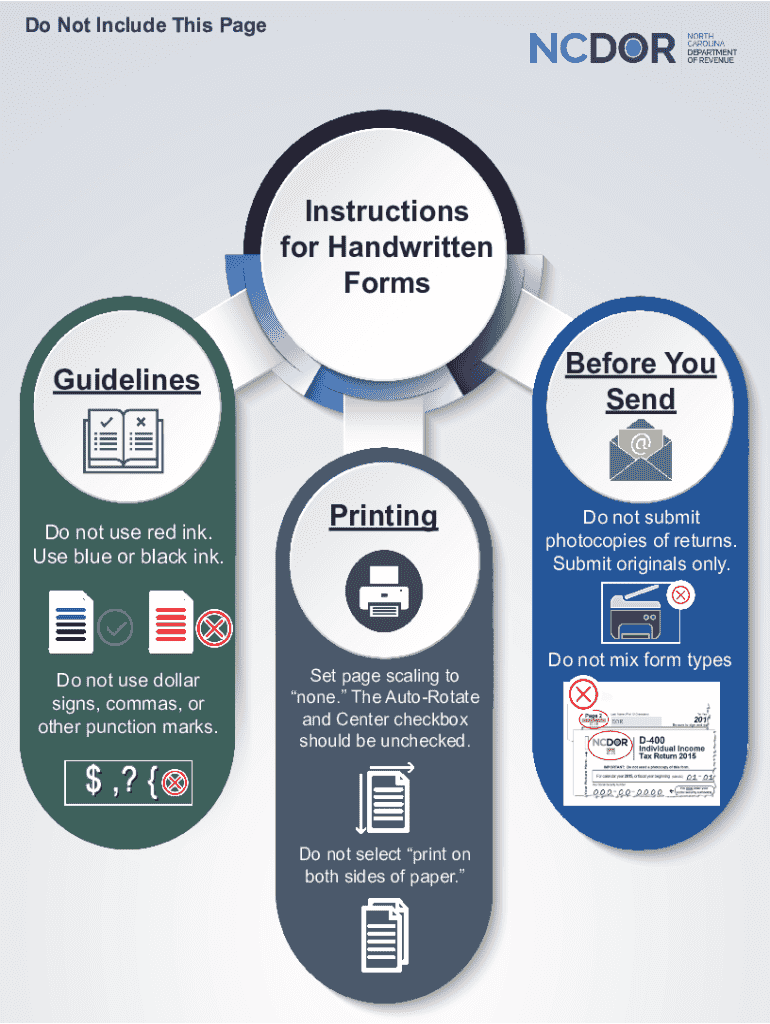
Do Not Include This PageInstructions for Handwritten Forms Before You SendGuidelinesDo not use red ink. Use blue or black ink.Do not use dollar signs, commas, or other punction marks.PrintingSet page.

Open form follow the instructions

Easily sign the form with your finger

Send filled & signed form or save
Tips on how to fill out, edit and sign Instructions For Handwritten Forms Guidelines online
How to edit Instructions For Handwritten Forms Guidelines
Check out a single service to manage all your paperwork effortlessly. Find, modify, and complete your Instructions For Handwritten Forms Guidelines in a single interface with the help of smart tools.
The days when people had to print forms or even write them manually are long gone. Nowadays, all it takes to get and complete any form, like Instructions For Handwritten Forms Guidelines, is opening a single browser tab. Here, you will find the Instructions For Handwritten Forms Guidelines form and customize it any way you need, from inserting the text straight in the document to drawing it on a digital sticky note and attaching it to the document. Discover tools that will streamline your paperwork without extra effort.
Click the Get form button to prepare your Instructions For Handwritten Forms Guidelines paperwork rapidly and start modifying it instantly. In the editing mode, you can easily fill in the template with your details for submission. Simply click on the field you need to alter and enter the information right away. The editor's interface does not require any specific skills to use it. When finished with the edits, check the information's accuracy once more and sign the document. Click on the signature field and follow the instructions to eSign the form in a moment.
Use Additional tools to customize your form:
- Use Cross, Check, or Circle tools to pinpoint the document's data.
- Add textual content or fillable text fields with text customization tools.
- Erase, Highlight, or Blackout text blocks in the document using corresponding tools.
- Add a date, initials, or even an image to the document if necessary.
- Make use of the Sticky note tool to annotate the form.
- Use the Arrow and Line, or Draw tool to add visual components to your document.
Preparing Instructions For Handwritten Forms Guidelines forms will never be perplexing again if you know where to look for the suitable template and prepare it quickly. Do not hesitate to try it yourself.
How to sign the PA BCO-10 form electronically
airSlate SignNow makes it easy to add a legally-binding electronic signature to your PA BCO-10 form from any device.
- Open the completed PA BCO-10 form in the editor.
- Click My Signature and choose your preferred signature type.
- Place the signature in the designated field and click Done.
- Download or send the signed document directly from the platform.
How to edit Instructions For Handwritten Forms Guidelines
Check out a single service to manage all your paperwork effortlessly. Find, modify, and complete your Instructions For Handwritten Forms Guidelines in a single interface with the help of smart tools.
The days when people had to print forms or even write them manually are long gone. Nowadays, all it takes to get and complete any form, like Instructions For Handwritten Forms Guidelines, is opening a single browser tab. Here, you will find the Instructions For Handwritten Forms Guidelines form and customize it any way you need, from inserting the text straight in the document to drawing it on a digital sticky note and attaching it to the document. Discover tools that will streamline your paperwork without extra effort.
Click the Get form button to prepare your Instructions For Handwritten Forms Guidelines paperwork rapidly and start modifying it instantly. In the editing mode, you can easily fill in the template with your details for submission. Simply click on the field you need to alter and enter the information right away. The editor's interface does not require any specific skills to use it. When finished with the edits, check the information's accuracy once more and sign the document. Click on the signature field and follow the instructions to eSign the form in a moment.
Use Additional tools to customize your form:
- Use Cross, Check, or Circle tools to pinpoint the document's data.
- Add textual content or fillable text fields with text customization tools.
- Erase, Highlight, or Blackout text blocks in the document using corresponding tools.
- Add a date, initials, or even an image to the document if necessary.
- Make use of the Sticky note tool to annotate the form.
- Use the Arrow and Line, or Draw tool to add visual components to your document.
Preparing Instructions For Handwritten Forms Guidelines forms will never be perplexing again if you know where to look for the suitable template and prepare it quickly. Do not hesitate to try it yourself.
Experience a faster way to fill out and sign forms on the web. Access the most extensive library of templates available.
Related content
Returns are due by the 15th day of the 3rd month following the end of the calendar year...
Both the questioned and known writing submitted for examination should be original...
Do not write between lines. Do not use arrows or quotation marks to duplicate information...
Use professional pre-built templates to fill in and sign documents online faster. Get access to thousands of forms.
If you believe that this page should be taken down, please follow our DMCA take down process here.