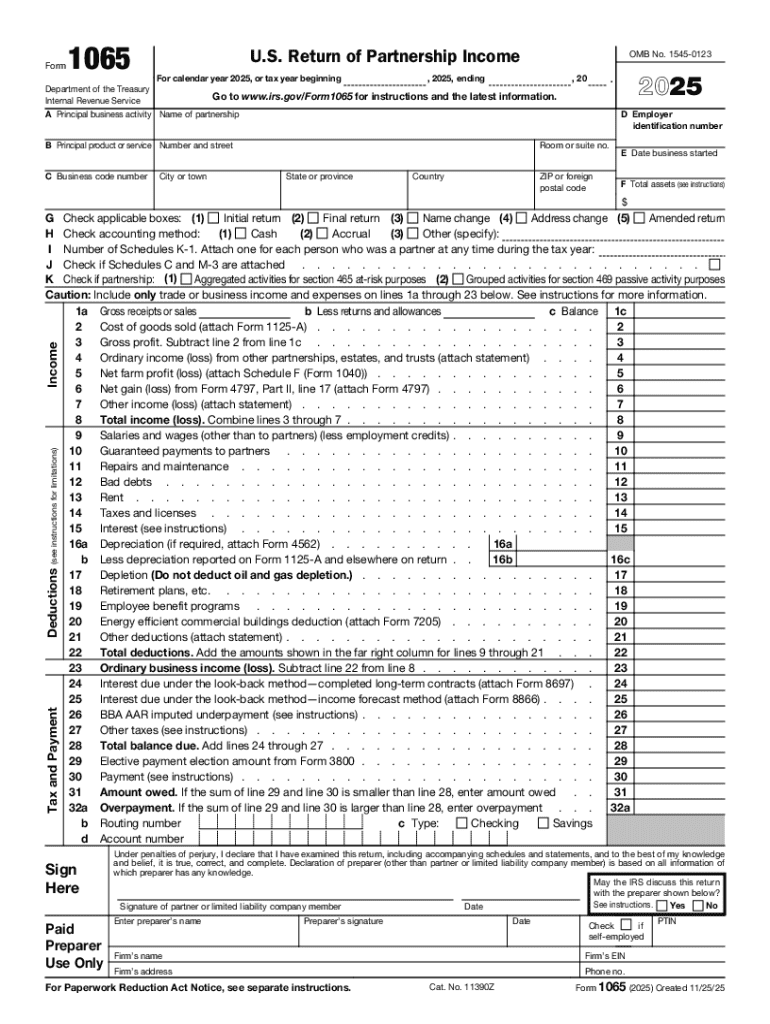
Form1065U.S. Return of Partnership Income For calendar year 2025, or tax year beginningDepartment of the Treasury Internal Revenue ServiceOMB No. 15450123, 2025, ending, 20Go to www.irs.gov/Form1065.
Loading

Open form follow the instructions

Easily sign the form with your finger

Send filled & signed form or save
How to fill out and sign Form 1065: Partnership Tax Return - TurboTax - Intuit online?
Get your online template and fill it in using progressive features. Enjoy smart fillable fields and interactivity.Follow the simple instructions below:
Business, legal, tax along with other e-documents need higher of compliance with the legislation and protection. Our templates are regularly updated according to the latest legislative changes. Additionally, with our service, all of the details you provide in the Form 1065: Partnership Tax Return - TurboTax - Intuit is protected against leakage or damage through top-notch encryption.
The tips below can help you complete Form 1065: Partnership Tax Return - TurboTax - Intuit quickly and easily:
- Open the template in the feature-rich online editor by clicking on Get form.
- Fill out the necessary boxes which are marked in yellow.
- Hit the green arrow with the inscription Next to move on from one field to another.
- Use the e-autograph solution to e-sign the document.
- Put the relevant date.
- Double-check the whole document to make sure you have not skipped anything.
- Hit Done and download the new document.
Our service allows you to take the whole procedure of completing legal documents online. As a result, you save hours (if not days or weeks) and eliminate extra expenses. From now on, submit Form 1065: Partnership Tax Return - TurboTax - Intuit from the comfort of your home, office, or even while on the move.
Tips on how to fill out, edit and sign Form 1065: Partnership Tax Return - TurboTax - Intuit online
How to fill and sign Form 1065: Partnership Tax Return - TurboTax - Intuit
Get your online template and fill it in using progressive features. Enjoy smart fillable fields and interactivity.Follow the simple instructions below:
Business, legal, tax along with other e-documents need higher of compliance with the legislation and protection. Our templates are regularly updated according to the latest legislative changes. Additionally, with our service, all of the details you provide in the Form 1065: Partnership Tax Return - TurboTax - Intuit is protected against leakage or damage through top-notch encryption.
The tips below can help you complete Form 1065: Partnership Tax Return - TurboTax - Intuit quickly and easily:
- Open the template in the feature-rich online editor by clicking on Get form.
- Fill out the necessary boxes which are marked in yellow.
- Hit the green arrow with the inscription Next to move on from one field to another.
- Use the e-autograph solution to e-sign the document.
- Put the relevant date.
- Double-check the whole document to make sure you have not skipped anything.
- Hit Done and download the new document.
Our service allows you to take the whole procedure of completing legal documents online. As a result, you save hours (if not days or weeks) and eliminate extra expenses. From now on, submit Form 1065: Partnership Tax Return - TurboTax - Intuit from the comfort of your home, office, or even while on the move.
How to edit Form 1065: Partnership Tax Return - TurboTax - Intuit
Find the correct Form 1065: Partnership Tax Return - TurboTax - Intuit template and edit it on the spot. Simplify your paperwork with a smart document editing solution for online forms.
Your everyday workflow with paperwork and forms can be more effective when you have all you need in one place. For instance, you can find, obtain, and edit Form 1065: Partnership Tax Return - TurboTax - Intuit in one browser tab. If you need a specific Form 1065: Partnership Tax Return - TurboTax - Intuit, you can easily find it with the help of the smart search engine and access it immediately. You don’t have to download it or look for a third-party editor to edit it and add your information. All of the instruments for efficient work go in one packaged solution.
This modifying solution allows you to modify, fill, and sign your Form 1065: Partnership Tax Return - TurboTax - Intuit form right on the spot. Once you find a suitable template, click on it to open the modifying mode. Once you open the form in the editor, you have all the needed instruments at your fingertips. You can easily fill in the dedicated fields and erase them if needed with the help of a simple yet multifunctional toolbar. Apply all the modifications immediately, and sign the form without exiting the tab by merely clicking the signature field. After that, you can send or print your file if necessary.
Make more custom edits with available instruments.
- Annotate your file with the Sticky note tool by placing a note at any spot within the document.
- Add required visual components, if needed, with the Circle, Check, or Cross instruments.
- Modify or add text anywhere in the document using Texts and Text box instruments. Add content with the Initials or Date tool.
- Modify the template text with the Highlight and Blackout, or Erase instruments.
- Add custom visual components with the Arrow and Line, or Draw tools.
Discover new options in streamlined and trouble-free paperwork. Find the Form 1065: Partnership Tax Return - TurboTax - Intuit you need in minutes and fill it in in the same tab. Clear the mess in your paperwork once and for all with the help of online forms.
How to fill and sign Form 1065: Partnership Tax Return - TurboTax - Intuit
Get your online template and fill it in using progressive features. Enjoy smart fillable fields and interactivity.Follow the simple instructions below:
Business, legal, tax along with other e-documents need higher of compliance with the legislation and protection. Our templates are regularly updated according to the latest legislative changes. Additionally, with our service, all of the details you provide in the Form 1065: Partnership Tax Return - TurboTax - Intuit is protected against leakage or damage through top-notch encryption.
The tips below can help you complete Form 1065: Partnership Tax Return - TurboTax - Intuit quickly and easily:
- Open the template in the feature-rich online editor by clicking on Get form.
- Fill out the necessary boxes which are marked in yellow.
- Hit the green arrow with the inscription Next to move on from one field to another.
- Use the e-autograph solution to e-sign the document.
- Put the relevant date.
- Double-check the whole document to make sure you have not skipped anything.
- Hit Done and download the new document.
Our service allows you to take the whole procedure of completing legal documents online. As a result, you save hours (if not days or weeks) and eliminate extra expenses. From now on, submit Form 1065: Partnership Tax Return - TurboTax - Intuit from the comfort of your home, office, or even while on the move.
Experience a faster way to fill out and sign forms on the web. Access the most extensive library of templates available.
Related content
Partnerships must provide partners adequate information and a copy of the covenant needed...
It supports a wide range of tax filings, including: Form 1065 for partnerships. Form 1120...
Under the Intuit Tax Freedom Project, we provide online federal and state income tax...
Use professional pre-built templates to fill in and sign documents online faster. Get access to thousands of forms.
If you believe that this page should be taken down, please follow our DMCA take down process here.