Loading
Form preview
  • US Legal Forms
  • Form Library
  • Foreign Forms
  • Foreign Philippines Other Forms
  • Ph Fm-csd-019

Get Ph Fm-csd-019

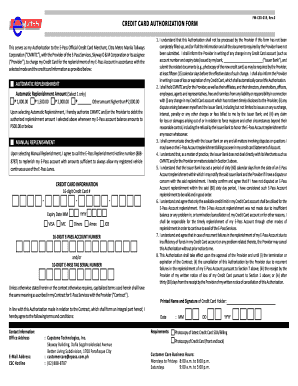
S not deal directly with its Merchants such as CMMTC and/or the Provider on matters stated in Section 3 above. 5. I understand that the Issuer Bank has set a period of sixty (60) calendar days from the date of an E-Pass Account replenishment within which I may notify the said Issuer Bank and the Provider if I have a dispute or concern with the said replenishment. I hereby confirm and agree that if I have not disputed an E-Pass Account replenishment within the said (60) sixty day period, I have c.

How it works

  1. Open form

    Open form follow the instructions

  2. Easily sign form

    Easily sign the form with your finger

  3. Share form

    Send filled & signed form or save

How to fill out the PH FM-CSD-019 online

The PH FM-CSD-019 is a credit card authorization form that enables users to authorize Citra Metro Manila Tollways Corporation to charge their credit card for the replenishment of their E-Pass account. This guide provides step-by-step instructions to assist users in accurately completing the form online.

Follow the steps to successfully complete the form.

  1. Click the ‘Get Form’ button to obtain the form and open it in the editor.
  2. Read through the introductory section of the form carefully. This section outlines the purpose of the authorization and the services provided by CMMTC and Skyway O & M Corporation.
  3. Select your preferred replenishment method by choosing either 'Automatic Replenishment' or 'Manual Replenishment.' If you choose Automatic Replenishment, select one of the provided amounts or specify a custom amount.
  4. Fill in the 'Credit Card Information' section. Enter your 16-digit credit card number, select the card type (e.g., VISA, MasterCard), and specify the expiry date.
  5. Provide your 16-digit E-Pass account number and/or 10-digit E-Pass tag serial number in the designated fields to ensure accurate account replenishment.
  6. Read and acknowledge the terms and conditions outlined in the authorization section. This includes the responsibilities regarding communication with the issuer bank about any changes or issues related to your credit card.
  7. Enter your printed name and signature as the credit card holder in the appropriate section to validate your authorization.
  8. Complete the contact information fields, including your office address and email address, to ensure proper communication from the provider.
  9. Finally, review all filled sections for accuracy, save the changes, and proceed to download or print the form as needed.

Complete your forms online today for a seamless E-Pass replenishment experience.

Get form

Experience a faster way to fill out and sign forms on the web. Access the most extensive library of templates available.
Get form

Related content

CSD-Induced Arterial Dilatation and Plasma Protein...
by AJ Schain · 2019 · Cited by 77 — We found that the CSD-induced brief dilatation and...
Learn more
Course Enrollment Profile
Feb 5, 2020 — Course Enrollment Profile. A semester by semester look at the number of...
Learn more
I-IYDRON IC CAST IRON H EAT OIL ...
The PF-5 series has a sealed, forced draft design, cast iron construction, uses gas, oil...
Learn more

Related links form

Comprehensive Equity Plan Format 2012 THE UNIVERSITY OF THE STATE OF NEW YORK - ACCES - New ... - Acces Nysed Strategy And Tactics For Pilot Implementation In The ADDIE Model ... Ied Study Erasmus Form

Questions & Answers

Get answers to your most pressing questions about US Legal Forms API.

Contact support

To create an E-ZPass account, you need to visit the E-ZPass website relevant to your state, as each state may have its specific site. You will have to fill out personal information, vehicle details, and a payment method. Once registered, you can easily monitor your toll usage and account balance. Utilizing resources like PH FM-CSD-019 can guide you through the process.

To create an e-pass, start by navigating to the Florida e-pass online portal. You should gather necessary information, including your vehicle registration details and payment method. The process is designed for user-friendliness, making it simple to set up your account. Remember, this ties back to the efficiency showcased in PH FM-CSD-019.

Creating an e-pass is a straightforward process that involves visiting the official Florida e-pass website. You will need to provide some basic information, such as your vehicle details and payment preferences. After completing the registration, you can manage your account easily. This convenience aligns well with the features outlined in PH FM-CSD-019.

While both e-pass in Florida and E-ZPass serve similar purposes for toll collection, they are different systems. E-ZPass is primarily used in the Northeastern and Midwestern United States. In contrast, e-pass in Florida is customized for the state's toll roads. Therefore, if you're looking into PH FM-CSD-019, it’s crucial to recognize these distinctions.

Get This Form Now!

Use professional pre-built templates to fill in and sign documents online faster. Get access to thousands of forms.
Get form
If you believe that this page should be taken down, please follow our DMCA take down processhere.

Industry-leading security and compliance

US Legal Forms protects your data by complying with industry-specific security standards.
  • In businnes since 1997
    25+ years providing professional legal documents.
  • Accredited business
    Guarantees that a business meets BBB accreditation standards in the US and Canada.
  • Secured by Braintree
    Validated Level 1 PCI DSS compliant payment gateway that accepts most major credit and debit card brands from across the globe.
Get PH FM-CSD-019
Get form
  • Adoption
  • Bankruptcy
  • Contractors
  • Divorce
  • Home Sales
  • Employment
  • Identity Theft
  • Incorporation
  • Landlord Tenant
  • Living Trust
  • Name Change
  • Personal Planning
  • Small Business
  • Wills & Estates
  • Packages A-Z
  • Affidavits
  • Bankruptcy
  • Bill of Sale
  • Corporate - LLC
  • Divorce
  • Employment
  • Identity Theft
  • Internet Technology
  • Landlord Tenant
  • Living Wills
  • Name Change
  • Power of Attorney
  • Real Estate
  • Small Estates
  • Wills
  • All Forms
  • Forms A-Z
  • Form Library
  • Legal Hub
  • About Us
  • Help Portal
  • Legal Resources
  • Blog
  • Affiliates
  • Contact Us
  • Delete My Account
  • Site Map
  • Industries
  • Forms in Spanish
  • Localized Forms
  • State-specific Forms
  • Forms Kit
  • Real Estate Handbook
  • All Guides
  • Notarize
  • Incorporation services
  • For Consumers
  • For Small Business
  • For Attorneys
  • USLegal
  • FormsPass
  • pdfFiller
  • signNow
  • altaFlow
  • DocHub
  • Instapage
Form Packages
  • Adoption
  • Bankruptcy
  • Contractors
  • Divorce
  • Home Sales
  • Employment
  • Identity Theft
  • Incorporation
  • Landlord Tenant
  • Living Trust
  • Name Change
  • Personal Planning
  • Small Business
  • Wills & Estates
  • Packages A-Z
Form Categories
  • Affidavits
  • Bankruptcy
  • Bill of Sale
  • Corporate - LLC
  • Divorce
  • Employment
  • Identity Theft
  • Internet Technology
  • Landlord Tenant
  • Living Wills
  • Name Change
  • Power of Attorney
  • Real Estate
  • Small Estates
  • Wills
  • All Forms
  • Forms A-Z
  • Form Library
Customer Service
  • Legal Hub
  • About Us
  • Help Portal
  • Legal Resources
  • Blog
  • Affiliates
  • Contact Us
  • Delete My Account
  • Site Map
  • Industries
  • Forms in Spanish
  • Localized Forms
  • State-specific Forms
  • Forms Kit
Legal Guides
  • Real Estate Handbook
  • All Guides
Prepared for you
  • Notarize
  • Incorporation services
Our Customers
  • For Consumers
  • For Small Business
  • For Attorneys
Our Sites
  • USLegal
  • FormsPass
  • pdfFiller
  • signNow
  • altaFlow
  • DocHub
  • Instapage
Social Media
Call us now toll free:
+1 833 426 79 33
As seen in:
© Copyright 1999-2026 airSlate Legal Forms, Inc. 3720 Flowood Dr, Flowood, Mississippi 39232
  • Your Privacy Choices
  • Terms of Service
  • Privacy Notice
  • Content Takedown Policy
  • Bug Bounty Program