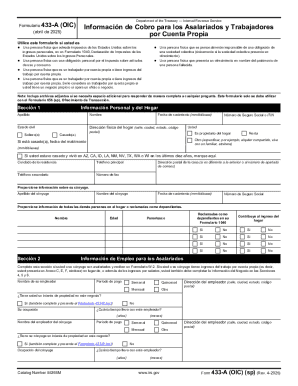
Get Form 433-a (oic) (sp) (rev. 4-2025)
How it works
-

Open form follow the instructions
-

Easily sign the form with your finger
-

Send filled & signed form or save
How to fill out and sign Form 433-A (OIC) (sp) (Rev. 4-2025) online?
Get your online template and fill it in using progressive features. Enjoy smart fillable fields and interactivity.Follow the simple instructions below:The times of terrifying complicated tax and legal forms have ended. With US Legal Forms filling out legal documents is anxiety-free. The leading editor is right close at hand supplying you with a wide range of useful tools for completing a Form 433-A (OIC) (sp) (Rev. 4-2025). The following tips, with the editor will assist you through the entire procedure.
- Click on the Get Form option to start editing.
- Switch on the Wizard mode on the top toolbar to get more suggestions.
- Fill out every fillable area.
- Ensure that the details you fill in Form 433-A (OIC) (sp) (Rev. 4-2025) is updated and correct.
- Indicate the date to the template with the Date option.
- Click on the Sign tool and create an electronic signature. You will find three options; typing, drawing, or uploading one.
- Make certain each field has been filled in correctly.
- Select Done in the top right corne to export the file. There are various ways for receiving the doc. An attachment in an email or through the mail as a hard copy, as an instant download.
We make completing any Form 433-A (OIC) (sp) (Rev. 4-2025) faster. Start now!
Tips on how to fill out, edit and sign Form 433-A (OIC) (sp) (Rev. 4-2025) online
How to fill out and sign Form 433-A (OIC) (sp) (Rev. 4-2025) online?
Get your online template and fill it in using progressive features. Enjoy smart fillable fields and interactivity.Follow the simple instructions below:
The times of terrifying complicated tax and legal forms have ended. With US Legal Forms filling out legal documents is anxiety-free. The leading editor is right close at hand supplying you with a wide range of useful tools for completing a Form 433-A (OIC) (sp) (Rev. 4-2025). The following tips, with the editor will assist you through the entire procedure.
- Click on the Get Form option to start editing.
- Switch on the Wizard mode on the top toolbar to get more suggestions.
- Fill out every fillable area.
- Ensure that the details you fill in Form 433-A (OIC) (sp) (Rev. 4-2025) is updated and correct.
- Indicate the date to the template with the Date option.
- Click on the Sign tool and create an electronic signature. You will find three options; typing, drawing, or uploading one.
- Make certain each field has been filled in correctly.
- Select Done in the top right corne to export the file. There are various ways for receiving the doc. An attachment in an email or through the mail as a hard copy, as an instant download.
We make completing any Form 433-A (OIC) (sp) (Rev. 4-2025) faster. Start now!
How to edit Form 433-A (OIC) (sp) (Rev. 4-2025): customize forms online
Simplify your document preparation process and adapt it to your demands within clicks. Complete and approve Form 433-A (OIC) (sp) (Rev. 4-2025) using a powerful yet intuitive online editor.
Preparing documents is always difficult, particularly when you deal with it from time to time. It demands you strictly follow all the formalities and precisely fill out all fields with full and precise data. Nevertheless, it often occurs that you need to change the form or insert extra fields to fill out. If you need to improve Form 433-A (OIC) (sp) (Rev. 4-2025) before submitting it, the best way to do it is by using our powerful yet simple-to-use online editing tools.
This comprehensive PDF editing tool allows you to quickly and easily complete legal paperwork from any internet-connected device, make fundamental edits to the template, and add more fillable fields. The service allows you to select a specific area for each data type, like Name, Signature, Currency and SSN and so on. You can make them required or conditional and decide who should complete each field by assigning them to a specific recipient.
Make the steps listed below to optimize your Form 433-A (OIC) (sp) (Rev. 4-2025) online:
- Open required sample from the catalog.
- Fill out the blanks with Text and place Check and Cross tools to the tickboxes.
- Utilize the right-hand panel to alter the form with new fillable areas.
- Opt for the fields based on the type of data you wish to be collected.
- Make these fields required, optional, and conditional and customize their order.
- Assign each field to a specific party using the Add Signer tool.
- Check if you’ve made all the necessary changes and click Done.
Our editor is a universal multi-featured online solution that can help you quickly and effortlessly adapt Form 433-A (OIC) (sp) (Rev. 4-2025) and other templates in accordance with your needs. Minimize document preparation and submission time and make your forms look professional without hassle.