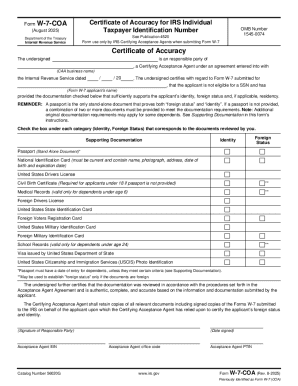
Get Form W-7-coa (rev. 8-2025)
How it works
-

Open form follow the instructions
-

Easily sign the form with your finger
-

Send filled & signed form or save
How to fill out and sign Form W-7-COA (Rev. 8-2025) online?
Get your online template and fill it in using progressive features. Enjoy smart fillable fields and interactivity.Follow the simple instructions below:Experience all the advantages of submitting and completing forms on the internet. Using our platform completing Form W-7-COA (Rev. 8-2025) will take a matter of minutes. We make that possible by giving you access to our full-fledged editor capable of changing/correcting a document?s initial text, adding unique fields, and e-signing.
Execute Form W-7-COA (Rev. 8-2025) in just a few clicks by following the instructions below:
- Pick the template you want from the library of legal form samples.
- Click the Get form button to open it and start editing.
- Complete all the required boxes (they will be yellowish).
- The Signature Wizard will allow you to add your electronic signature after you have finished imputing information.
- Insert the relevant date.
- Check the entire document to be certain you have filled out everything and no corrections are needed.
- Hit Done and save the ecompleted document to your device.
Send your Form W-7-COA (Rev. 8-2025) in an electronic form as soon as you finish filling it out. Your information is securely protected, since we keep to the most up-to-date security standards. Become one of numerous satisfied customers who are already completing legal forms right from their apartments.
Tips on how to fill out, edit and sign Form W-7-COA (Rev. 8-2025) online
How to fill out and sign Form W-7-COA (Rev. 8-2025) online?
Get your online template and fill it in using progressive features. Enjoy smart fillable fields and interactivity.Follow the simple instructions below:
Experience all the advantages of submitting and completing forms on the internet. Using our platform completing Form W-7-COA (Rev. 8-2025) will take a matter of minutes. We make that possible by giving you access to our full-fledged editor capable of changing/correcting a document?s initial text, adding unique fields, and e-signing.
Execute Form W-7-COA (Rev. 8-2025) in just a few clicks by following the instructions below:
- Pick the template you want from the library of legal form samples.
- Click the Get form button to open it and start editing.
- Complete all the required boxes (they will be yellowish).
- The Signature Wizard will allow you to add your electronic signature after you have finished imputing information.
- Insert the relevant date.
- Check the entire document to be certain you have filled out everything and no corrections are needed.
- Hit Done and save the ecompleted document to your device.
Send your Form W-7-COA (Rev. 8-2025) in an electronic form as soon as you finish filling it out. Your information is securely protected, since we keep to the most up-to-date security standards. Become one of numerous satisfied customers who are already completing legal forms right from their apartments.
How to edit Form W-7-COA (Rev. 8-2025): customize forms online
Simplify your document preparation process and adapt it to your requirements within clicks. Fill out and approve Form W-7-COA (Rev. 8-2025) with a comprehensive yet intuitive online editor.
Preparing documents is always difficult, particularly when you deal with it occasionally. It demands you strictly follow all the formalities and accurately complete all areas with full and precise data. Nevertheless, it often occurs that you need to adjust the form or insert extra areas to fill out. If you need to improve Form W-7-COA (Rev. 8-2025) prior to submitting it, the simplest way to do it is by using our comprehensive yet straightforward-to-use online editing tools.
This comprehensive PDF editing solution enables you to easily and quickly complete legal paperwork from any internet-connected device, make fundamental edits to the form, and add more fillable areas. The service enables you to pick a particular area for each data type, like Name, Signature, Currency and SSN and so on. You can make them mandatory or conditional and decide who should complete each field by assigning them to a defined recipient.
Make the steps below to modify your Form W-7-COA (Rev. 8-2025) online:
- Open required sample from the catalog.
- Fill out the blanks with Text and drop Check and Cross tools to the tickboxes.
- Utilize the right-hand panel to modify the form with new fillable areas.
- Select the areas depending on the type of data you want to be collected.
- Make these fields mandatory, optional, and conditional and customize their order.
- Assign each field to a particular party with the Add Signer tool.
- Verify that you’ve made all the required changes and click Done.
Our editor is a universal multi-featured online solution that can help you quickly and effortlessly optimize Form W-7-COA (Rev. 8-2025) along with other templates according to your needs. Reduce document preparation and submission time and make your paperwork look perfect without hassle.