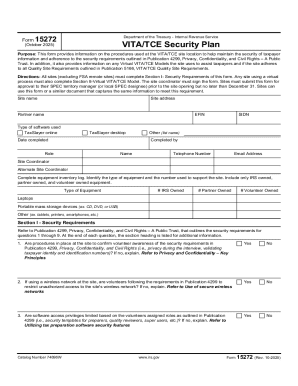
Get Form 15272 (rev. 10-2025). Vita/tce Security Plan
How it works
-

Open form follow the instructions
-

Easily sign the form with your finger
-

Send filled & signed form or save
How to fill out and sign Form 15272 (Rev. 10-2025). VITA/TCE Security Plan online?
Get your online template and fill it in using progressive features. Enjoy smart fillable fields and interactivity.Follow the simple instructions below:Legal, tax, business as well as other electronic documents need a high level of protection and compliance with the law. Our documents are regularly updated in accordance with the latest legislative changes. Additionally, with us, all the data you provide in the Form 15272 (Rev. 10-2025). VITA/TCE Security Plan is protected against leakage or damage by means of cutting-edge file encryption.
The following tips will help you fill in Form 15272 (Rev. 10-2025). VITA/TCE Security Plan quickly and easily:
- Open the document in the feature-rich online editing tool by clicking Get form.
- Fill out the required boxes that are yellow-colored.
- Hit the green arrow with the inscription Next to move on from field to field.
- Go to the e-autograph tool to e-sign the document.
- Put the date.
- Check the entire template to make sure you have not skipped anything important.
- Press Done and download the new template.
Our solution enables you to take the whole procedure of executing legal documents online. As a result, you save hours (if not days or weeks) and eliminate extra payments. From now on, fill in Form 15272 (Rev. 10-2025). VITA/TCE Security Plan from home, office, and even while on the go.
Tips on how to fill out, edit and sign Form 15272 (Rev. 10-2025). VITA/TCE Security Plan online
How to fill out and sign Form 15272 (Rev. 10-2025). VITA/TCE Security Plan online?
Get your online template and fill it in using progressive features. Enjoy smart fillable fields and interactivity.Follow the simple instructions below:
Legal, tax, business as well as other electronic documents need a high level of protection and compliance with the law. Our documents are regularly updated in accordance with the latest legislative changes. Additionally, with us, all the data you provide in the Form 15272 (Rev. 10-2025). VITA/TCE Security Plan is protected against leakage or damage by means of cutting-edge file encryption.
The following tips will help you fill in Form 15272 (Rev. 10-2025). VITA/TCE Security Plan quickly and easily:
- Open the document in the feature-rich online editing tool by clicking Get form.
- Fill out the required boxes that are yellow-colored.
- Hit the green arrow with the inscription Next to move on from field to field.
- Go to the e-autograph tool to e-sign the document.
- Put the date.
- Check the entire template to make sure you have not skipped anything important.
- Press Done and download the new template.
Our solution enables you to take the whole procedure of executing legal documents online. As a result, you save hours (if not days or weeks) and eliminate extra payments. From now on, fill in Form 15272 (Rev. 10-2025). VITA/TCE Security Plan from home, office, and even while on the go.
How to edit Form 15272 (Rev. 10-2025). VITA/TCE Security Plan: customize forms online
Enjoy the user friendliness of the multi-featured online editor while completing your Form 15272 (Rev. 10-2025). VITA/TCE Security Plan. Make use of the diversity of tools to quickly complete the blanks and provide the requested data right away.
Preparing documentation is time-taking and costly unless you have ready-to-use fillable templates and complete them electronically. The simplest way to deal with the Form 15272 (Rev. 10-2025). VITA/TCE Security Plan is to use our professional and multi-functional online editing tools. We provide you with all the essential tools for fast document fill-out and allow you to make any adjustments to your forms, adapting them to any requirements. In addition to that, you can make comments on the updates and leave notes for other people involved.
Here’s what you can do with your Form 15272 (Rev. 10-2025). VITA/TCE Security Plan in our editor:
- Fill out the blank fields using Text, Cross, Check, Initials, Date, and Sign options.
- Highlight essential details with a desired color or underline them.
- Conceal sensitive details using the Blackout tool or simply remove them.
- Insert images to visualize your Form 15272 (Rev. 10-2025). VITA/TCE Security Plan.
- Replace the original text using the one suiting your needs.
- Add comments or sticky notes to inform others about the updates.
- Drop extra fillable areas and assign them to exact recipients.
- Protect the sample with watermarks, place dates, and bates numbers.
- Share the paperwork in various ways and save it on your device or the cloud in different formats once you finish adjusting.
Working with Form 15272 (Rev. 10-2025). VITA/TCE Security Plan in our powerful online editor is the quickest and most efficient way to manage, submit, and share your paperwork the way you need it from anywhere. The tool works from the cloud so that you can use it from any place on any internet-connected device. All forms you generate or prepare are safely stored in the cloud, so you can always access them whenever needed and be assured of not losing them. Stop wasting time on manual document completion and get rid of papers; make it all on the web with minimum effort.