St Name No. (Include Building Name) 23 District/Municipality Date of Certification ( MM / DD / YYYY ) First Name Street Middle Name Subdivision City/Province I declare, under the penalties of perjury, that this certificate has been made in good faith, verified by me and to the best of my knowledge and belief, is true and correct, pursuant to the provisions of the National Internal Revenue Code, as amended, and the regulations issued under authority thereof. 24 25 Title/Position of Signa.
Loading

Open form follow the instructions

Easily sign the form with your finger

Send filled & signed form or save
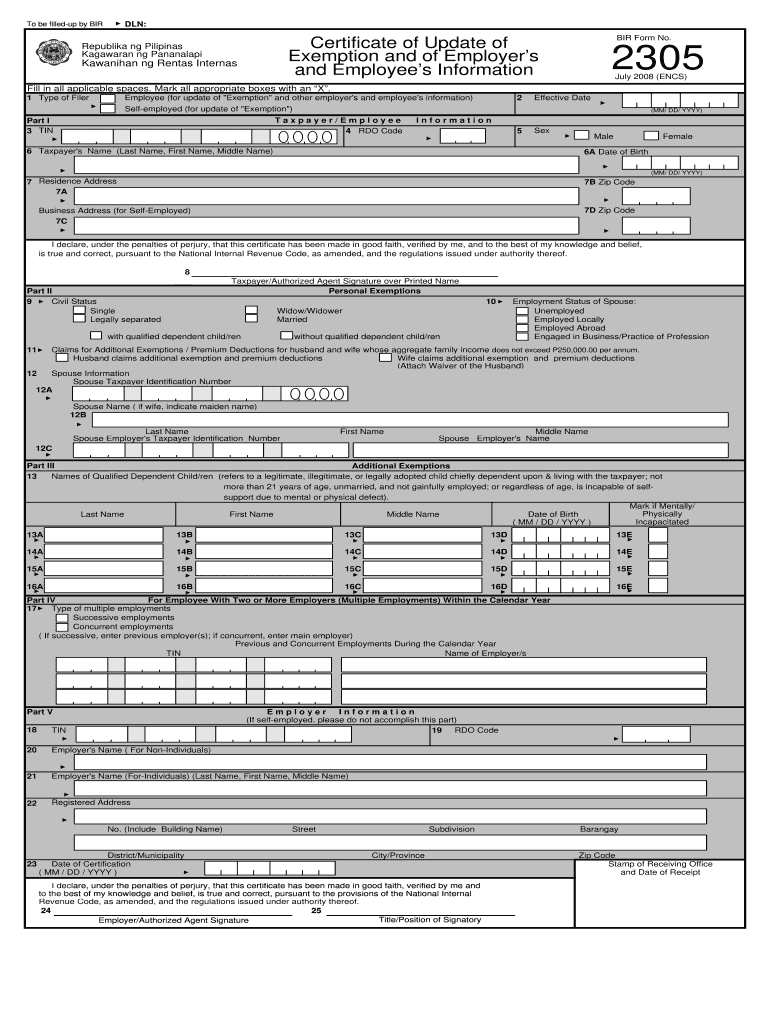
How to fill out the PH BIR 2305 online
The PH BIR 2305 form is essential for updating exemption and information for both employers and employees in the Philippines. This guide provides a clear, step-by-step approach to help users fill out the form online accurately and efficiently.
Follow the steps to complete the PH BIR 2305 online.
- Click ‘Get Form’ button to access the form and open it in the editor.
- Begin by entering your taxpayer identification number (TIN) in Part I, field 3. This is a crucial identifier for tax purposes.
- Select the type of filer by marking the appropriate box in field 1. Choose between ‘Employee’ or ‘Self-employed’ based on your status.
- Provide the effective date in field 2 using the format MM/DD/YYYY to indicate when any exemptions are applicable.
- Fill out your personal information including your sex, name, date of birth, and residence address in fields 5 to 7.
- In Part II, specify your civil status in field 9 and proceed to complete any relevant fields regarding personal exemptions.
- For users with dependents, complete Part III by providing the names and relevant details of qualified dependent children in fields 13A to 16E.
- If you have multiple employments, indicate the type and enter employer information in Part IV, including TINs and names of employers.
- Complete Part V if you are filling this form on behalf of an employer; provide employer details in fields 18 to 24.
- Review all filled fields for accuracy, sign in the indicated area, and date the certification in the relevant field before submission.
- Finally, save your changes, and you may choose to download, print, or share the completed form as needed.
Start filling out your PH BIR 2305 online today for a smoother documentation process.
Experience a faster way to fill out and sign forms on the web. Access the most extensive library of templates available.
Related content
by EA Mercer · 2000 · Cited by 169 — Co-expression of hippocalcin with the BIR domains...
This book describes the Philippine Individual Income Taxation from the point of view of...
We, Grundfos, declare under our sole responsibility that the product. Sololift2 WC-1...
Get answers to your most pressing questions about US Legal Forms API.
How to submit alphalist to BIR online?
To submit the alphalist to BIR online, you must first prepare your alphalist data in accordance with BIR guidelines. You then log into the BIR's e-filing system, where you can upload your file. Using PH BIR 2305 ensures that your submissions are accurate and up-to-date, making the online process smoother and more efficient.
How much is the BIR tax for small business in the Philippines?
The BIR tax for small businesses in the Philippines generally involves a range of rates, typically starting from 20% on net income for certain types of businesses. Understanding the nuances of these taxes can be overwhelming. By leveraging resources such as PH BIR 2305, small business owners can simplify tax compliance and gain clarity on what they owe.
What is the latest version of BIR alphalist data entry?
The latest version of the BIR alphalist data entry provides updates and improvements to streamline reporting to the Bureau of Internal Revenue. This form ensures that employers accurately report their employees' details to meet regulatory requirements. PH BIR 2305 plays a key role in ensuring that all tax identification numbers and withholding details are correctly recorded in the alphalist.
How much is BIR in the Philippines?
BIR, or the Bureau of Internal Revenue in the Philippines, collects various taxes that can vary widely depending on the income level and type of business. For individuals, the income tax rate can range from 0% to 35%. Understanding your responsibilities under PH BIR regulations is crucial for compliant financial management.
What is the purpose of BIR Form 2305 in the Philippines?
The purpose of BIR Form 2305 is to provide the Bureau of Internal Revenue with the necessary details about an employee's tax status. It helps in updating the taxpayer's records, especially when there are changes in withholding tax rates or exemptions. By using PH BIR 2305, you ensure that your employer withholds the correct amount of tax, which can prevent tax-related issues down the line.
How do I update my BIR form?
To update your BIR form, obtain the latest version from the BIR website, particularly for forms like PH BIR 2305. Fill out any new or updated information accurately, and submit it to the appropriate tax office. Regular updates ensure you remain compliant with tax regulations.
What is BIR form 1702 annual income tax return?
The BIR form 1702 is used for filing the annual income tax return for corporations and partnerships. This form helps in reporting income, tax deductions, and ultimately determining your tax liability. Understanding this form can complement your knowledge of the PH BIR 2305, especially for withholding tax updates.
How do I reprint my tax forms?
To reprint your tax forms, locate the original files saved on your computer, whether they are in PDF or another format. If you downloaded the PH BIR 2305 or similar forms, you can simply open them and print again. Ensure your printer is connected and functioning properly.
Where can I get my BIR form?
You can get your BIR forms, including the PH BIR 2305, from the Bureau of Internal Revenue's website. Additionally, local government offices and designated banks often have printed copies available. Make sure to check these locations for any assistance you may need.
How do I get a PDF tax form?
Getting a PDF tax form is straightforward. Navigate to the BIR website and select the desired form, like the PH BIR 2305. Click on the download link, and the form will usually save as a PDF file, allowing you to fill it out easily on your computer.
Use professional pre-built templates to fill in and sign documents online faster. Get access to thousands of forms.
If you believe that this page should be taken down, please follow our DMCA take down process here.
This form is available in several versions. Select the version you need from the drop-down list below.