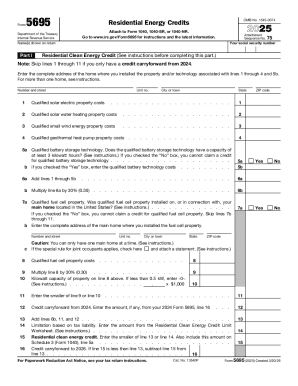
Form OMB No. 1545-0074 2025 Attachment Sequence No. 75 Your social security number Name(s) shown on return Part I Residential Clean Energy Credit (See instructions before completing this part.) Note: Skip lines 1 through 11 if you only have a credit carryforward from 2024. Enter the complete address of the home where you installed the property and/or technology associated with lines 1 through 4 and 5b. For more than one home, see instructions. Number and street Unit no. City or town.
Open form follow the instructions
Easily sign the form with your finger
Send filled & signed form or save
How to fill out the IRS Form 5695 online
This guide will assist you in completing IRS Form 5695, which is used to claim residential energy credits. By following the steps outlined below, you will gain clarity on each section of the form to ensure accurate submission.
Follow the steps to complete IRS Form 5695 effectively.
- Click ‘Get Form’ button to obtain the form and open it in the editor.
- In Part I, begin by entering your social security number and the name(s) shown on your return. If you have a credit carryforward from 2021, skip lines 1 through 11.
- For qualified solar electric property costs, enter the total on line 1. Proceed to lines 2 through 5 to include costs for solar water heating, small wind energy property, geothermal heat pumps, and biomass fuel properties respectively.
- On line 6a, add the amounts from lines 1 through 5. Multiply the result by 30% and enter it on line 6b.
- For qualified fuel cell property, answer yes or no on line 7a. If yes, provide the address of the main home where the fuel cell property was installed. Enter the costs on line 8 and calculate line 9, which is 30% of the cost.
- On lines 10 and 11, enter the kilowatt capacity and capture the smaller of line 9 or line 10.
- Enter any credit carryforward from 2021 on line 12. Add lines 6b, 11, and 12 to calculate line 13.
- Determine the limitation based on tax liability using the appropriate worksheet and enter that amount on line 14.
- On line 15, enter the lesser of line 13 or line 14, which represents your residential clean energy credit.
- Complete Part II by confirming if the energy-efficient improvements were made to your main home using lines 17a and 17b. If applicable, continue to enter the qualified improvements on lines 18 through 22.
- Add the appropriate amounts throughout Part II, and ensure to calculate the final credit on line 30, entering the smaller of line 28 or line 29.
- Review all entries for accuracy, then save your changes. Finally, download, print, or share the completed form as needed.
Begin filling out your IRS Form 5695 online today to claim your residential energy credits.
Experience a faster way to fill out and sign forms on the web. Access the most extensive library of templates available.
Related content
Information about Form 5695 and its separate instructions is at www.irs.gov/form5695. ▷...
Jun 3, 2014 — Form 5695, Residential Energy Credits – Use this form to figure and take...
2016 Instruction 1040 US Tax Form Instructions I1040gi. User Manual: ... tion for purposes...
Get answers to your most pressing questions about US Legal Forms API.
How do I get tax credit for Energy Star appliances?
To claim the credit, you'll need IRS Form 5695. Work out the credit amount on that form then enter it on your 1040. You should keep your receipt for the appliance as well as the Manufacturer's Certification Statement, so you can prove your claim if the IRS ever conducts an audit.
How do I file Form 5695?
First, you will need to know the qualified solar electric property costs. That is the total gross cost of your solar energy system after any cash rebates. Add that to line 1. Insert the total cost of any additional energy improvements, if any, on lines 2 through 4, and add them up on line 5.
Does TurboTax have Form 5695?
Form 5695, Home Energy Credits, has been available in TurboTax since early March. Select "Deductions and Credits", then "Home Energy Credits" in the "Home" section towards the top of the screen.
What is the 5695 tax form?
Federal tax Form 5695 is used to calculate your residential energy credit, and must be submitted alongside Form 1040 with your income tax return. ... If you're not sure whether your home improvement purchases qualify for credit, it's best to seek help from professional income tax preparation services.
What qualifies for the Residential Energy Tax Credit?
Equipment that qualifies for the Residential Renewable Energy Tax Credit includes solar, wind, geothermal and fuel-cell technology: Solar panels, or photovoltaics, for generating electricity. The electricity must be used in the home. ... Wind turbines that generate up to 100 kilowatts of electricity for residential use.
What is Form 5695 Line 17c?
Use Form 5695 to figure and take your residential energy credits. The residential energy credits are: The nonbusiness energy property credit, and. The residential energy efficient property credit.
How do I get Form 5695?
2018 Form 5695 and its instructions are available at IRS.gov/Form5695. If you are claiming the nonbusiness energy property credit on both a 2018 and a 2019 Form 5695, complete your 2018 Form 5695 first as there is a lifetime limitation on the credit itself and on window expenses.
Use professional pre-built templates to fill in and sign documents online faster. Get access to thousands of forms.
If you believe that this page should be taken down, please follow our DMCA take down process here.