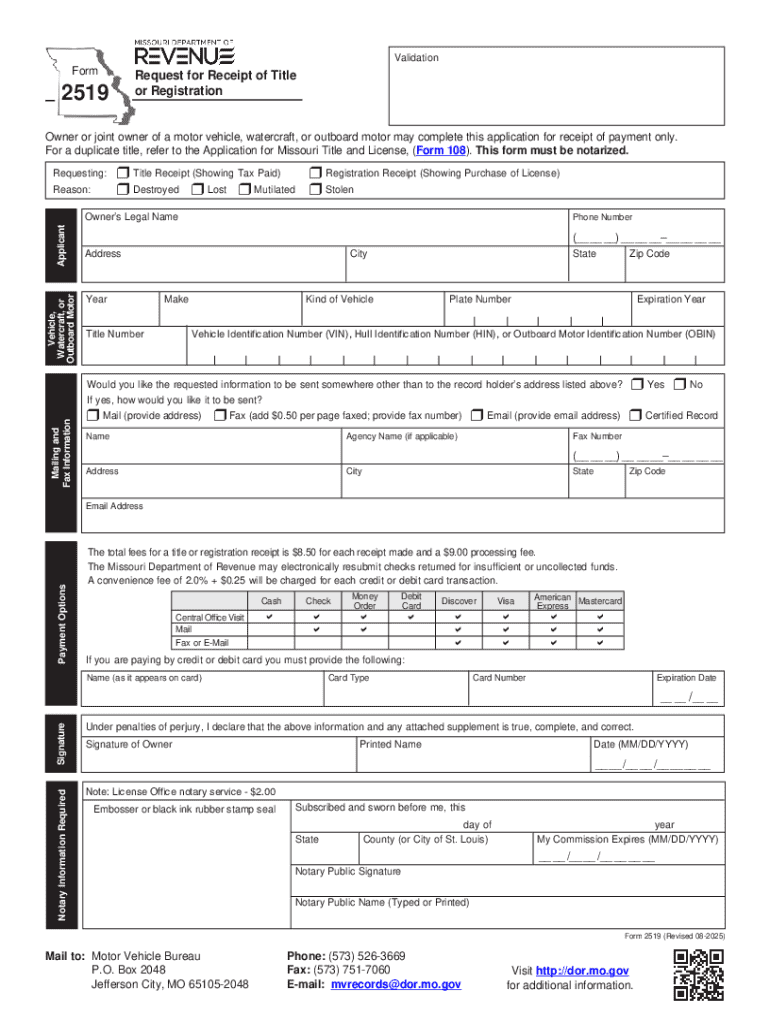
Reset FormPrint FormValidationFormRequest for Receipt of Title or Registration2519Owner or joint owner of a motor vehicle, watercraft, or outboard motor may complete this application for receipt of.
Loading

Open form follow the instructions

Easily sign the form with your finger

Send filled & signed form or save
How to fill out the Isf 2519 online
Filling out the Isf 2519 form online can streamline your process of requesting a receipt for title and/or registration. This guide will walk you through the key components of the form and provide detailed instructions to ensure that your submission is accurate and complete.
Follow the steps to fill out the Isf 2519 effectively.
- Press the ‘Get Form’ button to access the document. This will allow you to retrieve the Isf 2519 form for online completion.
- Indicate the type of receipt you require by selecting either 'Title Receipt' or 'Registration Receipt' from the options provided. Ensure you also check the reason for the request by marking the corresponding box for lost, stolen, mutilated, or destroyed.
- Enter the owner’s legal name in the designated field. This should be the full name of the person who holds ownership of the vehicle.
- Provide the complete street address, which may include a rural route or post office box. Make sure to include the county, city, state, and zip code in their respective fields.
- Fill out the vehicle information section by including the year, make, vehicle identification number, kind of vehicle, license plate number, and title number. Double-check to ensure that all numbers are accurate.
- Read and understand the statement regarding false statements in the application. This is a legal affirmation of your honesty in this process.
- Sign the form using your legal name, and include the date of the signature. Ensure that the signature matches your identification.
- If required, find a notary public who will oversee the signing of your application. Provide the notary public information including their name, signature, and embossed seal where indicated.
- Once all fields are completed, you can save your changes to the form. Consider downloading or printing a copy for your records if needed.
- Finally, submit the completed application to the Missouri Department of Revenue, either by mailing it to the specified address or delivering it to a contract office. Make sure to include the appropriate payment as instructed.
Complete your documents online today to ensure a smooth and efficient process.
Experience a faster way to fill out and sign forms on the web. Access the most extensive library of templates available.
Related content
Admin Acct Svcs Appd&Cont Isf. 2615. TEMPORARY EMPLOYEES. $20.25. 9. Approp Unit ... 2519...
2519, Foundation, 189900, School of Theatre FSUF, College of Fine Arts, F05487...
This is a major reV1S10n of, and makes obsolete, C28-6811-0. Section 1,. "Update Feature,"...
Get answers to your most pressing questions about US Legal Forms API.
Can you file an ISF yourself?
Yes, you can file an ISF yourself, but it requires attention to detail and access to the right tools. By utilizing online platforms, such as USLegalForms, you can facilitate this process and gain insights on the requirements. This can lead to a smooth submission for your ISF 2519, as long as you prepare correctly.
What do you need to file an ISF?
To file an ISF, you need key information including the importer of record's details, the shipping vessel, and shipment specifics. Ensure that you have the proper identifiers, such as an EIN and harmonized codes for your products. With these details ready, resources like USLegalForms can support you in submitting a complete ISF 2519.
How to file an ISF yourself?
Filing an ISF yourself involves gathering all essential information about your shipment and accessing the appropriate online filing platform. Create an account with a service like USLegalForms for guidance and tools that make the process easier. By doing this, you can independently submit your ISF 2519 while ensuring compliance.
How to fill in an ISF form?
To fill in an ISF form, start by collecting all necessary information, such as the shipment details, the exporting party's information, and vessel information. Carefully input each required field, and review your entries before submission. Using resources like USLegalForms can simplify this process and help you accurately complete your ISF 2519.
How do I submit an ISF?
You can submit an ISF by filing it electronically through the Automated Broker Interface (ABI) system. This requires registering with a customs broker or using an ISF filing platform like USLegalForms. By utilizing these services, you streamline the process and ensure your ISF 2519 complies with customs regulations.
How to fill out importer identity form?
To fill out the importer identity form, gather your business details including your company name, address, and contact information. Ensure you have your Employer Identification Number (EIN) ready, as this is crucial for proper identification. Review the form thoroughly, filling in each section accurately to prevent any delays when filing your ISF 2519.
Who provides the ISF form?
The ISF form is typically provided by customs brokers, freight forwarders, or you can access it directly through official online platforms. US Legal Forms also supplies the necessary documents and templates for an ISF 2519, making it easier for you to get started on your filing.
How do I get an ISF?
To obtain an ISF, you will need to gather specific details, such as shipping information and cargo description. You can file it online through the appropriate channels, or you can leverage platforms like US Legal Forms that provide seamless access to ISF 2519 filing resources.
Can I file an ISF myself?
Certainly, you can file an ISF yourself. It is important to collect all required information beforehand and make sure you follow the established regulations. The US Legal platform offers helpful tools and templates that can assist you in filing the ISF 2519 correctly.
Do you need a power of attorney to file an ISF?
Generally, you do not need a power of attorney to file an ISF. However, in some instances, having one may expedite the process, especially if you choose to have a representative handle the filing for you. For clear guidance, consider using US Legal Forms, which provides resources tailored to the ISF 2519.
Use professional pre-built templates to fill in and sign documents online faster. Get access to thousands of forms.
If you believe that this page should be taken down, please follow our DMCA take down process here.