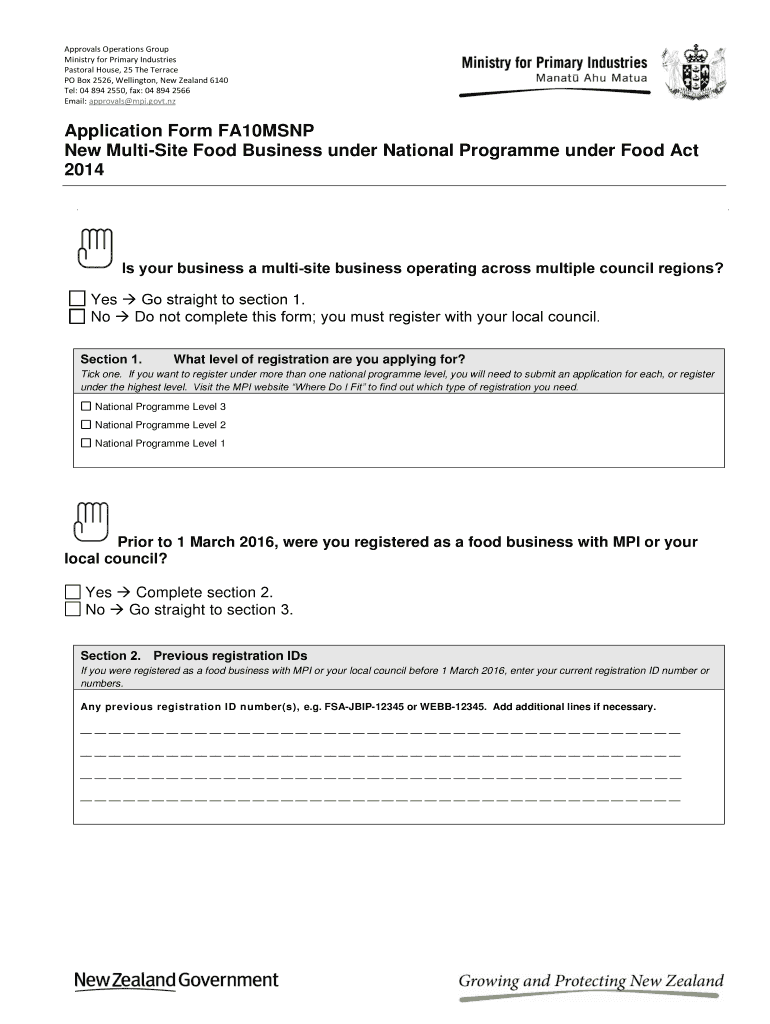
E registered as a food business with MPI or your local council before 1 March 2016, enter your current registration ID number or numbers. Any previous registration ID nu mber(s), e.g. FSA-JBIP-12345 or WEBB-12345. Add additional lines if necessary. __ __ __ __ __ __ __ __ __ __ __ __ __ __ __ __ __ __ __ __ __ __ __ __ __ __ __ __ __ __ __ __ __ __ __ __ __ __ __ __ __ __ __ __ __ __ __ __ __ __ __ __ __ __ __ __ __ __ __ __ __ __ __ __ __ __ __ __ __ __ __ __ __ __ __ __ __ __ __ __ __ __ __ __.
Loading

Open form follow the instructions

Easily sign the form with your finger

Send filled & signed form or save
How to fill out the NZ FA10MSNP online
This guide provides clear and detailed instructions for users on how to fill out the NZ FA10MSNP application form for a new multi-site food business. Designed to be user-friendly, this guide supports individuals with minimal legal experience in effectively completing the online form.
Follow the steps to successfully complete the NZ FA10MSNP
- Press the ‘Get Form’ button to access the NZ FA10MSNP application form and open it in the editor.
- Determine if your business is a multi-site operation across different council regions. If yes, proceed to section 1. If no, you must complete your registration using your local council's application form.
- In section 1, select the level of registration you are applying for by ticking the appropriate box for National Programme Level 1, Level 2, or Level 3.
- If you were registered as a food business with the Ministry for Primary Industries (MPI) or your local council before March 1, 2016, proceed to section 2 to enter your previous registration ID numbers.
- In section 3, fill in the details of the operator, which includes the legal name, NZ Business Number, trading name, and contact information for both postal and physical addresses.
- Section 4 requires the name of the verification agency. Attach confirmation from your verification agency that they will provide services for your registration.
- Section 5 involves providing a description of your scope of operations. You can either attach a completed Scope of Operations form or provide a written description detailing the sectors you operate in, the products you handle, processes, and trading operations.
- In section 6, enter details about all the addresses where food handling occurs, repeating information from section 2 if necessary, or attach a spreadsheet with the required information.
- The applicant statement in section 7 must be completed and signed to confirm your authority and that the information provided is accurate.
- In section 8, specify your payment method for the registration fee. Ensure you include the fee payment with your completed form.
- Lastly, in section 9, conduct a final check to confirm all components are complete and include all required attachments before submitting your application to MPI.
Begin completing your NZ FA10MSNP application form online today!
Experience a faster way to fill out and sign forms on the web. Access the most extensive library of templates available.
Related content
We are indebted to the following people for their contributions in the form of ... V: 3 2...
Get answers to your most pressing questions about US Legal Forms API.
How to get New Zealand visa easily?
Obtaining a New Zealand visa can be a smooth process if you understand the requirements specific to your situation. Utilizing the NZ FA10MSNP can guide you through necessary forms and help you compile the needed information. By preparing your application thoroughly, you increase your chances of receiving your visa promptly.
Does New Zealand grant citizenship?
Yes, New Zealand does grant citizenship to eligible individuals who meet specific residency and character requirements. The process can take time, but you can facilitate your application using the NZ FA10MSNP, ensuring that you have all supporting documents and criteria met to avoid potential delays.
How to get GST registered in NZ?
To register for GST in New Zealand, you need to understand your business's GST obligations based on your sales. This can be achieved by filling out the necessary forms, including the NZ FA10MSNP, to ensure all details are correct. The registration process is straightforward and can significantly benefit your business operations.
How to get New Zealand citizenship by grant?
To obtain New Zealand citizenship by grant, you need to have held residency for at least five years and demonstrate your commitment to New Zealand. After ensuring you meet all criteria, you can submit your application with appropriate forms, like the NZ FA10MSNP, for clarity and ease in processing.
What is the fastest way to get New Zealand citizenship?
The fastest route to New Zealand citizenship generally involves having a residency visa for at least five years. However, if you meet certain conditions, including marrying a New Zealand citizen, you might qualify sooner. Exploring the NZ FA10MSNP can guide you through the documentation and requirements necessary for your application.
How can I get NZ residency?
To obtain NZ residency, you typically must meet specific criteria regarding skills, family connections, or other qualifying factors. Using forms like the NZ FA10MSNP can help streamline your application process. Ensure you have all required documentation ready for submission, which can expediate your residency application.
How did Kupe defeat the octopus?
According to legend, Kupe defeated the octopus, known as Te Wheke-a-Muturangi, through intelligence and bravery. He devised a clever plan to trap the creature, ultimately securing his victory. This story symbolizes the triumph of wit over brute force and highlights Kupe’s resourcefulness as a navigator. Such narratives enrich the cultural fabric of New Zealand, reinforcing themes important within NZ FA10MSNP.
What is the legend of Kupe?
The legend of Kupe tells the story of his adventurous journey across the ocean to discover New Zealand. It encompasses themes of navigation, bravery, and respect for the land. Kupe's tale is actually a foundational myth, shaping Māori identity and cultural practices. This legend illustrates the deep connections between the people and their environment, which is important to the NZ FA10MSNP context.
Is pōhutukawa native to NZ?
Yes, pōhutukawa is native to New Zealand, often referred to as the New Zealand Christmas tree due to its vibrant red blossoms in December. It plays an essential role in the local ecosystem, providing habitat for birds and contributing to beautiful coastal landscapes. Understanding native flora like pōhutukawa enhances our appreciation of New Zealand's unique biodiversity. This knowledge ties into the broader themes present in NZ FA10MSNP discussions.
Why did people leave Hawaiki for NZ?
People left Hawaiki, their ancestral homeland, to seek new opportunities and resources in New Zealand. Factors included overpopulation, the desire for new land, and the pursuit of better fishing grounds. This migration demonstrates the spirit of exploration inherent in Māori culture. The story of departure from Hawaiki is intrinsically tied to the broader narrative of NZ FA10MSNP.
Use professional pre-built templates to fill in and sign documents online faster. Get access to thousands of forms.
If you believe that this page should be taken down, please follow our DMCA take down process here.