Loading
Form preview
  • US Legal Forms
  • Form Library
  • More Forms
  • More Multi-State Forms
  • Class Application, Fall 2011

Get Class Application, Fall 2011

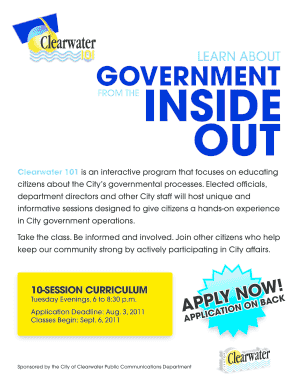
Cials, department directors and other City staff will host unique and informative sessions designed to give citizens a hands-on experience in City government operations. Take the class. Be informed and involved. Join other citizens who help keep our community strong by actively participating in City affairs. 10-Session Curriculum Tuesday Evenings, 6 to 8:30 p.m. Application Deadline: Aug. 3, 2011 Classes Begin: Sept. 6, 2011 Sponsored by the City of Clearwater Public Communications Department.

How it works

  1. Open form

    Open form follow the instructions

  2. Easily sign form

    Easily sign the form with your finger

  3. Share form

    Send filled & signed form or save

How to fill out and sign CLASS APPLICATION, Fall 2011 online?

Get your online template and fill it in using progressive features. Enjoy smart fillable fields and interactivity.Follow the simple instructions below:

Are you still searching for a quick and practical solution to complete CLASS APPLICATION, Fall 2011 at a reasonable cost? Our platform provides you with a rich collection of templates that are offered for completing on the internet. It takes only a few minutes.

Stick to these simple actions to get CLASS APPLICATION, Fall 2011 ready for submitting:

  1. Get the form you will need in our library of legal forms.
  2. Open the template in our online editing tool.
  3. Look through the instructions to learn which information you will need to provide.
  4. Click the fillable fields and put the requested details.
  5. Add the date and insert your electronic signature once you fill in all of the boxes.
  6. Double-check the completed document for misprints along with other errors. If you necessity to change something, the online editor as well as its wide range of instruments are at your disposal.
  7. Save the filled out template to your computer by clicking Done.
  8. Send the electronic document to the intended recipient.

Filling in CLASS APPLICATION, Fall 2011 doesn?t need to be confusing any longer. From now on easily cope with it from your home or at the office straight from your mobile device or desktop.

Tips on how to fill out, edit and sign CLASS APPLICATION, Fall 2011 online

How to fill out and sign CLASS APPLICATION, Fall 2011 online?

Get your online template and fill it in using progressive features. Enjoy smart fillable fields and interactivity.Follow the simple instructions below:

Are you still searching for a quick and practical solution to complete CLASS APPLICATION, Fall 2011 at a reasonable cost? Our platform provides you with a rich collection of templates that are offered for completing on the internet. It takes only a few minutes.

Stick to these simple actions to get CLASS APPLICATION, Fall 2011 ready for submitting:

  1. Get the form you will need in our library of legal forms.
  2. Open the template in our online editing tool.
  3. Look through the instructions to learn which information you will need to provide.
  4. Click the fillable fields and put the requested details.
  5. Add the date and insert your electronic signature once you fill in all of the boxes.
  6. Double-check the completed document for misprints along with other errors. If you necessity to change something, the online editor as well as its wide range of instruments are at your disposal.
  7. Save the filled out template to your computer by clicking Done.
  8. Send the electronic document to the intended recipient.

Filling in CLASS APPLICATION, Fall 2011 doesn?t need to be confusing any longer. From now on easily cope with it from your home or at the office straight from your mobile device or desktop.

How to edit CLASS APPLICATION, Fall 2011: customize forms online

Benefit from the usability of the multi-featured online editor while filling out your CLASS APPLICATION, Fall 2011. Use the range of tools to quickly fill out the blanks and provide the requested information right away.

Preparing documentation is time-taking and expensive unless you have ready-made fillable templates and complete them electronically. The simplest way to deal with the CLASS APPLICATION, Fall 2011 is to use our professional and multi-featured online editing solutions. We provide you with all the necessary tools for quick form fill-out and enable you to make any adjustments to your templates, adapting them to any needs. Apart from that, you can comment on the updates and leave notes for other people involved.

Here’s what you can do with your CLASS APPLICATION, Fall 2011 in our editor:

  1. Fill out the blanks using Text, Cross, Check, Initials, Date, and Sign tools.
  2. Highlight crucial details with a preferred color or underline them.
  3. Hide sensitive data using the Blackout tool or simply erase them.
  4. Import pictures to visualize your CLASS APPLICATION, Fall 2011.
  5. Substitute the original text using the one suiting your needs.
  6. Add comments or sticky notes to communicate with others on the updates.
  7. Create extra fillable fields and assign them to particular people.
  8. Protect the sample with watermarks, add dates, and bates numbers.
  9. Share the document in various ways and save it on your device or the cloud in different formats as soon as you finish adjusting.

Dealing with CLASS APPLICATION, Fall 2011 in our powerful online editor is the quickest and most effective way to manage, submit, and share your paperwork the way you need it from anywhere. The tool works from the cloud so that you can utilize it from any place on any internet-connected device. All templates you create or fill out are safely stored in the cloud, so you can always open them whenever needed and be assured of not losing them. Stop wasting time on manual document completion and get rid of papers; make it all online with minimum effort.

Get form

Experience a faster way to fill out and sign forms on the web. Access the most extensive library of templates available.
Get form

Related content

Certified Enrollment Supplementary Weighting
Fall 2012 Certified Enrollment Supplementary Weighting by District · Fall 2011 Certified...
Learn more
The Fall 2011 Entering Class, By the Numbers
Aug 11, 2011 — 6,485 applications had been received for the Summer/Fall 2011 terms, an...
Learn more
MIT 6.006: Introduction to Algorithms
Course Resources · Course Website: Fall 2011 · Recordings: Fall 2011 · Textbooks:...
Learn more

Related links form

NEW APPLICATION FOR NON‐REGISTERED FINGERPRINT PERSON 2012 101 Anniversary South Pole Discovery Invite Physiological Training Record 2011 Florida Swimming Spring Senior Championship

Questions & Answers

Get answers to your most pressing questions about US Legal Forms API.

Contact support

Writing an application for admission requires clarity and purpose. Start with a strong introduction that outlines your intention and qualifications. When preparing your CLASS APPLICATION, Fall 2011, focus on highlighting your strengths and how you align with the school's values and programs.

Completing an application for admission to school involves several steps. Begin by reviewing the application thoroughly to understand what is required. For the CLASS APPLICATION, Fall 2011, be diligent in providing all requested information and ensure you meet any deadlines.

Filling an application for admission requires attention to detail. Start by gathering your personal information, academic records, and any other necessary documents. For the CLASS APPLICATION, Fall 2011, ensure that you understand the specific requirements and formats requested by the institution.

To properly fill out an application, follow the guidelines provided in the application instructions. Take your time to fill in each section accurately, and be honest in your responses. If you are applying for the CLASS APPLICATION, Fall 2011, make sure all information is up-to-date and relevant.

When filling out an admission form, read the instructions carefully to avoid mistakes. Provide accurate information and ensure that all required fields are completed. For the CLASS APPLICATION, Fall 2011, double-check your details before submitting to ensure everything is correct.

If you were born in 2011, you are currently in the 2023 academic year and would be around 12 years old. This places you in the early stages of middle school, where you will continue to develop your academic skills and interests. As you grow, you will eventually prepare for your own CLASS APPLICATION, Fall 2011, which will help shape your future educational path. Embrace this exciting time of learning and discovery.

Students from the class of 2011 would generally be around 30 years old today, depending on their birthdays. This estimate assumes they graduated high school at age 18 in 2011. Many individuals from this class are now navigating adulthood, pursuing careers, and perhaps starting families. Recognizing their age helps you understand their experiences and perspectives.

Kids who were in school during the 2011 academic year would typically be classified as part of the class of 2011. Most students who graduated that year would now be pursuing various paths, such as higher education or entering the workforce. Understanding this classification can help you connect with peers from that time. If you are looking to reconnect, consider using platforms that cater to alumni from the class of 2011.

If you graduated in 2011, you likely turned 18 years old that year, assuming you completed high school within the typical four-year timeline. Therefore, as of now, you would be around 30 years old. This age reflects the common graduation period for students born around 1993. Keep in mind that individual circumstances may vary, but this provides a general guideline.

To apply for varsity in grade 11, you need to complete a CLASS APPLICATION, Fall 2011. Start by gathering the required documents, such as your academic records and letters of recommendation. Next, check with your school for specific eligibility criteria and deadlines for submission. Once you have everything ready, submit your application through the proper channels, ensuring that you meet all requirements.

Get This Form Now!

Use professional pre-built templates to fill in and sign documents online faster. Get access to thousands of forms.
Get form
If you believe that this page should be taken down, please follow our DMCA take down processhere.

Industry-leading security and compliance

US Legal Forms protects your data by complying with industry-specific security standards.
  • In businnes since 1997
    25+ years providing professional legal documents.
  • Accredited business
    Guarantees that a business meets BBB accreditation standards in the US and Canada.
  • Secured by Braintree
    Validated Level 1 PCI DSS compliant payment gateway that accepts most major credit and debit card brands from across the globe.
Get CLASS APPLICATION, Fall 2011
Get form
Form Packages
Adoption
Bankruptcy
Contractors
Divorce
Home Sales
Employment
Identity Theft
Incorporation
Landlord Tenant
Living Trust
Name Change
Personal Planning
Small Business
Wills & Estates
Packages A-Z
Form Categories
Affidavits
Bankruptcy
Bill of Sale
Corporate - LLC
Divorce
Employment
Identity Theft
Internet Technology
Landlord Tenant
Living Wills
Name Change
Power of Attorney
Real Estate
Small Estates
Wills
All Forms
Forms A-Z
Form Library
Customer Service
Your Privacy Choices
Terms of Service
Privacy Notice
Legal Hub
Content Takedown Policy
Bug Bounty Program
About Us
Help Portal
Legal Resources
Blog
Affiliates
Contact Us
Delete My Account
Site Map
Industries
Forms in Spanish
Localized Forms
State-specific Forms
Forms Kit
Legal Guides
Real Estate Handbook
All Guides
Prepared for You
Notarize
Incorporation services
Our Customers
For Consumers
For Small Business
For Attorneys
Our Sites
US Legal Forms
USLegal
FormsPass
pdfFiller
signNow
altaFlow
DocHub
Instapage
Social Media
Call us now toll free:
+1 833 426 79 33
As seen in:
  • USA Today logo picture
  • CBC News logo picture
  • LA Times logo picture
  • The Washington Post logo picture
  • AP logo picture
  • Forbes logo picture
© Copyright 1997-2026
airSlate Legal Forms, Inc.
3720 Flowood Dr, Flowood, Mississippi 39232
Form Packages
Adoption
Bankruptcy
Contractors
Divorce
Home Sales
Employment
Identity Theft
Incorporation
Landlord Tenant
Living Trust
Name Change
Personal Planning
Small Business
Wills & Estates
Packages A-Z
Form Categories
Affidavits
Bankruptcy
Bill of Sale
Corporate - LLC
Divorce
Employment
Identity Theft
Internet Technology
Landlord Tenant
Living Wills
Name Change
Power of Attorney
Real Estate
Small Estates
Wills
All Forms
Forms A-Z
Form Library
Customer Service
Your Privacy Choices
Terms of Service
Privacy Notice
Legal Hub
Content Takedown Policy
Bug Bounty Program
About Us
Help Portal
Legal Resources
Blog
Affiliates
Contact Us
Delete My Account
Site Map
Industries
Forms in Spanish
Localized Forms
State-specific Forms
Forms Kit
Legal Guides
Real Estate Handbook
All Guides
Prepared for You
Notarize
Incorporation services
Our Customers
For Consumers
For Small Business
For Attorneys
Our Sites
US Legal Forms
USLegal
FormsPass
pdfFiller
signNow
altaFlow
DocHub
Instapage
Social Media
Call us now toll free:
+1 833 426 79 33
As seen in:
  • USA Today logo picture
  • CBC News logo picture
  • LA Times logo picture
  • The Washington Post logo picture
  • AP logo picture
  • Forbes logo picture
© Copyright 1997-2026
airSlate Legal Forms, Inc.
3720 Flowood Dr, Flowood, Mississippi 39232