Get Special Report On Florida Power & Light Company Rate Increase
How it works
-

Open form follow the instructions
-

Easily sign the form with your finger
-

Send filled & signed form or save
How to fill out and sign Special Report On Florida Power & Light Company Rate Increase online?
Get your online template and fill it in using progressive features. Enjoy smart fillable fields and interactivity.Follow the simple instructions below:Business, legal, tax as well as other e-documents need a high level of protection and compliance with the legislation. Our forms are regularly updated in accordance with the latest legislative changes. In addition, with our service, all of the information you provide in the Special Report On Florida Power & Light Company Rate Increase is protected against loss or damage via cutting-edge encryption.
The tips below will help you fill in Special Report On Florida Power & Light Company Rate Increase quickly and easily:
- Open the document in the feature-rich online editor by clicking Get form.
- Fill out the required fields that are marked in yellow.
- Click the green arrow with the inscription Next to move on from field to field.
- Go to the e-signature tool to e-sign the form.
- Insert the relevant date.
- Check the entire e-document to be sure that you have not skipped anything.
- Click Done and save the resulting form.
Our platform enables you to take the whole procedure of completing legal forms online. Consequently, you save hours (if not days or even weeks) and get rid of unnecessary payments. From now on, fill out Special Report On Florida Power & Light Company Rate Increase from your home, office, and even while on the go.
Tips on how to fill out, edit and sign Special Report On Florida Power & Light Company Rate Increase online
How to fill out and sign Special Report On Florida Power & Light Company Rate Increase online?
Get your online template and fill it in using progressive features. Enjoy smart fillable fields and interactivity.Follow the simple instructions below:
Business, legal, tax as well as other e-documents need a high level of protection and compliance with the legislation. Our forms are regularly updated in accordance with the latest legislative changes. In addition, with our service, all of the information you provide in the Special Report On Florida Power & Light Company Rate Increase is protected against loss or damage via cutting-edge encryption.
The tips below will help you fill in Special Report On Florida Power & Light Company Rate Increase quickly and easily:
- Open the document in the feature-rich online editor by clicking Get form.
- Fill out the required fields that are marked in yellow.
- Click the green arrow with the inscription Next to move on from field to field.
- Go to the e-signature tool to e-sign the form.
- Insert the relevant date.
- Check the entire e-document to be sure that you have not skipped anything.
- Click Done and save the resulting form.
Our platform enables you to take the whole procedure of completing legal forms online. Consequently, you save hours (if not days or even weeks) and get rid of unnecessary payments. From now on, fill out Special Report On Florida Power & Light Company Rate Increase from your home, office, and even while on the go.
How to edit Special Report On Florida Power & Light Company Rate Increase: customize forms online
Choose the right Special Report On Florida Power & Light Company Rate Increase template and edit it on the spot. Simplify your paperwork with a smart document editing solution for online forms.
Your everyday workflow with paperwork and forms can be more effective when you have everything that you need in one place. For instance, you can find, obtain, and edit Special Report On Florida Power & Light Company Rate Increase in a single browser tab. Should you need a particular Special Report On Florida Power & Light Company Rate Increase, it is simple to find it with the help of the smart search engine and access it right away. You don’t need to download it or search for a third-party editor to edit it and add your data. All the resources for efficient work go in a single packaged solution.
This editing solution allows you to personalize, fill, and sign your Special Report On Florida Power & Light Company Rate Increase form right on the spot. Once you see a suitable template, click on it to go to the editing mode. Once you open the form in the editor, you have all the essential tools at your fingertips. It is easy to fill in the dedicated fields and remove them if necessary with the help of a simple yet multifunctional toolbar. Apply all the modifications right away, and sign the form without leaving the tab by simply clicking the signature field. After that, you can send or print your document if needed.
Make more custom edits with available tools.
- Annotate your document with the Sticky note tool by putting a note at any spot within the document.
- Add necessary visual components, if required, with the Circle, Check, or Cross tools.
- Modify or add text anywhere in the document using Texts and Text box tools. Add content with the Initials or Date tool.
- Modify the template text with the Highlight and Blackout, or Erase tools.
- Add custom visual components with the Arrow and Line, or Draw tools.
Discover new options in efficient and effortless paperwork. Find the Special Report On Florida Power & Light Company Rate Increase you need in minutes and fill it in in the same tab. Clear the mess in your paperwork once and for all with the help of online forms.
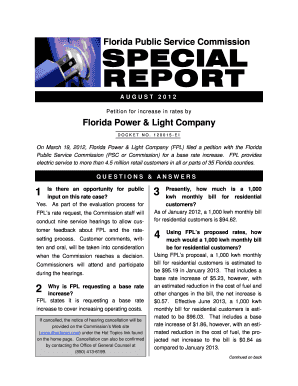
The FPL rate increase proposal outlines the company's request to raise electricity rates to cover operational expenses and infrastructure improvements. This proposal is submitted to the Florida Public Service Commission for review and approval. Understanding the details of this proposal can help you prepare for potential changes in your electricity bills. For a comprehensive overview, refer to our Special Report On Florida Power & Light Company Rate Increase.
Industry-leading security and compliance
-
In businnes since 199725+ years providing professional legal documents.
-
Accredited businessGuarantees that a business meets BBB accreditation standards in the US and Canada.
-
Secured by BraintreeValidated Level 1 PCI DSS compliant payment gateway that accepts most major credit and debit card brands from across the globe.