We use cookies to improve security, personalize the user experience, enhance our marketing activities (including cooperating with our marketing partners) and for other business use.
Click "here" to read our Cookie Policy. By clicking "Accept" you agree to the use of cookies. Read less
Read more
Accept
Loading
Form preview
  • US Legal Forms
  • Form Library
  • More Forms
  • More Multi-State Forms
  • Pasaporte De Servicios Para El Cliente

Get Pasaporte De Servicios Para El Cliente

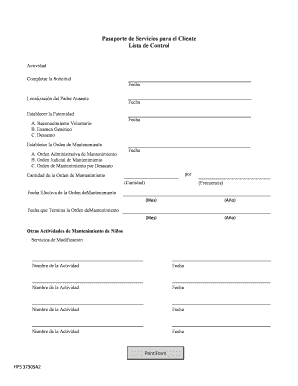
Nto Voluntario B. Examen Gen tico C. Desacato Establecer la Orden de Mantenimiento A. Orden Administrativa de Mantenimiento B. Orden Judicial de Mantenimiento C. Orden de Mantenimiento por Desacato Fecha Fecha Fecha Fecha por Cantidad de la Orden de Mantenimiento (Cantidad) (Frecuencia) Fecha Efectiva de la Orden deMantenimiento (Mes) (A o) (Mes) (A o) Fecha que Termina la Orden deMantenimiento Otras Actividades de Mantenimiento de Ni os Servicios de Modificaci n Nombre de la Ac.

How it works

  1. Open form

    Open form follow the instructions

  2. Easily sign form

    Easily sign the form with your finger

  3. Share form

    Send filled & signed form or save

How to fill out and sign Pasaporte De Servicios Para El Cliente online?

Get your online template and fill it in using progressive features. Enjoy smart fillable fields and interactivity.Follow the simple instructions below:

The days of frightening complex legal and tax forms are over. With US Legal Forms the whole process of filling out legal documents is anxiety-free. The leading editor is directly close at hand giving you various beneficial tools for submitting a Pasaporte De Servicios Para El Cliente. These tips, combined with the editor will guide you with the whole process.

  1. Select the Get Form option to start enhancing.
  2. Turn on the Wizard mode on the top toolbar to have extra suggestions.
  3. Fill each fillable area.
  4. Make sure the information you fill in Pasaporte De Servicios Para El Cliente is updated and accurate.
  5. Include the date to the template using the Date feature.
  6. Click on the Sign tool and create a digital signature. Feel free to use 3 available alternatives; typing, drawing, or uploading one.
  7. Be sure that each and every field has been filled in properly.
  8. Select Done in the top right corne to save and send or download the record. There are several alternatives for receiving the doc. An attachment in an email or through the mail as a hard copy, as an instant download.

We make completing any Pasaporte De Servicios Para El Cliente more convenient. Get started now!

Tips on how to fill out, edit and sign Pasaporte De Servicios Para El Cliente online

How to fill out and sign Pasaporte De Servicios Para El Cliente online?

Get your online template and fill it in using progressive features. Enjoy smart fillable fields and interactivity.Follow the simple instructions below:

The days of frightening complex legal and tax forms are over. With US Legal Forms the whole process of filling out legal documents is anxiety-free. The leading editor is directly close at hand giving you various beneficial tools for submitting a Pasaporte De Servicios Para El Cliente. These tips, combined with the editor will guide you with the whole process.

  1. Select the Get Form option to start enhancing.
  2. Turn on the Wizard mode on the top toolbar to have extra suggestions.
  3. Fill each fillable area.
  4. Make sure the information you fill in Pasaporte De Servicios Para El Cliente is updated and accurate.
  5. Include the date to the template using the Date feature.
  6. Click on the Sign tool and create a digital signature. Feel free to use 3 available alternatives; typing, drawing, or uploading one.
  7. Be sure that each and every field has been filled in properly.
  8. Select Done in the top right corne to save and send or download the record. There are several alternatives for receiving the doc. An attachment in an email or through the mail as a hard copy, as an instant download.

We make completing any Pasaporte De Servicios Para El Cliente more convenient. Get started now!

How to edit Pasaporte De Servicios Para El Cliente: customize forms online

Make the most of our powerful online document editor while preparing your forms. Complete the Pasaporte De Servicios Para El Cliente, emphasize on the most significant details, and easily make any other essential adjustments to its content.

Completing documents electronically is not only time-saving but also comes with an opportunity to modify the template according to your requirements. If you’re about to work on Pasaporte De Servicios Para El Cliente, consider completing it with our robust online editing solutions. Whether you make a typo or enter the requested data into the wrong area, you can instantly make adjustments to the form without the need to restart it from the beginning as during manual fill-out. Aside from that, you can point out the vital information in your paperwork by highlighting particular pieces of content with colors, underlining them, or circling them.

Follow these simple and quick steps to complete and adjust your Pasaporte De Servicios Para El Cliente online:

  1. Open the file in the editor.
  2. Enter the required information in the empty areas using Text, Check, and Cross tools.
  3. Follow the form navigation to avoid missing any mandatory areas in the template.
  4. Circle some of the critical details and add a URL to it if needed.
  5. Use the Highlight or Line tools to point out the most significant facts.
  6. Decide on colors and thickness for these lines to make your form look professional.
  7. Erase or blackout the facts you don’t want to be visible to other people.
  8. Replace pieces of content that contain errors and type in text that you need.
  9. End up modifcations with the Done key once you make certain everything is correct in the form.

Our robust online solutions are the simplest way to fill out and modify Pasaporte De Servicios Para El Cliente in accordance with your requirements. Use it to prepare personal or professional documents from anyplace. Open it in a browser, make any changes in your documents, and return to them anytime in the future - they all will be securely kept in the cloud.

Get form

Experience a faster way to fill out and sign forms on the web. Access the most extensive library of templates available.
Get form

Related content

Pasaportes Estadounidenses
Es necesario tener cita previa para tramitar un pasaporte en una una agencia pasaportes...
Learn more
Know Your Rights Spanish Version
Confiamos en que tendrá una estadía satisfactoria en los Estados. Unidos. Sin embargo...
Learn more
Pasaportes - WebMoney Wiki
Cada Transferencia WebMoney miembro sistema debe tener un Pasaporte WM. Una Transferencia...
Learn more

Related links form

Regatta Entry Form PRE-NOTICE OF RACE CACFP Reimbursement Claim For Adult Care Centers Sponsor Training Certification

Questions & Answers

Get answers to your most pressing questions about US Legal Forms API.

Contact support

Existen tres tipos principales de pasaporte que se pueden considerar bajo el concepto de Pasaporte De Servicios Para El Cliente. Primero, el pasaporte regular, que es el más común y se utiliza para acceder a servicios básicos. Segundo, el pasaporte de emergencias, diseado para situaciones que requieren atención rápida. Por último, el pasaporte digital, que ofrece acceso a servicios en línea, permitiendo a los clientes gestionar sus necesidades desde cualquier lugar.

Un pasaporte de servicio es un documento que facilita el acceso a una variedad de servicios diseados para mejorar la experiencia del cliente. En el contexto del Pasaporte De Servicios Para El Cliente, este documento ayuda a los usuarios a identificar y acceder a los recursos y beneficios que les corresponden. Al contar con un pasaporte de servicio, los clientes pueden navegar por las opciones disponibles y maximizar su satisfacción.

El número de pasaporte se escribe en un formato específico que incluye letras y números. Generalmente, comienza con una letra seguida de varios números. En Pasaporte De Servicios Para El Cliente, te guiamos para que ingreses esta información correctamente. Asegúrate de seguir las instrucciones para evitar cualquier inconveniente en tu trámite.

Sí, puedes rellenar manualmente una solicitud de pasaporte. Sin embargo, es recomendable utilizar un formato digital para asegurar que la información sea clara y legible. En nuestra plataforma, Pasaporte De Servicios Para El Cliente, ofrecemos herramientas que simplifican este proceso. Así, podrás completar tu solicitud de manera más eficiente y evitar errores que podrían causar retrasos.

Para obtener un pasaporte, necesitarás presentar ciertos documentos, como tu identificación oficial y una foto reciente. También es importante completar el formulario de solicitud correspondiente. Considera visitar uslegalforms para acceder a formularios y guías que faciliten este proceso. Con el pasaporte de servicios para el cliente, tendrás acceso a información y apoyo que te ayudarán a asegurar que tu solicitud sea exitosa.

Para obtener un pasaporte de emergencia, debes dirigirte a la oficina de pasaportes más cercana o a una embajada si te encuentras en el extranjero. Es recomendable llevar contigo la documentación necesaria y, si es posible, programar una cita. Además, puedes consultar la página de uslegalforms para obtener información detallada sobre los requisitos y pasos a seguir. Este recurso te proporcionará toda la asistencia que necesitas para obtener tu pasaporte de servicios para el cliente rápidamente.

Con tu pasaporte de servicios para el cliente, puedes realizar una variedad de trámites esenciales. Esto incluye la solicitud de documentos legales, la gestión de contratos, y la obtención de servicios notariales. Además, este pasaporte te permite acceder a asistencia legal y a recursos útiles que te ayudarán en tus necesidades diarias. Aprovecha esta herramienta para simplificar tus gestiones y obtener la ayuda que requieres.

El formato de solicitud de pasaporte para el Cliente incluye una serie de pasos que son esenciales para garantizar un proceso sin problemas. Primero, es importante reunir toda la documentación necesaria, como identificación y fotos recientes. Luego, debe completar el formulario de solicitud, que puede encontrarse fácilmente en nuestra plataforma. Usar el Pasaporte De Servicios Para El Cliente facilita este proceso, ya que proporciona guías y plantillas que aseguran que no se omita ningún detalle.

Get This Form Now!

Use professional pre-built templates to fill in and sign documents online faster. Get access to thousands of forms.
Get form
If you believe that this page should be taken down, please follow our DMCA take down processhere.

Industry-leading security and compliance

US Legal Forms protects your data by complying with industry-specific security standards.
  • In businnes since 1997
    25+ years providing professional legal documents.
  • Accredited business
    Guarantees that a business meets BBB accreditation standards in the US and Canada.
  • Secured by Braintree
    Validated Level 1 PCI DSS compliant payment gateway that accepts most major credit and debit card brands from across the globe.
Get Pasaporte De Servicios Para El Cliente
Get form
Form Packages
Adoption
Bankruptcy
Contractors
Divorce
Home Sales
Employment
Identity Theft
Incorporation
Landlord Tenant
Living Trust
Name Change
Personal Planning
Small Business
Wills & Estates
Packages A-Z
Form Categories
Affidavits
Bankruptcy
Bill of Sale
Corporate - LLC
Divorce
Employment
Identity Theft
Internet Technology
Landlord Tenant
Living Wills
Name Change
Power of Attorney
Real Estate
Small Estates
Wills
All Forms
Forms A-Z
Form Library
Customer Service
Terms of Service
Privacy Notice
Legal Hub
Content Takedown Policy
Bug Bounty Program
About Us
Help Portal
Legal Resources
Blog
Affiliates
Contact Us
Delete My Account
Site Map
Industries
Forms in Spanish
Localized Forms
State-specific Forms
Forms Kit
Legal Guides
Real Estate Handbook
All Guides
Prepared for You
Notarize
Incorporation services
Our Customers
For Consumers
For Small Business
For Attorneys
Our Sites
US Legal Forms
USLegal
FormsPass
pdfFiller
signNow
airSlate WorkFlow
DocHub
Instapage
Social Media
Call us now toll free:
+1 833 426 79 33
As seen in:
  • USA Today logo picture
  • CBC News logo picture
  • LA Times logo picture
  • The Washington Post logo picture
  • AP logo picture
  • Forbes logo picture
© Copyright 1997-2025
airSlate Legal Forms, Inc.
3720 Flowood Dr, Flowood, Mississippi 39232
Form Packages
Adoption
Bankruptcy
Contractors
Divorce
Home Sales
Employment
Identity Theft
Incorporation
Landlord Tenant
Living Trust
Name Change
Personal Planning
Small Business
Wills & Estates
Packages A-Z
Form Categories
Affidavits
Bankruptcy
Bill of Sale
Corporate - LLC
Divorce
Employment
Identity Theft
Internet Technology
Landlord Tenant
Living Wills
Name Change
Power of Attorney
Real Estate
Small Estates
Wills
All Forms
Forms A-Z
Form Library
Customer Service
Terms of Service
Privacy Notice
Legal Hub
Content Takedown Policy
Bug Bounty Program
About Us
Help Portal
Legal Resources
Blog
Affiliates
Contact Us
Delete My Account
Site Map
Industries
Forms in Spanish
Localized Forms
State-specific Forms
Forms Kit
Legal Guides
Real Estate Handbook
All Guides
Prepared for You
Notarize
Incorporation services
Our Customers
For Consumers
For Small Business
For Attorneys
Our Sites
US Legal Forms
USLegal
FormsPass
pdfFiller
signNow
airSlate WorkFlow
DocHub
Instapage
Social Media
Call us now toll free:
+1 833 426 79 33
As seen in:
  • USA Today logo picture
  • CBC News logo picture
  • LA Times logo picture
  • The Washington Post logo picture
  • AP logo picture
  • Forbes logo picture
© Copyright 1997-2025
airSlate Legal Forms, Inc.
3720 Flowood Dr, Flowood, Mississippi 39232